07.0 - MANAGING PLANNNING & SCHEDULING
07.1 - Module 07-1 - Introduction to Managing Planning & Scheduling
07.2 - Module 07-2 - Develop the Planning & Scheduling Policies & Procedures Manual
07.3- MODULE 07-3 - IDENTIFY / CAPTURE ALL SCHEDULE ACTIVITIES
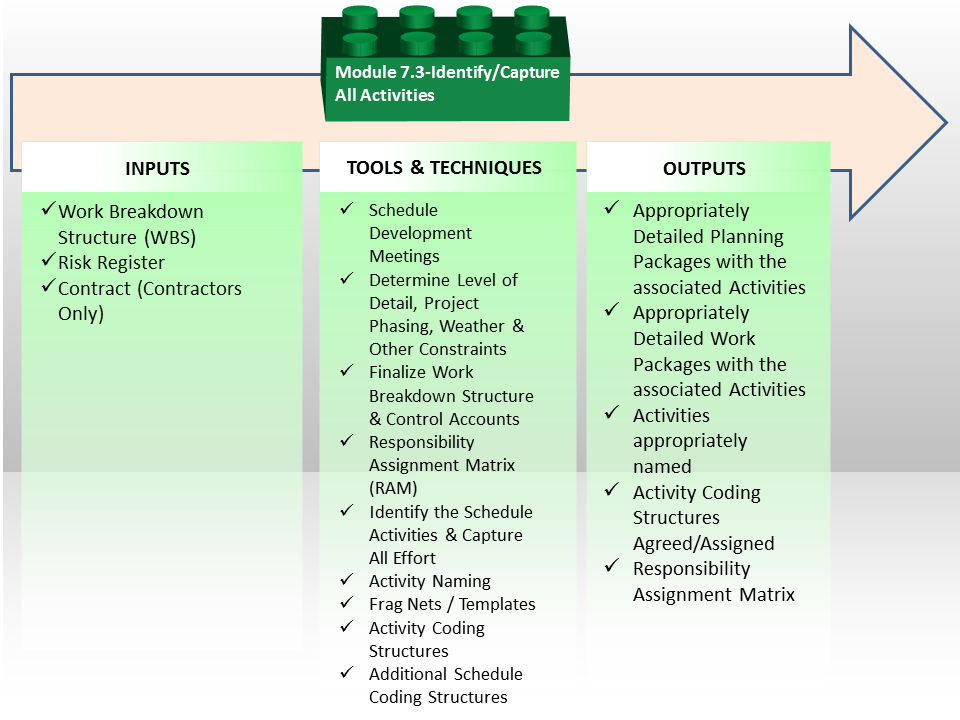
Figure 1 - Identify / Capture all Schedule Activities Process Map
Source: Guild of Project Controls
07.3.1 INTRODUCTION
The schedule should reflect all activities as defined as being necessary by the scope reflected by the project Work Breakdown Structure (WBS), which defines the work necessary to accomplish a project’s objectives, including activities both the owner and contractors are to perform.
The elements representing these processes are called project or schedule “Activities” (e.g.: those which make up the project schedule and its network diagram). These activities represent individual scopes of work that cumulatively comprise the full project scope of work. The WBS is useful for verifying that the activities provide the appropriate scope of work with no overlap or holes. The count of activities provides the level of detail of the project schedule, so it is important that careful consideration is given to the appropriate number and scope of activities. Each activity should represent a scope of work that can be completed by one responsible party, with a reasonable crew or individual resource, in a reasonable work atmosphere and conditions.
Consistency in nomenclature of activities will enhance the development and understanding of the schedule. When the schedule is complete, it will be necessary for each activity to clearly explain the scope of work, the location of work and the responsible party to execute the activity scope of work. However, this information can best be carried during the schedule development in the coding structure or WBS and, once the schedule is developed, automatically embedded in the activity descriptions or names. This will expedite the schedule development and helps with efficiency of development.
07.3.2 INPUTS
- Work Breakdown Structure
- Risk Register
- Contract Documents (contractors only)
07.3.3 TOOLS & TECHNIQUES
07.3.3.1 Schedule Development Meetings
The best way to engage the stakeholders in the development of the project schedule or programme is through the use of a Schedule Development or Planning Sessions with are dedicated to involving the project management team and major stakeholders in the development of the schedule. The key being to determine the purpose of the schedule before the content of the schedule is detailed or listed.
These stakeholders must include the major trade subcontractors or subconsultants to ensure that they participate in discussions about the sequencing required to execute the project plan. These stakeholders generally will have needs such as procurement limitations, delivery and subproject completion limitations, and resource limitations. If these limitations are not accommodated in the schedule, it will not be followed and those stakeholders will not actively participate. This would create a situation where the schedule or programme is little more than a hypothetical approach to the project plan and is likely to fail. It also opens the door to additional cost claims from the stakeholders who were not included and did not provide approval of the overall plan.
Often the Schedule Development Session will result in a high level summary schedule that captures the project management team’s plan for sequencing and phasing for the project. Once this Session is complete, the participants should approve the overall summary schedule to allow the full detailed development to proceed without continuous participation of the stakeholders. This then provides direction and limits for the full detailed development of the programme or schedule.
The stakeholders must be allowed an opportunity to review the final product before benchmarking it for use. These two steps will ensure that the stakeholders and the project management team have confidence in the schedule and view the schedule as one that they were instrumental in development. They will be more likely to cooperate and use the schedule for a management and analysis tool.
This is particularly important in construction projects where the Contractor is using a small in-house team to perform the work and instead acting more as a broker or management contractor using independent contractors to perform the work. In this case, the Contractor may know little about the subcontractors’ plans and thus any schedule developed without their involvement will likely not be accurately reflect the sub-contractors plans and is unlikely to succeed.
One of the most accurate and reliable (albeit most time consuming) methods of developing schedules is what is known as the “sticky note” method.
The example below shows how the Network Diagram View was used on a large project:
- WHICH IS WHERE YOU GET THE PEOPLE WHO ARE ACTUALLY GOING TO BE DOING THE WORK AND HAVE THEM WALK THROUGH HOW THEY ARE GOING TO DO IT.
- THIS IS ESPECIALLY POWERFUL WHEN YOU HAVE TO INTEGRATE THE WORK OF MULTIPLE SUBCONTRACTORS, DIFFERENT TRADES OR DIFFERENT DEPARTMENTS.
As we can see, from Figure 1 below, which was a multi-billion US dollar telecommunications project, there was no one person in the organization who could possibly know all the interactions between each department and surely no scheduler could possibly know how the organization worked. Thus the only way to approach this was to work with each department and groups of departments to have them explain to the scheduler what their workflow was and how their department interfaced with other departments, (see different coloured sticky notes)
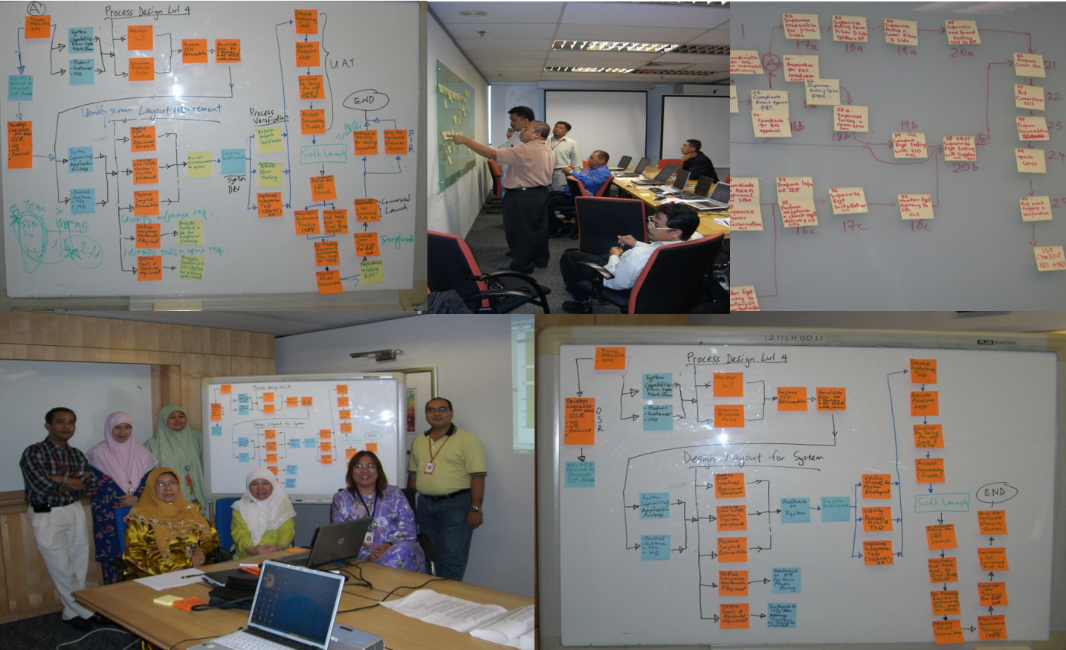
Figure 2 - Team Collaborating to Develop the Model (Part 1)
Source: Giammalvo, Paul D (2015) Course Materials. Contributed Under Creative Commons License BY v 4.0
In this example, the planner / schedulers worked as facilitators gathering this information and entering it and the logical relationships into the scheduling software.
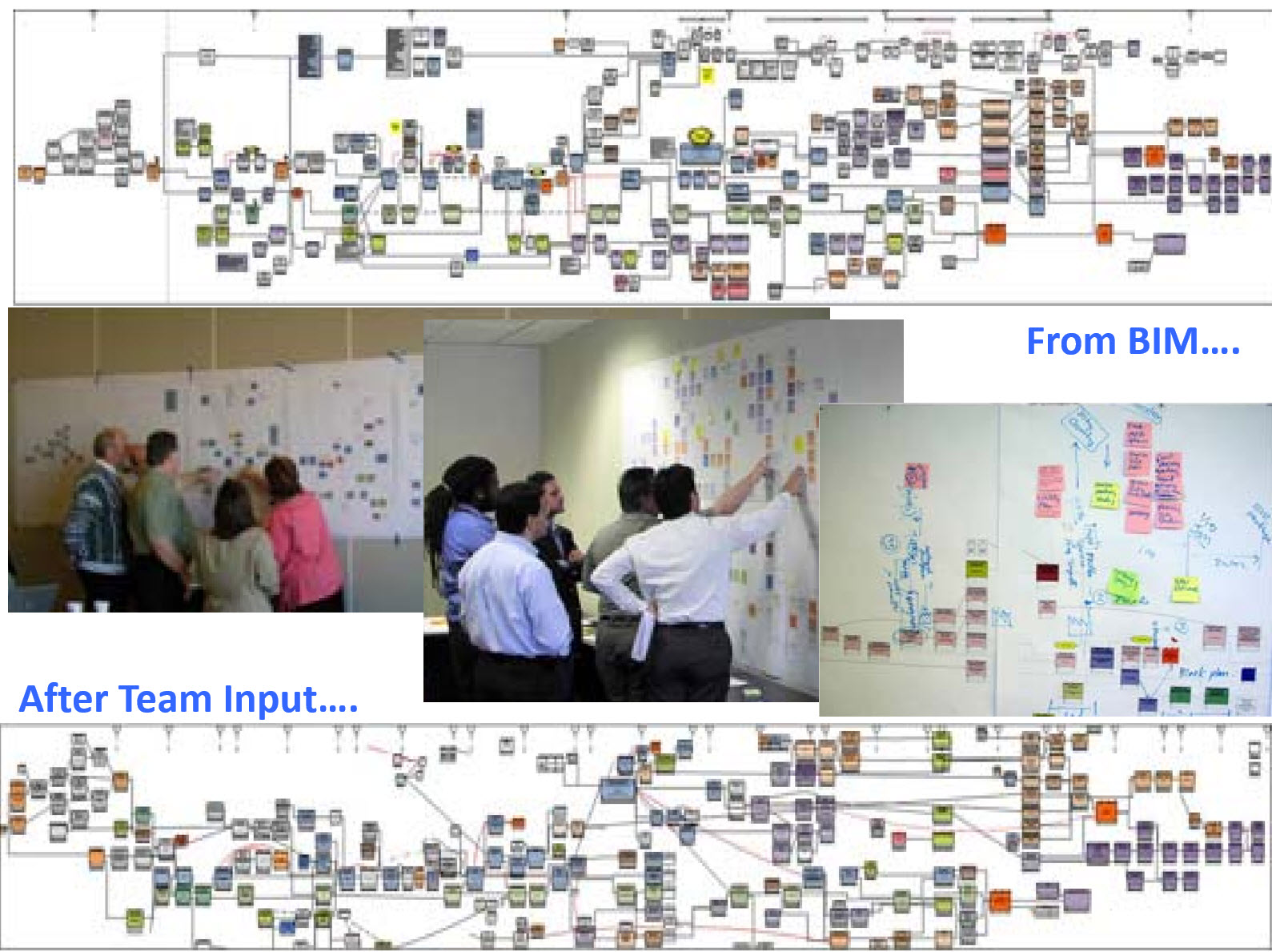
Figure 3 - Team Collaborating to Develop the Model (Part 2)
Source: Giammalvo, Paul D (2015) Course Materials. Contributed Under Creative Commons License BY v 4.0
For those involved with Building Information Modelling, the process is exactly the same. Regardless of what the computer model shows, at the point when execution is being planned (usually a Level 3 or Level 4, 5 or even Level 6 schedule) the people who are responsible to execute the work have to review the schedule and validate the work flow and resource assignments. The example shown in Figure 2 & 3 above is taken from an actual BIM project and illustrates how important it is that regardless of whether the schedule is created manually or through the use of BIM modeling, planners and schedulers need to work as facilitators with the project team to ensure that the schedule being used represents what those doing the work actually plan on doing and NOT what the scheduler or the BIM program THINKS they should be doing.
For those planner / schedulers who complain that they create great schedules, stick them on the wall and then no one ever bothers to look at them, and / or what is actually happening in the field is coincidental to the schedule rather than being driven by the schedule, changing the process used to develop the schedule to a more participative one will definitely generate more ownership in the schedules and people may actually start to follow them more proactively.
On the other hand, this is a time consuming process and it only appropriate for complex projects where the work flow is not reasonably known or understood by the planner / scheduler. Regardless even for the simple projects the planner / scheduler needs to involve the people who are going to be doing the work as much as possible to generate ownership and buy in.
When the data collection phase was complete, the Network Diagram view was used to help "walk" top management through each of the processes before obtaining their sign off.
In addition to this planning session, it is important to hold routine scheduling meetings with the major stakeholders, especially the client / owner, to ensure that their feedback is incorporated and their needs are accommodated. This is very useful although care must be taken that the feedback does not require additional scope of work or tend to increase or prolong time required to perform the scope by making changes that should be handled with the formal change management process.
An important point worth noting is if your organization is putting this kind of effort into creating the schedule (as “best tested and proven” practices would indicate you should), and then you hang the schedule on the wall and nobody pays any attention to it, doesn’t it make sense that if the OWNER starts paying off the schedule instead of off milestones that not only would it service to appropriately match payment to the work being executed, but will encourage the contractor to be looking at the schedule every week, as he/she knows the schedule is the basis for payment? While very Pavlovian, if owners were more aware of the importance cash flow management has for contractors, they could use it to their advantage in a positive way to “encourage” or “reward” the contractor to follow the schedule more closely.
07.3.3.2 Determine Level of Detail, Project Phasing, Weather & Other Constraints
In order to be able to ensure that all elements are “captured” or “identified” the following need to be considered and finalised if not already determined:
- DETERMINE LEVEL OF SCHEDULE DETAIL
- DETERMINE SEQUENCING OF PHASING
- DETERMINE WEATHER PLANNING & OTHER MAJOR CONSTRAINTS OR IMPOSED PARAMETERS
07.3.3.3 Finalise Work Breakdown Structure & Control Accounts
Now that the planner / scheduler has determined the level of detail of the schedule and has gained concensus / buy-in from the project team in regard to the phasing and sequencing (including any major imposed constraints), the next action in the process is to finalise the WBS and Control Accounts which has previously been outlines and strategised (refer Module 2 Managing Scope).
The WBS is a scope (product or deliverable) oriented, hierarchical structure that defines all work required for the project at any given point in time and describes planned outcomes instead of planned actions. Explained another way, the WBS tells us WHAT needs to be produced, not HOW or WHEN.
It (WBS) provides a structured framework that divides the scope into manageable parts and each ‘deeper’ or descending level provides a more detailed look at the scope that its parent represents. It helps to ensure that all work scope is included in the plan and promotes an objective structuring of the schedule. All WBS's have an associated WBS Dictionary which is essentially a description or definition of each WBS element.
The WBS also provides a comprehensive, consistent tool for collecting and reporting project status as it is the basis for measuring progress against the plan and essentially is the foundation for reporting status to management.
In Figure 3 below, we have provided an illustrative example of a WBS which has been, in this case, defined down to Level 7:
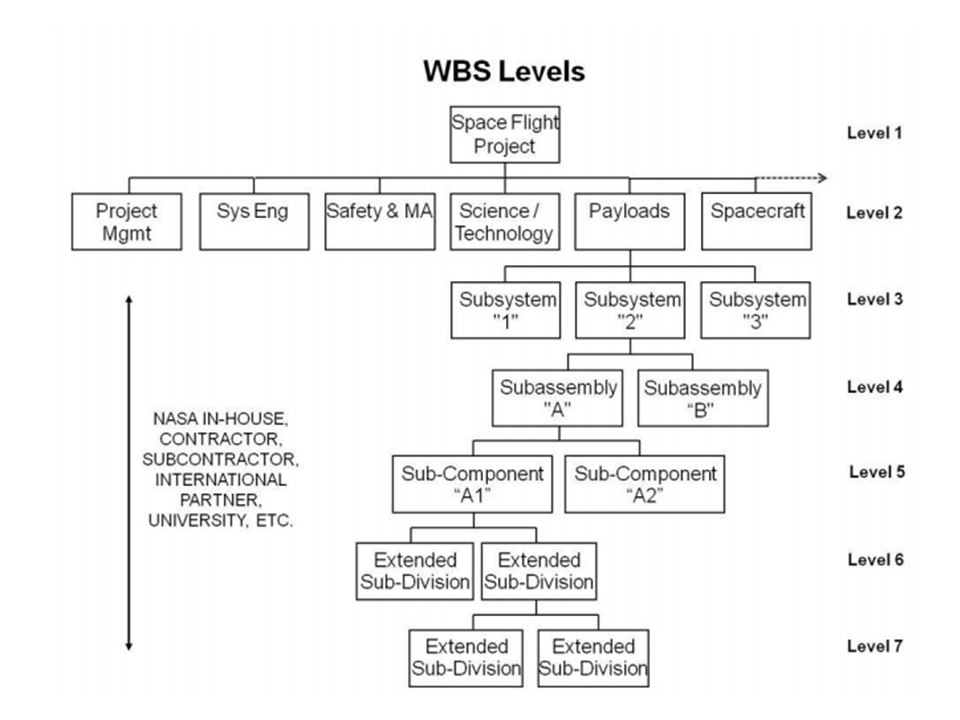
Figure 4 - Illlustration depicting how work scope can be arranged as hierarchical WBS levels
Source: NASA (n.d.) Work Breakdown Structure Handbook
For those seeking additional sample WBS structures, turn to the GAO’s “Best Practices in Capital Budgeting” Appendix IX.
- TO CREATE A WBS, THE PLANNER OR SCHEDULER NEEDS TO IDENTIFY ALL SECTIONS, ELEMENTS AND PHASES OF THE PROJECT AND
- THEN ORGANIZE THIS SCOPE INTO A HIERARCHICAL STRUCTURE WITH EACH LOWER LEVEL OF THE STRUCTURE DEFINING ELEMENTS OF THE SCOPE OF WORKS ABOVE IT.
At the low levels of the WBS (often referred to as Work Packages or Planning Packages) the structure is finalized by attributing its scope to a uniquely identified Control Account (often referred to as Cost Accounts) usually taken from the cost management or Code of Accounts system. This allows the project management team to produce a hierarchical summation of the three core components; the schedule, the cost and the resource and allows the management team to have ‘control points’ or ‘management points’ where they can compare essential related items such as planned scope, actual work done, allocated budget, actual cost and all of the interrelated reporting metrics associated with earned value.
It can be said that schedule activities represent actions, while Work Packages represent project deliverables and so define project scope.
The recognized rule is that a Control Account can include (or summarise) several Work Packages but logically each Work Package can only be assigned to one Control Account (to prevent double counting). This graphic demonstrates the integration of the elements which need to be managed:
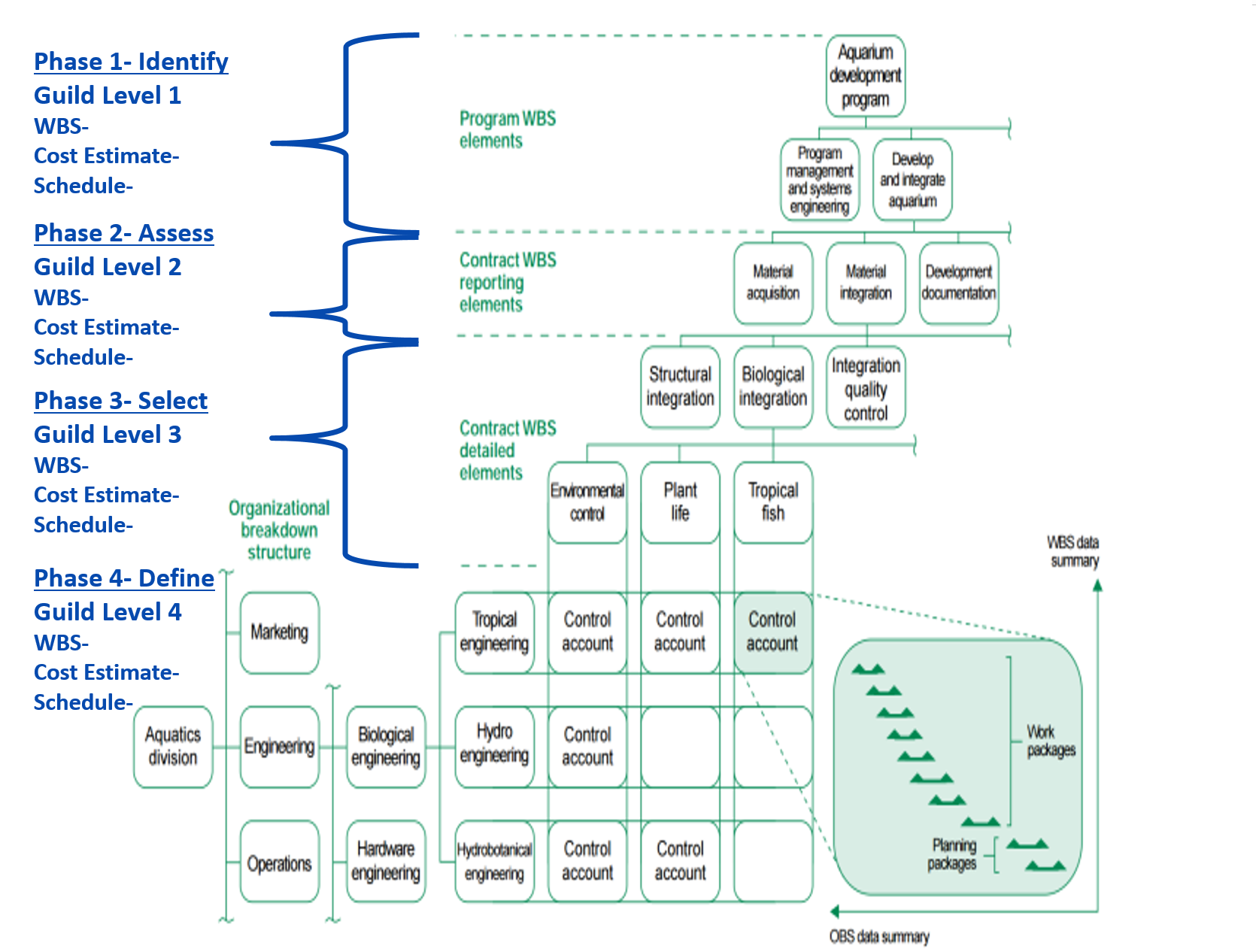
Figure 5 - Illustrating the concept of the Control Account and Work Package Activities
Source: GAO Cost Estimating and Assessment Guide Best Practices for Developing and Managing Capital Program Costs (2009)
Most scheduling software packages will arrange and display the activity listings grouped and sorted by the WBS structure, in fact, many packages now treat this structure as the default organizational structure for the schedule.
- EACH ACTIVITY OF THE SCHEDULE IS ASSIGNED TO A WBS ELEMENT
One of the most important Work Breakdown Structure design principles is called the 100% rule. It states that:
- The structure is to include 100% of the work defined by the project scope and captures all deliverables in terms of the work to be completed, including project management.
- The rule applies at all levels within the structure hierarchy: the sum of the work at the “child” level must equal 100% of the work represented by the “parent”, where one or more “child” levels are subsets of the “parent” level.
- The structure should not include any work that falls outside the actual scope of the project, that is, it cannot include more than 100% of the work.
It is important to note that the same 100% rule also applies to the activity level which sits below the lowest level of the breakdown structure; namely that work represented by the activities in each work package must add up to 100% of the work required to complete that work package.
For more on this refer to Module 2 Managing Scope but more specifically, Module 3-3 Creating the WBS and Module 3-4 Creating the Work Packages.
07.3.3.3 Responsibility Assignment Matrix (RAM)
The Responsibility Assignment Matrix (RAM) is a chart used in clarifying roles and responsibilities in cross-functional / department projects or processes. It goes beyond the Responsibility Breakdown Structure (RBS) in correlating the responsibilities and roles with the Work Packages.
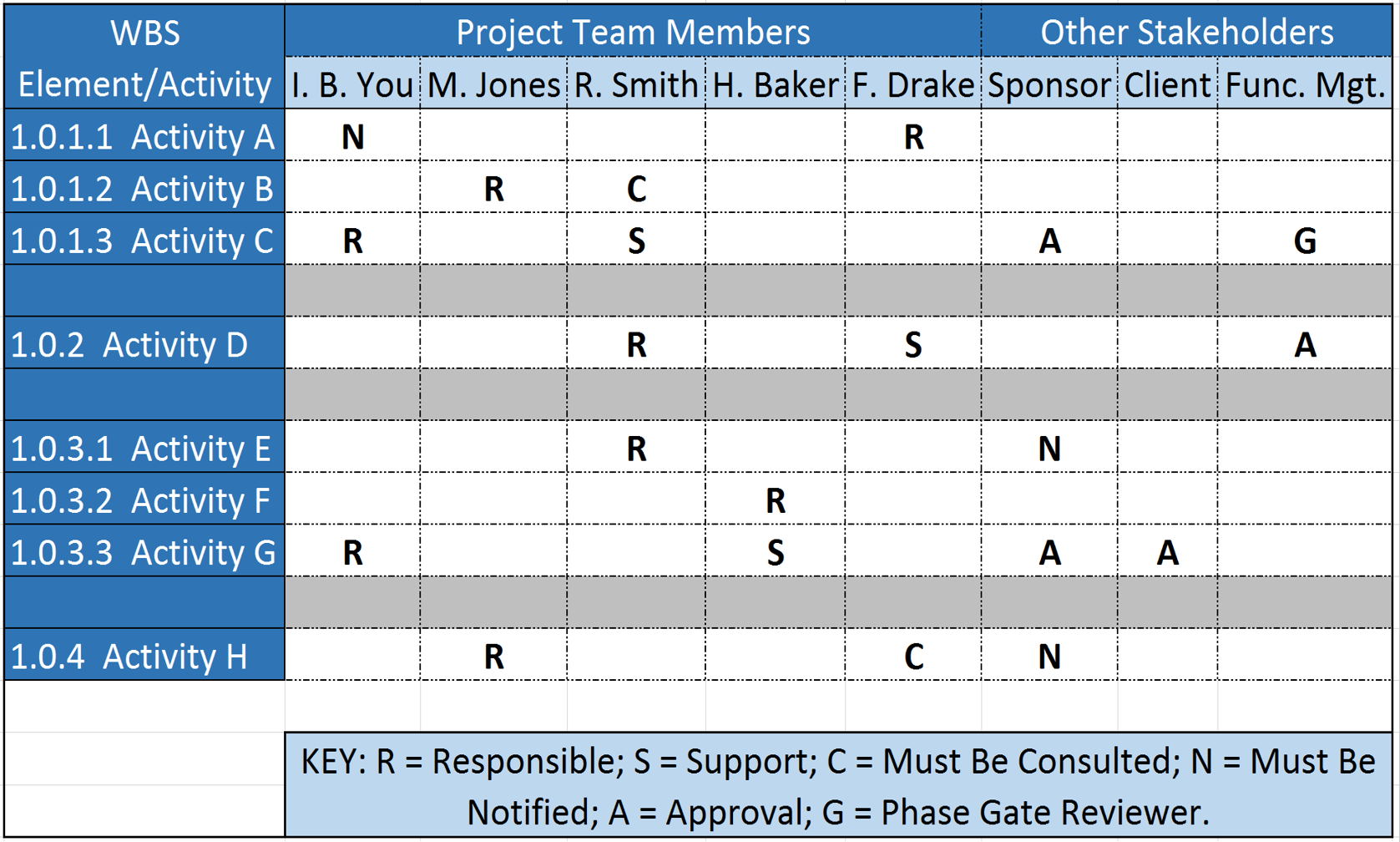
Figure 6 - Responsibility Assignment Matrix (RAM)
Source: Giammalvo, Paul D (2015) Course Materials. Contributed Under Creative Commons License BY v 4.0
In some organizations, a RAM is also called a “RACI Chart” (Responsible, Accountable, Consulted or Informed).
For more on the topic of RAM and RACI documents refer to Module 2 - Managing People
- BY MERGING THE WBS AND OBS, THE PLANNER OR SCHEDULER CREATES A RESPONSIBILITY ASSIGNMENT MATRIX (RAM) OR RESPONSIBILITY BREAKDOWN STRUCTURE (RBS)
The RAM displays the lowest level of both the WBS and the RBS. The integration identifies specific responsibility (i.e. people) for specific project tasks (i.e. activities).
In the Responsibility Assignment Matrix project Work Packages are associated with responsible persons (not departments) and each Work Package shall have only one responsible person.
07.3.3.4 Identify the Schedule Activities & Capture All Effort
Referring back above to "Finalise work Breakdown Strucutre" we know that while the WBS tells us WHAT we have to deliver, HOW we deliver what we have committed to is very much specific to each project. For this reason, even though we may have identical projects, because the people may be different, as well as working conditions and any one of hundreds of other variables, the activities used for each Work Package may very well be substantially different. This is why it is so critically important that the scheduler work closely with the people actually doing the work to find out how THEY plan on executing it and the project scheduler capturing that in the software.
This is one of the risks that we face in using Building Information Modelling (BIM) to create our schedules. Just because we can build something using a software package is no guaranty that we can follow that schedule when we get out into the field.
A project schedule consists of activities, usually requiring resources for their execution.
Activities are characterized by their duration, effort (e.g. man-hours, quantities or machines) costs, and work volumes.
- BASED ON THE IDENTIFIED NECESSARY LEVEL OF SCHEDULE DETAIL PLUS ANY NECESSARY SEQUENCING OR PHASING OF THE PROJECT, A FULL LIST OF ACTIVITIES NEEDS TO BE DEVELOPED SUCH THAT THE ACTIVITY LISTING ACCOMMODATES 100% OF THE SCOPE
- ACTIVITIES CAN BE CREATED AS MILESTONES TO REPRESENT KEY EVENTS WITHIN A SCHEDULE.
A milestone event is by definition an activity with zero duration (e.g. zero scope), which in practical terms can be regarded as a "moment in time". Milestones are normally used in project schedules to indicate a significant event and can help project teams identify what needs to be achieved in the near term by focusing on the next Milestone. These Milestones can represent contractual requirements or simply useful points for monitoring. If each Milestone is achieved on time, there is a good chance the overall project will be achieved on time.
Milestones are also used to define ‘stop and check review’ or ‘toll-gate’ interfaces - a step within the process that must be successfully completed before the project team moves on to the next step. The team judges the completeness of each step during a review. Often a project and its schedule are split into phases and are controlled via such reviews or tollgate interfaces.
07.3.3.5 Activity Names
The aim:
- CREATE USEFUL NAMES / DESCRIPTIONS FOR EACH ACTIVITY
As activity names are a form of INSTRUCTION to people often at a different location from the planner/scheduler they need to be clear as to what the person assigned to that activity is supposed to do, where they are supposed to do it and any other pertinent information they may need.
- IN ADDITION TO USING THE DESCRIPTION / NAME FIELD, THE PLANNER/SCHEDULER CAN ALSO USE THE "NOTES FIELD" TO PROVIDE MORE CLARIFICATION OR INSTRUCTION.
Below are some examples of well-written Activity Names:
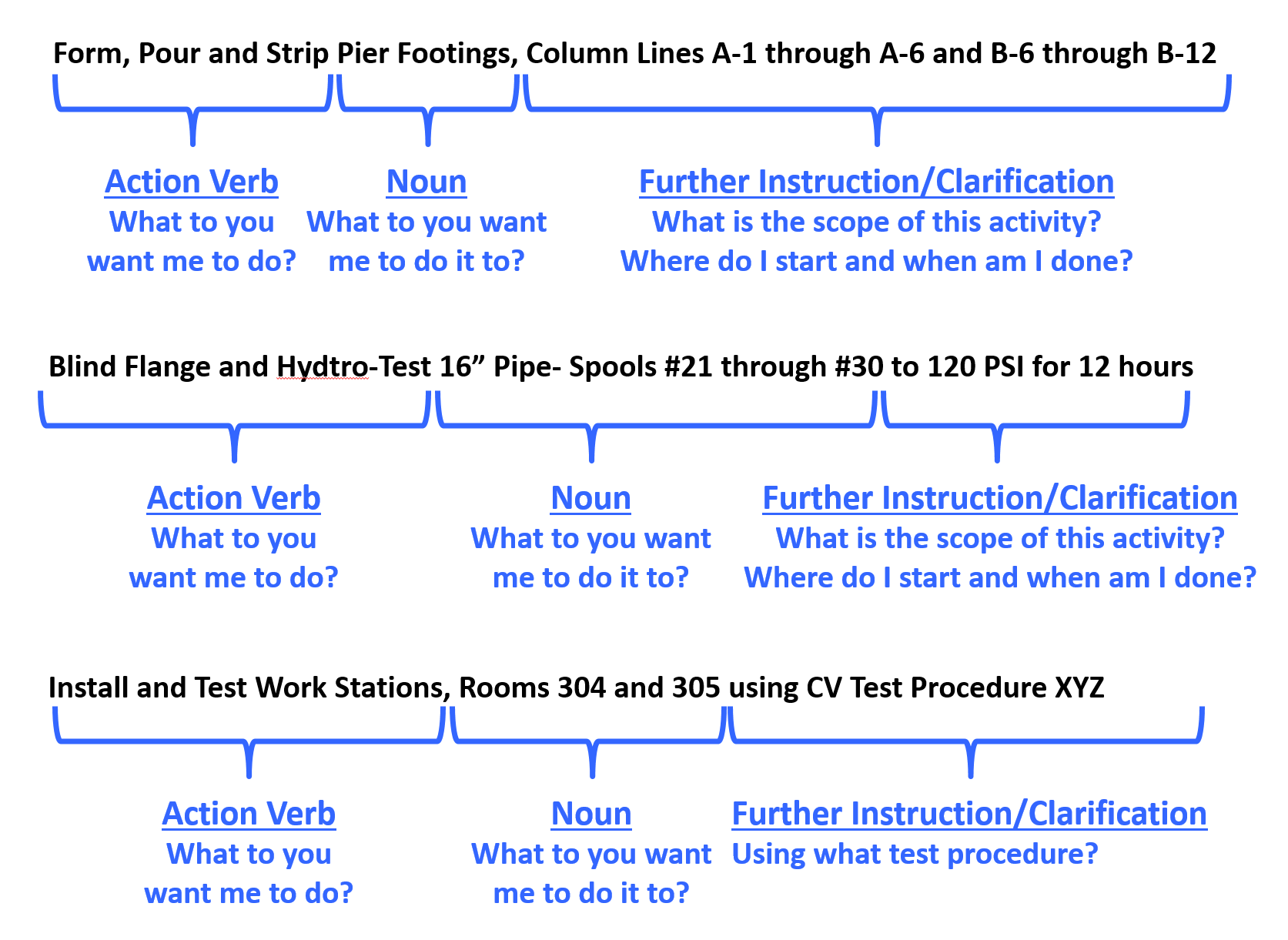
Figure 7 – Examples of Well Written Activity Names
Source: Giammalvo, Paul D (2015) Course Materials. Contributed Under Creative Commons License BY v 4.0
07.3.3.6 Frag Nets / Templates
Planners and schedulers frequently work with repetitive sets of activities and, for example, Work Breakdown Structures that have been used on other projects and they need to rely upon knowing an ever expanding list of production rates and cycle times.
With the advent of computerised scheduling systems, planners and schedulers are seeing the benefits of creating “libraries of information” that have been used on previous schedules and projects. These comprise the following;
- typical templates,
- activity coding systems,
- organizational structures,
- production rates, and
- small schedule segments.
These schedule fragments are known as “Fragnets” or "Templates".
Sections of Work Breakdown Structures from previous projects are useful to save time in the schedule development process. WBS templates are even more valuable when they are accompanied by information about the actual performance (durations, man-hours utilised, etc.) expended on previous projects and greatly assist in the creation of schedules.
Use Templates for inspiration or a starting point.
Just browsing through the various templates — even ones unrelated to the current project — can provide ideas and start on the road to building the next schedule.
Caution must be used however in validating that a fragnet taken from a previous schedule represents what those actually performing the work are planning on doing.
It is vital that the planner/scheduler take the time and effort required to find out how the site team actually plan on executing the work rather than trying to create a schedule hoping that someone will follow it.
Just because you create a schedule does not guaranty that anyone in the field will actually follow it and in the end, invariably what they are doing will be more realistic given the specific conditions than anything you created using a computer simulation or created even based on many years of experience.
07.3.3.7 Activity Codes
Activity Codes are a fundamental component of any schedule and should not be used in place of the core hierarchical breakdown structures (refer below), but can be used to supplement the capability of the hierarchical breakdown structures for organizing, sorting and filtering of the schedule.
- Activity codes answer the question “How do we want to see or view our activities?”
- ASSIGN ANY NECESSARY ACTIVITY CODES TO HELP SORT AND FILTER THE SCHEDULE
Construction projects use many different kinds of delivery methods, products, and installation methods, but one thing is common to all – the need for effective teamwork by the many parties involved to ensure the correct and timely completion of work. The successful completion of projects requires effective communication amongst the people involved, and that in turn requires easy access to essential project information. Efficient information retrieval is only possible when a standard filing system is used by everyone. STANDARDIZED coding structrures provide such a standard filing and retrieval scheme that can be used throughout the industry(s) and through companies.
- Standardizing the WBS, and other coding structure is the best way to get a reliable database.
- By standardizing the codes, companies can collect and share data between projects and programmes and elements of scope or necessary items / activities contained within each project phase are less likely to be forgotten.
- By standardizing the code codes, they will produce a better estimate of the cost, allowing the data to be shared across the company and lead to a more efficient project execution.
While it appears as though “Omniclass” is going to be one of the dominant coding structures for the future, whether Building Information Modelling (BIM) prevails or not the Guild of Project Controls is advocating the use of STANDARDIZED coding structures rather than “ad hoc” structures unique to each company. Explained another way, instead of every company, be it Owner or Contractor, “reinventing the wheel” by creating their own Activity codes, as project control practitioners we need to aspire to play a leadership role by supporting and incorporating standardized WBS, Cost and similar breakdown structures.
Important to note is that if and when BIM is used by your organization that the Omniclass coding structures will come preloaded into every “object” meaning that the planner/scheduler will not have to ADD these codes. They will come with the "object" when the designer places it in the design. This means is if we as practitioners don’t adopt these coding structures it will mean we have to write translator programs to modify our existing cost, productivity and frag net activities to conform to the Omniclass codes.
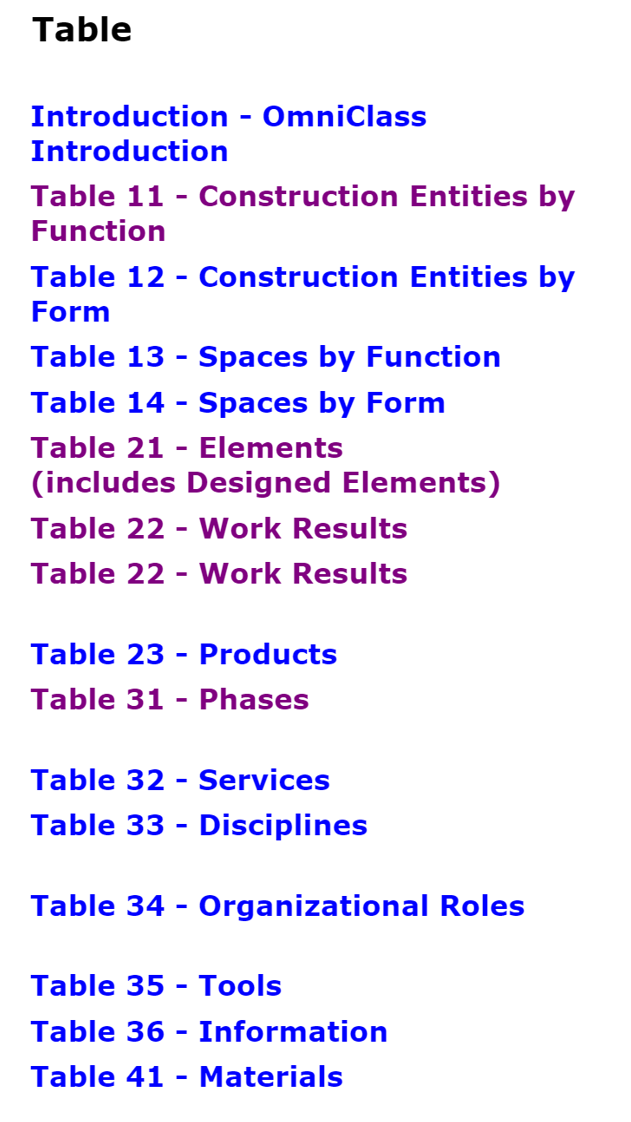
Figure 8 - Omniclass 15 Table Coding Structures
Source: Giammalvo, Paul D (2015) Course Materials. Contributed Under Creative Commons License BY v 4.0
As you can see from the Omniclass Tables, there are 15 different ways we can view or sort our project activities, depending on the needs of each stakeholder. But even if we standardize on these codes, does not stop us from creating new ones.
An example of alternative codes are shown below:
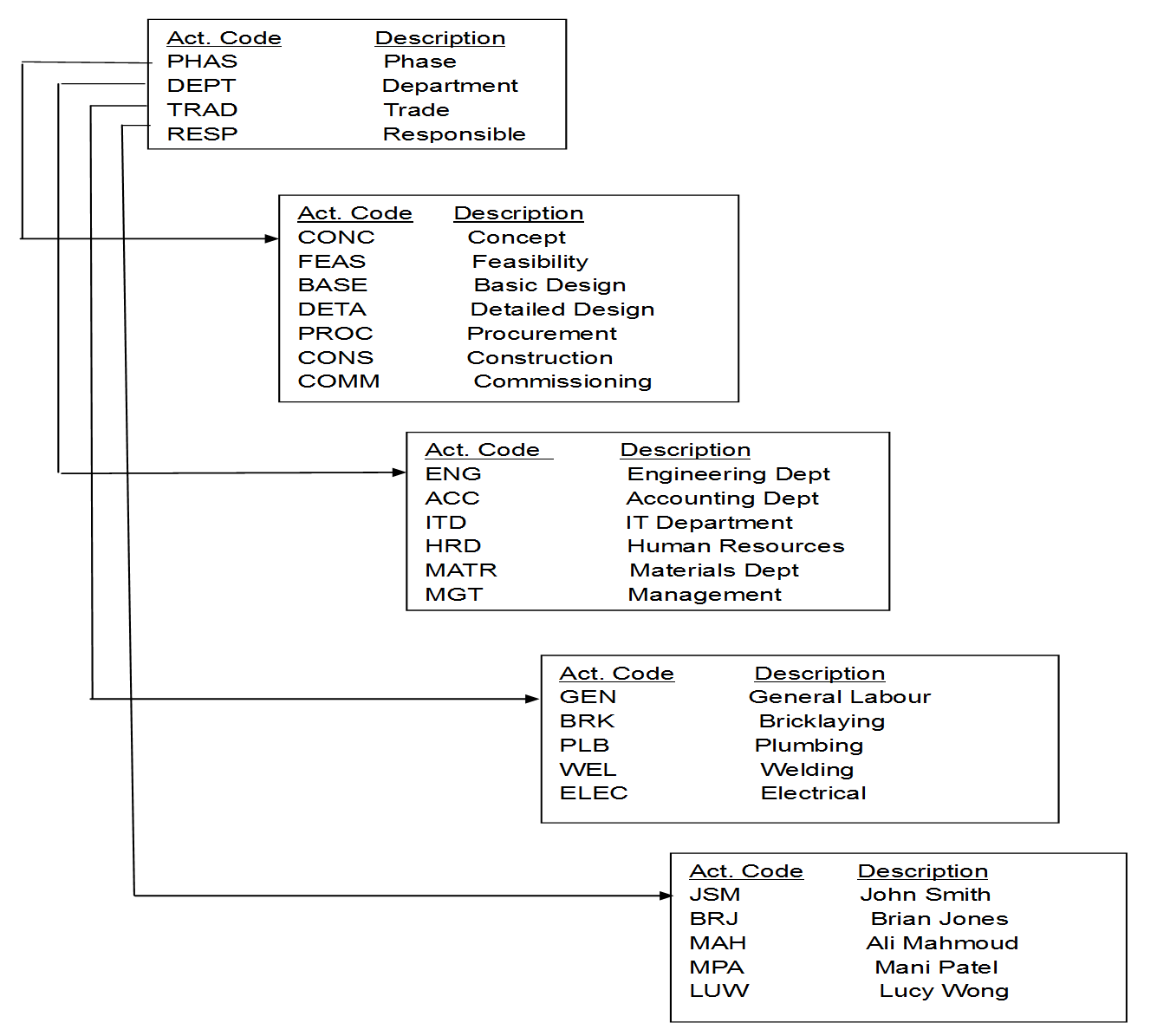
Figure 9 - Examples of Common Activity Code Structures
Source: Primavera (n.d.) Handbook
Figure 9 above is an example of a commonly used “ad hoc” set of codes. Irrespective of which code sets you utilise, activity codes have three basic functions in a schedule:
- to organize the schedule into groups and sub-groups;
- to sort within each group or sub-group; and
- to filter specific activities from the layout view.
They may be also used for activity identification where activity descriptions cannot specifically identify works. If an activity is “pouring concrete” or “final design” a lot of activities in the schedule may have the same name and such an activity code may identify the work represented by this activity. In repetitive projects, this is very helpful because a large group of identical activities can be copied and pasted back into the schedule with a different Activity Code, for example, in duplicating "Floor 4" to create "Floor 5" activities.
Activity Codes are provided with fields in the schedule software database and form an essential part of all schedules.
Typical ‘construction’ type projects are often divided up into Activity Codes such as Phases, Locations, Responsibilities, Disciplines, and these can be organized in a hierarchical manner in the same way that a Work Breakdown Structure is automatically developed. So under Phase there would likely be a subset of Codes representing Design, Procurement, Construction (for example), and under Discipline another subset representing electrical, mechanical, civil, structural disciplines (for example).
As with WBS, such codes can be standardised across organisations and, owners and projects with obvious coordination benefits.
There is a difference between Activity ID and Activity Codes which needs to be clear:
- The Activity ID is a unique number identifying each and every activity.
- Activity ID’s are mutually exclusive- there cannot be two identical Activity ID’s.
- In Microsoft Project the software program automatically assigns an Activity ID. The problem with this is as you add more activities, the Activity ID number changes. Meaning what was Activity #10 today may be Activity #15 after you add more activities.
- Oracle Primavera does a better job on this by requiring you to enter in Activity ID’s however, a lot of people try to make the Activity ID complicated by including all kinds of “intelligence” into the Activity ID when that would be best handled using the User Defined fields, also known as Activity Codes, in any of the major software packages.
What is important is that the structure is matched accurately to the nature and needs of the project. It can be very difficult to change the coding structure once the schedule is in circulation so some thought needs to be applied to this at the start of the project.
07.3.3.8 Additional Schedule Coding Structures
Without a means of organising the schedule activities the schedule would be presented as simply a very long list of tasks and as a result it would be difficult to understand, utilise or explain.
There are numerous ways that a project can be broken down so it is possible to have a need for more than one "breakdown structure", or put another way, more than one way of breaking the project scope down into various levels of detail.
- USE / ADOPT MULTIPLE PROJECT BREAKDOWN STRUCTURES
Generically termed as “work” breakdown structures, these allow the scheduler to obtain and present multiple performance plans and performance reports and to therefore present or analyse the project plan, and its progress, from different perspectives.
To supplement the WBS there is an array of hierarchical breakdown structures that the scheduler can adopt to organise and present the activities that reside within the schedule. Some examples are:
- Cost Breakdown Structure – a hierarchical structure that contains all direct costs, indirect costs and other administrative costs for the project and allows for information exchange between the project and accounting, and may interface with other departments such as procurement or finance.
- Responsibility Breakdown Structure - a hierarchical structure that contains names of staff, or alternatively staff type for the project and allows for the assignment of “staff to project scope” (refer Responsibility Assignment Matric below).
- Contract Breakdown Structure - a hierarchical structure that contains details of the contracts and sub-contracts relating to a project. This is often achieved by using Activity Codes on smaller projects.
- Risk Breakdown Structure - a hierarchical representation of risks, starting from higher levels and going down to finer level risks. For instance, at the top level you could split your risk into technical risk, management risk, scheduling risk and external risks (Level 1), then go on to finer levels such as design risks, funding risk etc (Level 2) and so on. You can keep subdividing the risks into deeper levels as long it makes sense.
While these are the most common breakdown structures, we can also supplement them with user defined sort fields, such as Area, Funding Source, Stadia Distances or anything else that makes it easier for our stakeholders to see and understand the project plan and progress against that plan.
07.3.4 OUTPUTS
- Appropriately Detailed Planning Packages With The Associated Activities
- Appropriately Detailed Work Packages With The Associated Activities
- Activities Appropriately Named
- Activity Coding Structures Agreed / Assigned
- Responsibility Assignment Matrix
Best Practices Checklist: Capture Schedule Activities: (Adapted from GAO “Best Practices in Scheduling”)
- The WBS is the basis of the project schedule. The schedule clearly reflects the WBS and defines the activities necessary to produce and deliver each product.
- The schedule reflects all effort (steps, events, work required, and outcomes) to accomplish the deliverables described in the program’s work breakdown structure.
- The schedule includes planning for all activities that have to be accomplished for the entire duration of the program, including all blocks, increments, phases, and so on.
- The detailed schedule includes all activities the owner, its contractors, and others must perform to complete the work, including government-furnished equipment or information, deliverables, or services from other projects.
- The schedule contains primarily detail activities and includes milestones only to reflect major events or deliverables.
- If the owner and its contractor use different scheduling software packages, a process is defined to preserve integrity between the different schedule formats, and the converted data are verified and validated when the schedules are updated.
- Effort that has no measurable output and cannot be associated with a physical product or defined deliverable is represented by level of effort (LOE) activities.
- Activity names are descriptive and clear enough to identify their associated product without the need to review high-level summary or predecessor activity names.
- Activities within the schedule are easily traced to key documents and other information through activity or task codes.
07.3.5 REFERENCES & TEMPLATES
- GAO “Best Practices in Scheduling” Best Practice 1 pages 10-24
- GAO "Cost Estimating and Assessment Guide Best Practices for Developing and Managing Capital Program Costs"
07.4 - Module 07-4 - Create the Logical Relationships & Sequence Activities
07.5 - Module 07-5 - Assigning Resources to all Activities
07.6 - Module 07-6 - Calculate the Duration of Each Activity
07.7 - Module 07-7 - Calculating Float & the Critical Path
07.8 - Module 07-8 - Validate the Critical Path & Completed Dates
07.9 - Module 07-9 - Validating Horizontal & Vertical Integration
07.10 - Module 07-10 - Conducting a Schedule Risk Analysis
07.11 - Module 07-11 - Baselining & Communicating the Schedule
GPCCAR M07-3, Revision 1.01