07.0 - MANAGING PLANNNING & SCHEDULING
07.1 - Module 07-1 - Introduction to Managing Planning & Scheduling
07.2 - Module 07-2 - Develop the Planning & Scheduling Policies & Procedures Manual
07.3 - Module 07-3 - Identify / Capture all Schedule Activities
07.4 - Module 07-4 - Create the Logical Relationships & Sequence Activities
07.5 - Module 07-5 - Assigning Resources to all Activities
07.6 - Module 07-6 - Calculate the Duration of Each Activity
07.7 - Module 07-7 - Calculating Float and the Critical Path
07.8 - Module 07-8 - Validate the Critical Path and Completion Dates
07.9 - MODULE 07-9 - VALIDATE HORIZONTAL AND VERTICAL INTEGRATION
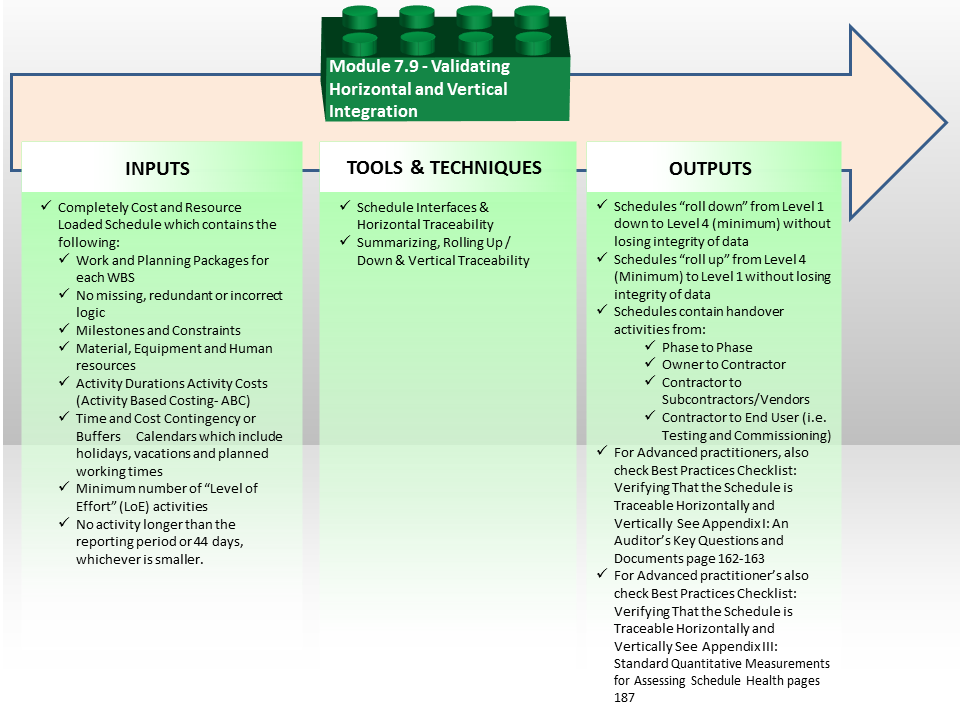
Figure 1 - Validating Horizontal and Vertical Integration Process Map
Source: Guild of Project Controls
07.9.1 INTRODUCTION
The second quality control check project control professionals need to conduct is to ensure that the schedule can “roll up” and “roll down” without losing any activities or data. While this may be easy enough in principle, when you consider that owners, consultants, contractors, sub-contractors and vendors not only have different CPM scheduling software packages but also use different activity coding structures, the enormity of this task can begin to be understood.
Which is why it is so important for the OWNER’s project control team to have input into the specification wording in the contract documents, under CSI Masterformat/Omniclass Table 22, General Conditions, 22-01 32 00 through 22-01 32 10 to ensure that:
- The software the consultants, contractors, sub-contractors and vendors use is compatible with the software the owner is using;
- The owner has defined the Activity ID coding structure;
- The owner has defined the Activity Coding fields and coding structures (i.e. Omniclass Table 21, 22 and 31);
- The owner has defined the Resource Codes/Resource Dictionary.
Note for those using FIDIC contract documents you will have to check to see EXACTLY where this information can be found. It is under General Conditions as CSI/Omniclass has it but there are no references to any specific Paragraph or Clause.
As can be appreciated, this is not a one time event but a continuous process which needs to start in the early phases of the project life span, probably around Phase 2 or latest Phase 3.
Failure to standardize and define these fields will result in chaos and the inability to roll up or roll down the schedules. To add to the complexity of this problem, these coding structures also have to be coordinated with and agreed to by finance and procurement departments as well.
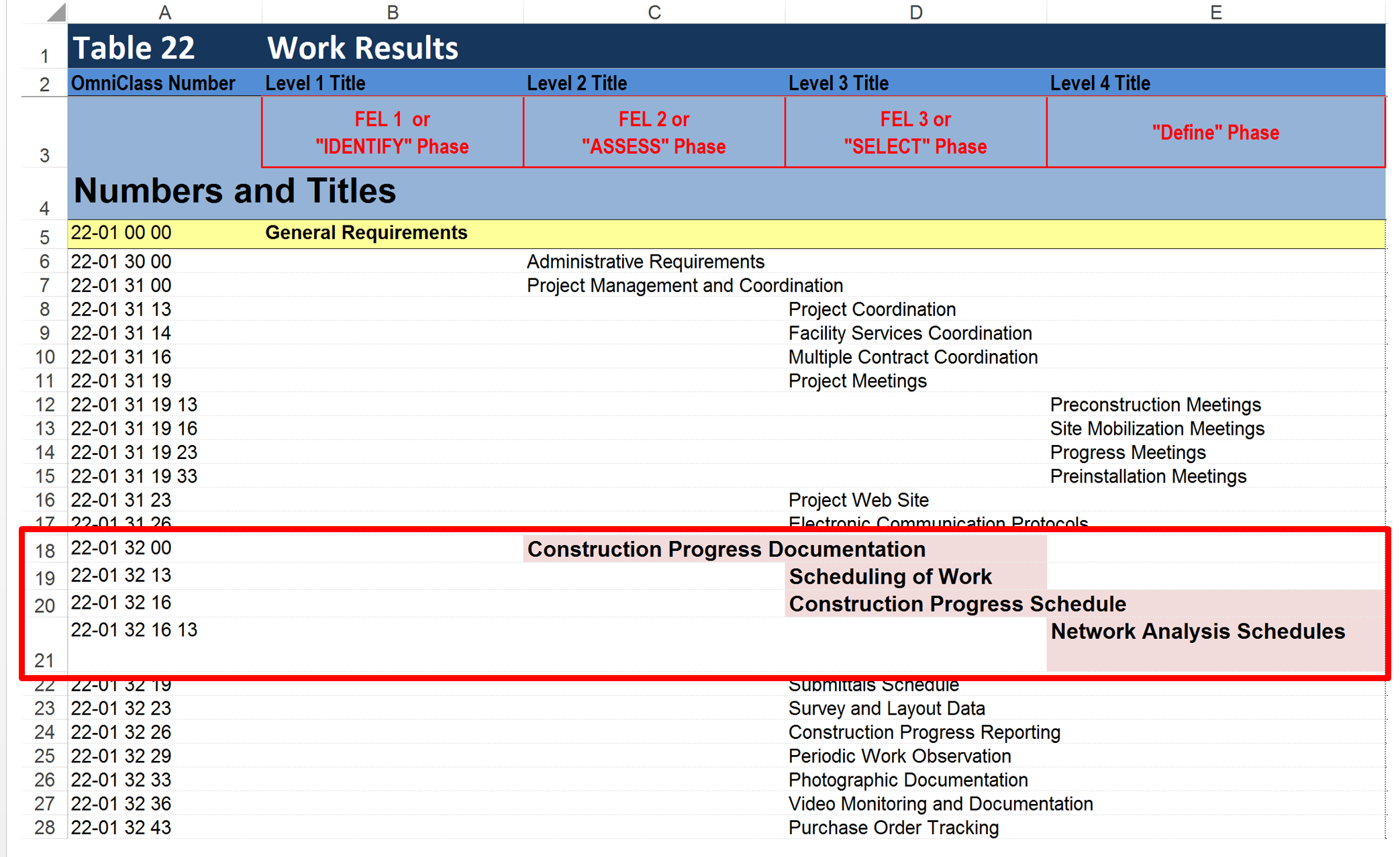
Figure 2 - Omniclass Table 22 Illustrating Where to Find Scheduling Specifications
Source: Omniclass Tables (n.d.)
07.9.2 INPUTS
Completely cost and resource loaded schedule which contains the following:
- Work and planning packages for each wbs element (100% of necessary activities)
- No missing, redundant or incorrect logic
- Milestones and constraints
- Material, equipment and labour resources
- Activity durations which are realistic and achievable
- Activity costs (Activity Based Costing- ABC)
- Time and cost contingency or buffers appropriate to the riskiness of the project, work package and/or activity
- Calendars which include holidays, vacations and planned working timesminimum number of “level of effort” (LOE) activities
- No activity longer than the reporting period or 44 days, whichever is smaller unless otherwise justified
07.9.3 TOOLS & TECHNIQUES
07.9.3.1 Schedule Interfaces & Horizontal Traceability
Horizontal Traceability is a simple concept yet one which is frequently missing in schedules. What horizontal traceability is asking us to validate is whether there are activities which cover handovers from one phase to another or from one trade or contractor to another or from the contractor to the owner. Site access milestones are a good example of this.
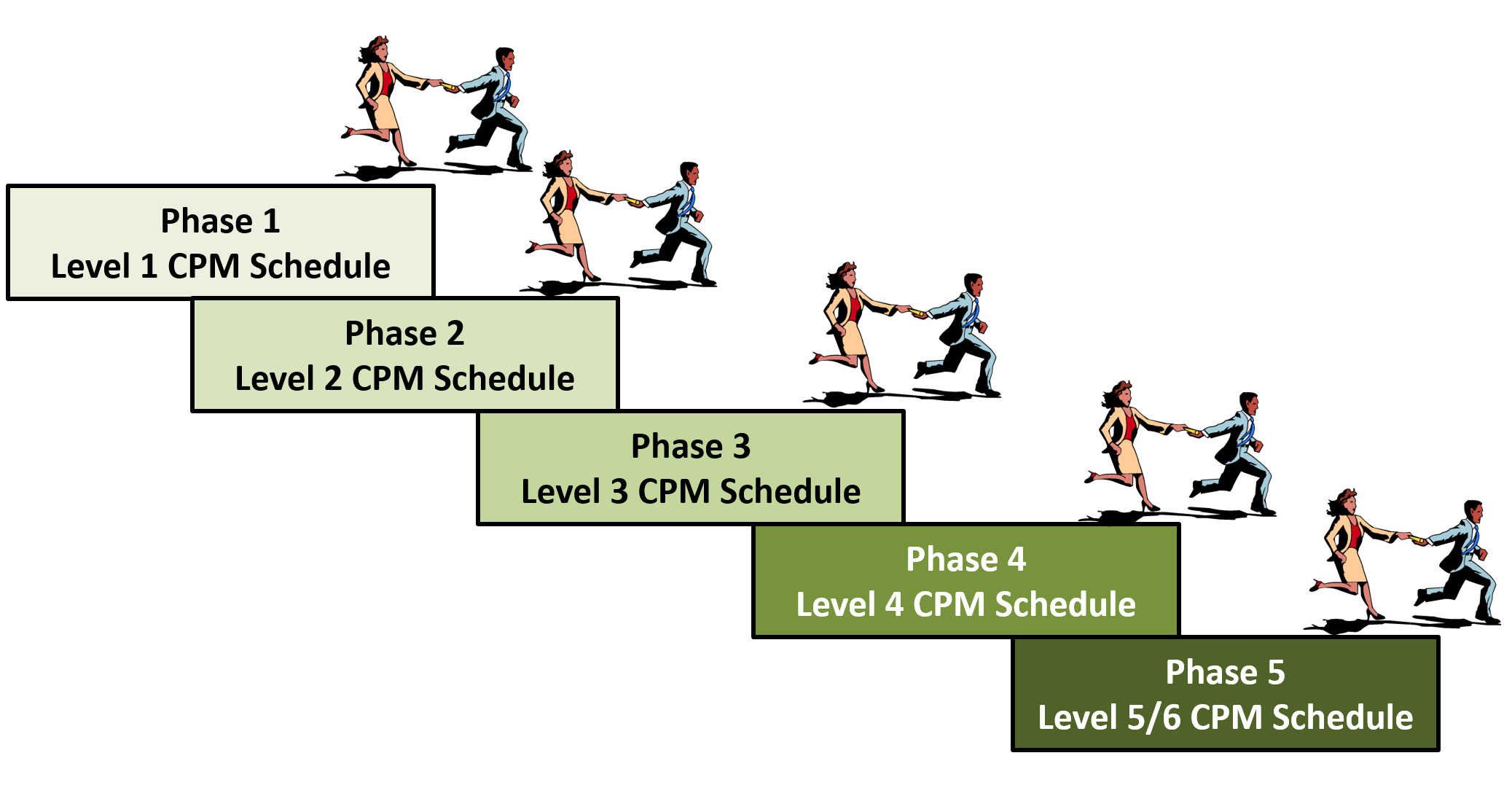
Figure 3 - Horizontal Traceability Illustrated
Source: Giammalvo, Paul D (2015) Course Materials. Contributed Under Creative Commons License BY v 4.0
Schedule Interfaces are anything on the project that requires relationships or coordination with schedule activities and provides potential conflicts with the schedule that might cause delay. Interfaces can be categorised into two main types:
- External Interfaces - occur between Contractor & Client and their external organisations and are usually outside of the control of the contractor’s responsibility.
- Internal Interfaces - occur within work areas of Contractor’s responsibility and usually occur between disciplines, design teams, sub-consultants or sub-contractors.
Interfaces can be Tangible or Hard Interfaces and have a physical connection such as a structural steel connection, pipe termination, or cable connection etc.
However, interfaces can also be Intangible or Soft Interfaces or Technical Interfaces and involve only the exchange of information such as design or performance criteria, clearance requirements or utility needs between project team(s) and / or additional internal or external stakeholders.
They can also be Execution Interfaces which occur when different contractors, teams or design / implementation specialists are dependent on each other (these are usually managed by project or construction type managers).
- While organisations and projects may have sophisticated interface management plans, systems, responsibility matrixes, meetings and methodologies, the planner/scheduler should capture Internal and External interfaces in the schedule so that they are identified and assigned an Interface Date that can be prioritised, monitored, reported and delivered.
Interfaces often impact on progress (e.g. hinder it or facilitate it) and as such planning and managing is improved when they are integral parts of the schedule and its inherent logical relationships.
Interfaces in the schedule will have predecessor activities which will need to be completed in order to all the interfaces to occur, or be concluded. Such interfaces will also have successor activities which can only commence after the interface has been completed. It is therefore vital that the scheduler investigates, incorporates and gains team acceptance of the interfaces to be included within the project schedule when it is created.
The planner or scheduler should ensure integration with the project’s interface systems and, by utilising the schedule, should monitor the status of the interface actions to enable active follow‐up by the project team.
When a project or organisation implements a formal interface management system each interface is assigned a unique ID number. The scheduler should attempt to incorporate these references into the schedule in order to link the schedule with the project interface system and processes.
07.9.3.2 Summarising, Rolling Up/Down & Vertical Traceability
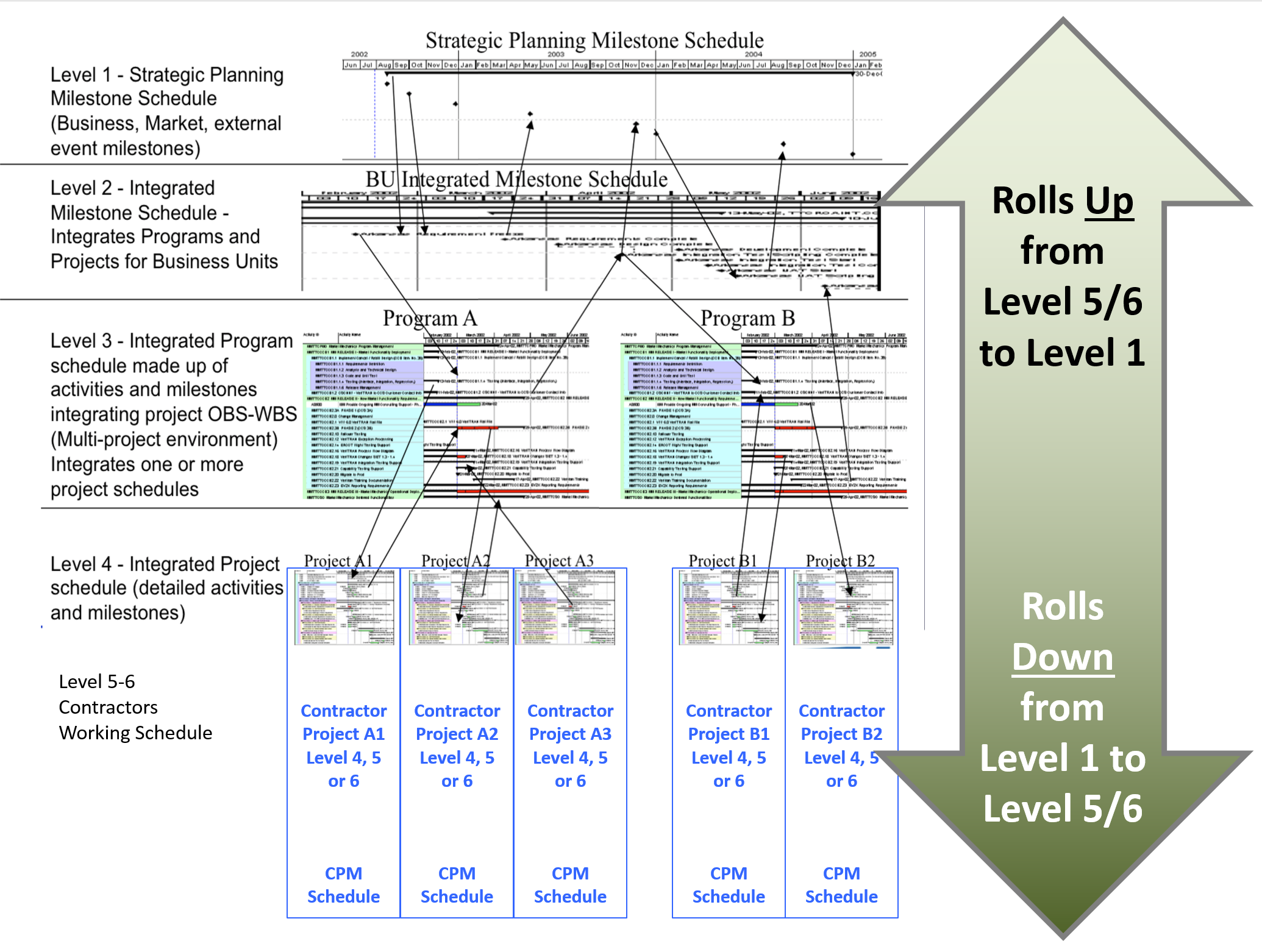
Figure 4 - Vertical Traceability Illustrated
Source: Giammalvo, Paul D (2015) Course Materials. Contributed Under Creative Commons License BY v 4.0
The schedule needs to be utilised by different people with differing needs and objectives (i.e. site teams need a detailed schedule, site manage may need a summarised version for the scope within his remit, whilst the overall project management team may want a much higher level summary schedule) therefore it is vital that the schedule is be capable of being “organised” and “summarised” using the WBS codes or other coding structures assigned to the activities such that a multitude of useful detailed and summary level schedules / reports can be generated during the progress of the works to address the needs of different stakeholders.
Worth noting is that especially for large schedules containing 5,000, 10,000 or more activities it is expected that using “Rolling Wave Planning” techniques, that it is not only acceptable but highly likely that a large schedule would consist of multiple levels of detail, with more detail the closer in time and the less detail the further we look into the future, HOWEVER, in order to ensure that the S Curve or Performance Measurement Baseliine values remain valid, it means that each activity must be cost loaded at the appropriate or relevant level of detail. Failure to apply the concepts of “Activity Based Costing” (ABC) at some level of detail will result in an S Curve or PMB which is incomplete.
Whilst it is recognised that numerous software systems exist, each with slight differences and alternative capabilities, here is an explanation about “WBS Summary Activities” from the Oracle Primavera P6 Help System explaining the concept and benefits of “Summarising, Rolling Up / Down”:
- A WBS summary activity type represents a group of activities that share a common work breakdown structure (WBS) level.
- The summary-level WBS activity enables the rollup of dates for the activity group.
- Rollup values (i.e. dates etc) for a WBS summary activity are calculated when the project is scheduled.
- The duration of a WBS summary activity extends from the start of the earliest activity in a group to the finish of the latest activity.
- The WBS code of a WBS summary activity determines which activities comprise the group.
- For example, a WBS summary activity assigned to WBS code A, would roll up values for all activities under any subordinate WBS that relates to code "A": "A.1", "A.1.1" and so on.
- If the WBS summary activity in this case were assigned to WBS code "A.1", it would roll up values for activities under WBS "A.1" and "A.1.1", but not for those activities under "A.2" or "A.2.1".
While this concept seems easy enough to understand in principal, when you start to work with schedules which are 6 levels deep and you have an Engineering Schedule, a Procurement Schedule, a Construction Schedule and a Testing and Commissioning Schedule, all being created by different consultants, contractor and vendors, the task of integrating all of them and ensuring all these schedules can “roll up” or “roll down” often becomes a major challenge, particularly to owner’s project controls practitioners.
Ideally it is the OWNER who needs to dictate the WBS and other coding structures, which was one of the primary drivers behind the creation of the OmniClass and Norzok Z-014 standardized WBS/CBS coding structures. This needs to be done in the Contract Documents. Another important consideration by owners is to ensure that whatever scheduling software the contractors, subcontractors and key vendors are using is COMPATIBLE with the scheduling software being used by the Owner’s project control department. Explained another way, in order to achieve both vertical and horizontal traceability or integrity, the different software packages either need to be able to exchange data directly OR be importable using the various database formats. (i.e. CSV (Comma Delimited) or DIF (Data Interchange Format) Only by the owner taking charge and establishing these requirements can they hope to be able to fully integrate the schedules and have them roll up or down to the level of detail they need to make management decisions. It should be noted though that CONTRACTORS can and do use and utilise alternative coding structures if they should wish.
This is the reason behind why Project Control professionals, both on the owner and contactor side, need to be familiar with the technical specifications, in particular, Division 1- General Conditions, for this is where these requirements are to be found. (Omniclass Table 22, Line Item 18, number 22-01 32 00 “Construction Progress Documentation”)
Alternatively, if the Owner or Contract Documents do not prescribe this, it is the planner / schedulers task to work with the project team to develop a WBS/CBS and other coding structures that meets everyone’s needs, or better yet, adopt a standardized WBS/CBS/Activity Coding structure such as Omniclass or Norzok Z-014, both of which provide multi-dimensional sorting and filtering options.
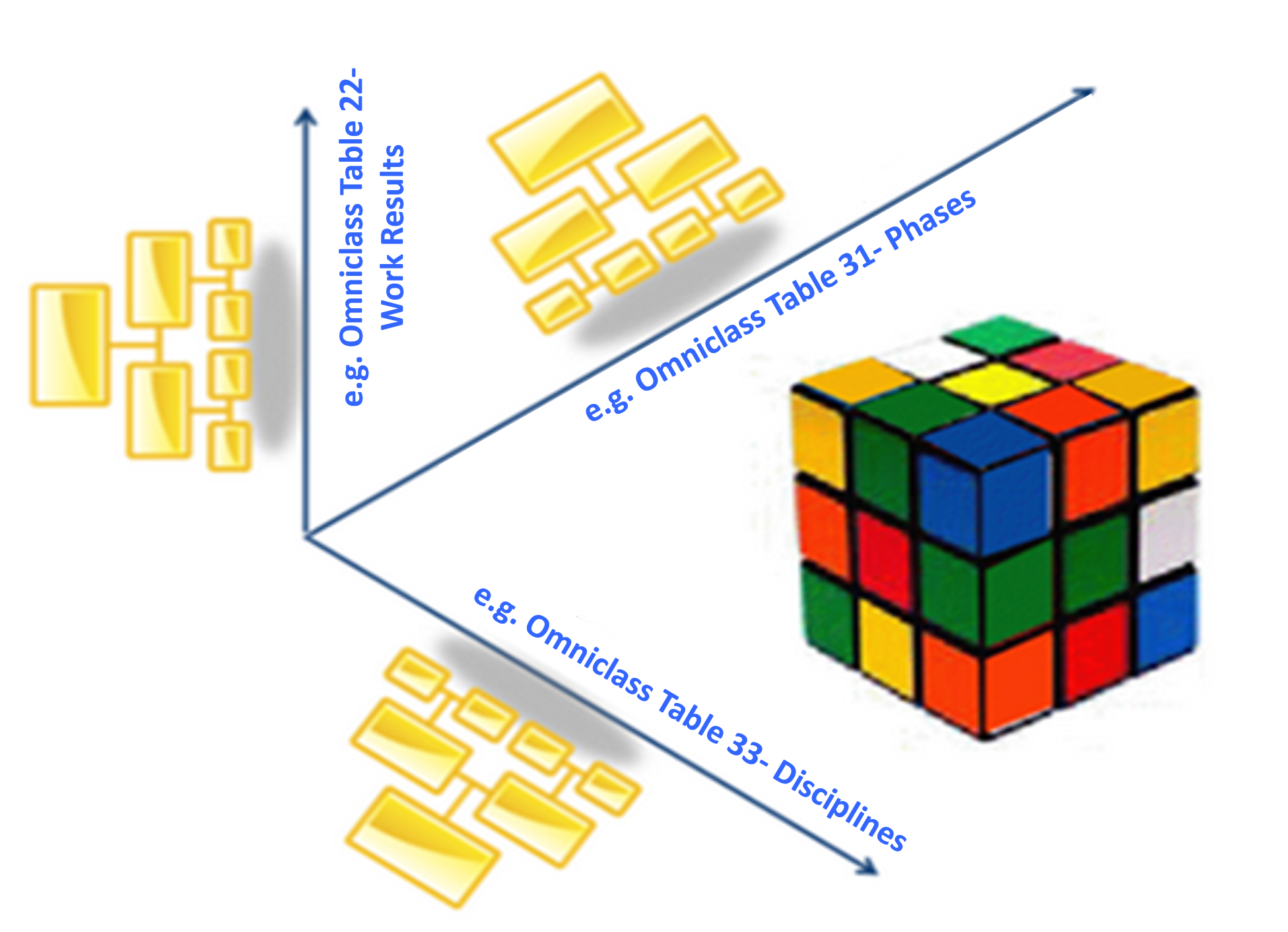
Figure 5 - Illustrating the concept of using Omniclass Tables or other Sort Codes to View the Project
Source: Moine, Jean Yves, Leynaud, Xavier and Giammalvo, PD (2015) Creating and Using Multi-Dimensional WBS Structures
Figure 5 above provides us with a conceptual approach behind the use of Activity Codes as the basis to view or sort or filter our project from many different perspectives. This provides the project control professional with the ability to customize the presentation of his/her schedule specifically to meet the needs of any individual or groups of stakeholders. This is one of the driving forces behind the evolution of CSI Master and Uniformat, Norzok Z-014 into what we know today as Omniclass.
07.9.4 OUTPUTS
Best Practices Checklist: Validate Horizontal and Vertical Integration: (Adapted from GAO “Best Practices in Scheduling”)
- The schedule is horizontally traceable. That is, the schedule depicts logical relationships between different program elements and product hand-offs and clearly shows when major deliverables and hand-offs are expected;
- - includes complete logic from program start to program finish and fully integrates the entire scope of work from all involved in the program;
- - includes milestones representing key decisions or deliverables with traced and validated predecessor activities to ensure that they are directly related to completing the milestone;
- - clearly identifies and logically links “giver/receiver” milestones between schedules that are defined in the schedule baseline document;
- - dynamically reforecasts the date of a key milestone through network logic if activities related to accomplishing the milestone are delayed;
- - is affected by activities whose durations are extended by hundreds of days;
- - includes giver/receiver milestones that are defined in the schedule baseline document
- The schedule is vertically traceable. That is, it demonstrates that data are consistent between summary, intermediate, and detailed levels of the schedule, including dates that are frequently validated through a documented process;
- - allows activity owners to trace activities to higher-level milestones with intermediate and summary schedules;
- - allows lower-level schedules to be rolled up into the overall program schedule, which includes owner activities, other contractor schedules, and interfaces with external parties.
- For advanced practitioner’s also check GAO best practices checklist: standard quantitative measurements for assessing schedule health
07.9.5 REFERENCES & TEMPLATES
- GAO “Best Practices In Scheduling”
- GAO "Cost Estimating And Assessment Guide Best Practices For Developing And Managing Capital Program Costs"
07.10 - Module 07-10 - Conducting a Schedule Risk Analysis
07.11 - Module 07-11 - Baselining & Communicating the Schedule
GPCCAR M07-9, Revision 1.03