07.0 - MANAGING PLANNNING & SCHEDULING
07.1 - Module 07-1 - Introduction to Managing Planning & Scheduling
07.2 - Module 07-2 - Develop the Planning & Scheduling Policies & Procedures Manual
07.3 - Module 07-3 - Identify / Capture all Schedule Activities
07.4 - Module 07-4 - Create the Logical Relationships & Sequence Activities
07.5 - MODULE 07-5 - ASSIGNING RESOURCES TO ALL ACTIVITIES
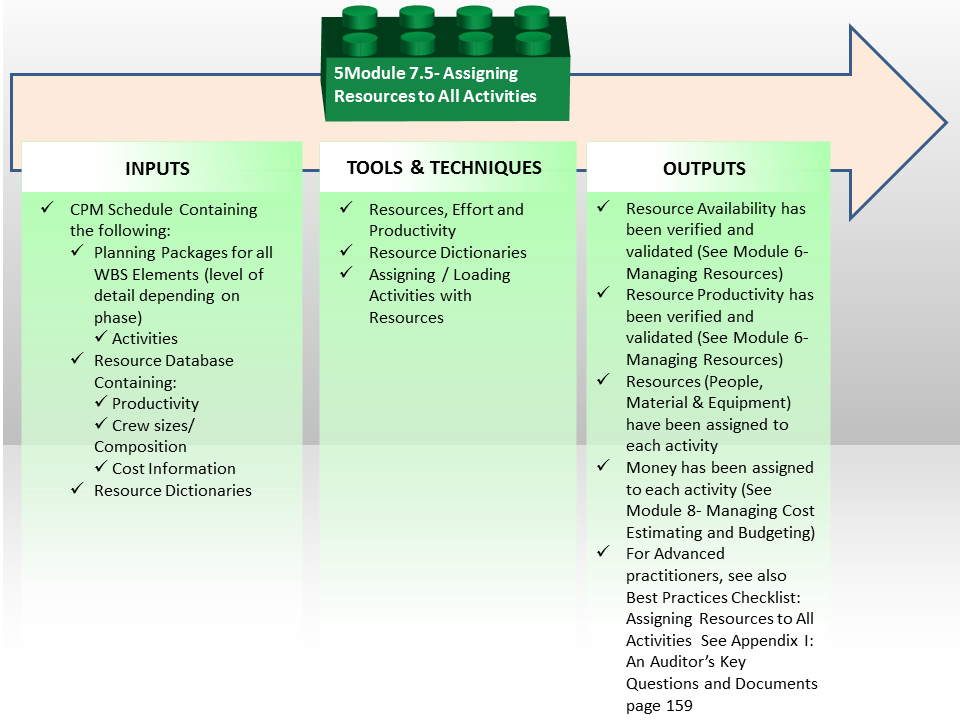
Figure 1 - Assigning Resources to All Activities Process Map
Source: Guild of Project Controls
07.5.1 INTRODUCTION
- HAVING IDENTIFIED ALL ACTIVITIES AND CREATED THE APPROPRIATE LOGIC LINKS, WE CAN NOW TURN OUR ATTENTION TO DETERMINING WHAT NUMBER OF RESOURCES ARE AVAILABLE, AND FOR BOTH HUMAN AND EQUIPMENT RESOURCES, WHAT THEIR PRODUCTIVITY ARE.
NOTE - For OWNERS doing “top down” duration and cost estimates, they often create the durations first (Module 07-6 - Calculate the Duration of Each Activity) and then using the durations as the basis, then try to staff the activities to meet achieve those durations, while others, usually CONTRACTORS, determine their activity durations after ascertaining their planned or available resources, their resource productivity and the required volume of work to be carried out.
In all instances, the schedule should reflect the resources (labor, materials etc.) needed to do the work, whether they will be available when needed, and any funding or time constraints. There are three primary resources we need to concern ourselves with in the context of applied planning and scheduling:
- Materials (whether supplied by owner or contractor and whether they are direct, indirect, bulk or consumable)
- Equipment (whether supplied by owner or contractor)
- Labour ( contractors direct plus both owner’s and contractor’s indirect(overhead))
Whilst this Module is primarily aimed at Planners & Schedulers we need to point out that additional “cost resources” will need to be attached to the schedule in order to demonstrate the cost estimates / budgets and manage time in conjunction with cost.
Given that historically so many projects finish late, “best tested and proven” practice suggests that both Owners and Contractors look at the realities of what resources are available and what their productivity is BEFORE we estimate our durations. This can be done either in Module 4 - Managing Risk & Opportunity or Module 6 - Managing Resources. Whichever approach is being used, the point is both Owners and Contractors alike need to have a clear understanding of what resources they are going to need, what is their availability and for people and equipment what is their relative productivity against some standard. Failure to know that when creating as CPM schedule is almost sure to result in overly optimistic delivery dates.
As noted previously, because the GAO’s “Best Practices in Scheduling” is our primary reference, this Module will be dedicated to showing clarification, expansion, elaboration or in some cases, disagreement with what the GAO document is recommending. For those studying for your certification exams, it is highly recommended that you know and understand both documents regardless of which exam you are preparing to sit for.
For the purposes of examples, Microsoft Project has been used for no other reason than it is probably the most popular program meaning most people will be familiar with it. This is not meant as an endorsement of any one software over another, but simply a way to use examples which are likely to be familiar to most practitioners. To a greater or lesser degree, there are other much more sophisticated programs, but all of them provide the same basic features, the only difference being the higher end programs offer more flexibility and options as well as more sophistication in how to allocate those resources. Otherwise, the fundamental concepts remain the same.
07.5.2 INPUTS
A CPM Schedule Containing The Following:
- Planning Packages for all WBS Elements
- Activity Codes
- Start Milestone
- Finish Milestone
- Interim (Contractual or Other) Milestones
- No Open ends
- Ideally not more than 3 Logic Links per Activity
- Resource Database
- Resource Dictionaries
07.5.3 TOOLS & TECHNIQUES
07.5.3.1 Project Controls Database
While the Guild of Project Controls is not endorsing any particular software or system, R.S. Means has given the Guild permission to use their cost estimating databases to illustrate not only what fields a well-constructed Project Controls Database should contain but how both planner/schedulers and cost estimators/quantity surveyors as part of the project team need to be able to use this information separately or together to produce robust resource loaded schedules and supportive cost estimates.

Figure 2 - Case Study Using Commercial Database Information
Source: Giammalvo, Paul D (2015) Course Materials. Contributed Under Creative Commons License BY v 4.0
In the example above which represents a typical example of “Activity Based Costing” at Level 5 or Level 6:
- Item 1 - "03 30 Cast In Place Concrete" is CSI Masterformat/Omniclass Table 22 2nd Level WBS Structure. (Level 1 is "03 is Concrete")
- Item 2 - "03 30 53 Misc Cast in Place Concrete" is CSI Masterformat/Omniclass Table 22 3rd Level WBS
- Item 3 - "03 30 53.40- Concrete" in Place is CSI Masterformat/Omniclass Table 22 Level 4 WBS, which from this level down becomes not only a WBS but a Cost Breakdown Structure (CBS) and Productivity Breakdown Structure (PBS) as well. One coding structure serving three purposes. Worth noting is Level 3 of the WBS is the MINIMUM level of detail that an owner should be providing to a contractor, assuming the owner wants to minimize claims and disputes while at the same time, obtaining highly competitive bids.
- Item 4 - "03 30 53.40.0010", "03 30 53.40.0020" and "03 30 53.40.0050" is an ACTIVITY consisting of Forming (0.0010); Installing Rebar (0.0020) and Placing and Finishing Concrete (0.0050)
- Item 5 - There are two types of Activity “03 30 53.40.0300" is based on "10’ (foot) long spans” and Activity “03 30 53.40.0350 is based on "25’ (foot) long spans”. Depending on the number of scenarios, you could create other cost and time productivity calculations for as many different combinations as you are likely to use.
- Item 6 - For the remaining example we will be using "Activity 03 30 53.40.0350" to form, reinforce, place concrete and strip 25’ long, 5 kip (5,000 lbs) beams. Notice that the only piece of information MISSING from this is the Quantity Take Off or Bill of Materials? When we start to use Building Information Modelling (BIM) this information will be coming to us, using these coding structures. If we do not use BIM, then we have ascertain the quantities from the Bill of Materials/Bill of Quantities that come with the tender or contract documentation.
- Item 7 - This is where we know the composition of the crew that was used to calculate the productivity and costs. See below for a more detailed look at what "Crew C-14A" is made of.
- Item 8 - Is simply the daily output that Crew C-14A can produce ON AVERAGE. (P50) value. It is not adjusted for any risks. This is one of the most important pieces of information that the planner/sheduler needs as this is how we calculate the DURATION
- Item 9 - Is the number of Crew Labor Hours per Cubic Yard (CY) of beam concrete. This too is another useful piece of information for all project control professionals but especially planners/schedulers, as many projects are not tracked based on money but on man-hours expended or earned vs planned man hours. This will be covered in Module 9
- Item 10 - This is the Unit of Measure. In this case, it is Cubic Yards (CY) but it could have been Cubic Meters (M3) or any other fast and reliable way to measure physical progress.
- Item 11 - For our Example we will be using "Crew C-14A".
- Item 12 - Crew C-14A can produce on average, 18.55 Cubic Yards (CY) per day for this particular activity. Different activities will have different productivity rates.
- Item 13 - On average, it takes 10.782 labor hours per Cubic Yard (CY) in place for this particular activity. Different activities will have different productivity rates.
- Item 14 - For the example below the Unit of Measure will be Cubic Yards (CY)
For all remaining estimating database items not numbered while they may or may NOT be used by the planner/scheduler depending on whether the activity resource has been classified. (Per Work Volume Unit or Per Work Day) but certainly will be needed by the cost estimator/quantity surveyor and/or the project controller.
And again using the above referenced R.S. Means database this is what the aforementioned “Crew C-14A” consists of. You will notice that the “crew” is further brocken down into its constituent parts:
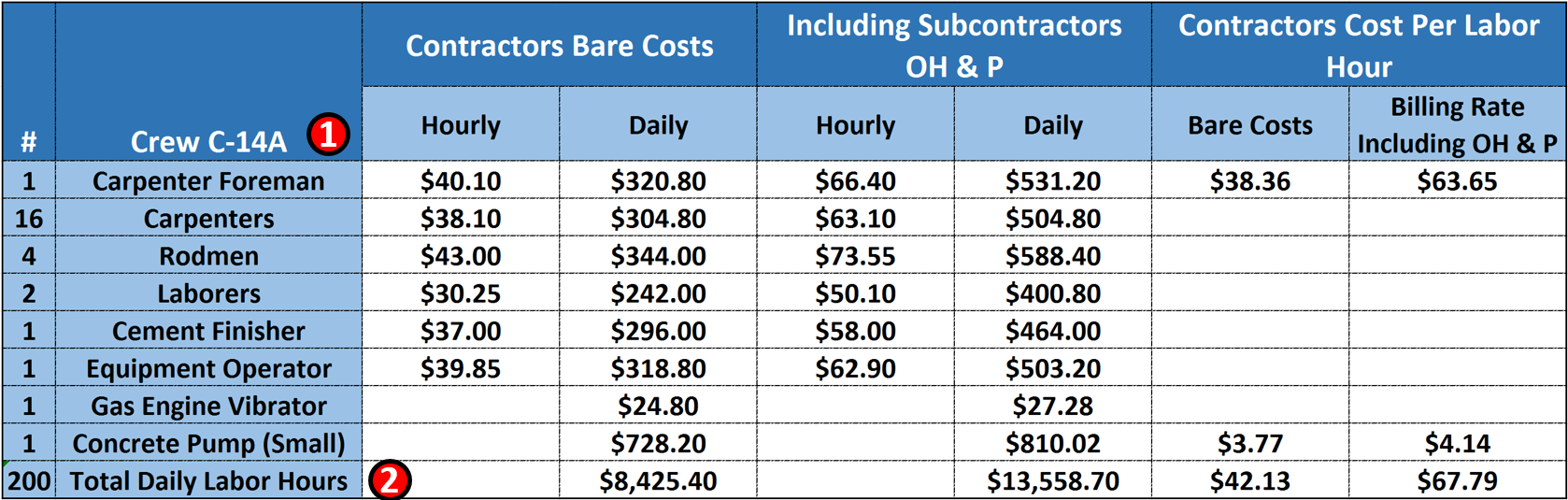
Figure 3 - Case Study Demonstrating Crew Composition Details
Source: Giammalvo Paul D (2015) Adapted from RS Means Facilities Handbook 2008, Contributed Under Creative Commons License BY v 4.0
Our Project Controls Database is primarily aimed at production rates and build times if you are a planner/scheduler and costs if you are a cost estimator/quantity surveyor.
Our database indicates that Crew C-14A consists of the 8 Labor and Equipment items; 1 carpenter foreman plus 16 carpenters, 4, rodmen, 2 laborers and 1 equipment operator equals 25 man days of labour and working an 8 hour day = 200 man days of labour per crew working day.
What we are MOSTLY looking for as planners/schedulers are the Crew or Gang, the daily output, the labour hours and the unit of measure. (See Figure 1 above)
Having established and kept current a Project Controls Database when we have created a schedule then we have to draw from this database to create our Resource Pool or Resource Assignments or Resource Dictionary.
07.5.3.2 Resource Dictionaries
In order to organise and coordinate these project resources we need to create “Resource dictionaries”.
Such a dictionary is a predefined “pick list” or “library” of resource types from which the planner/scheduler can select when later assigning resources to activities within the schedule.
- This library needs to come from the Project Controls Database to ensure that planner, schedulers, cost estimators, quantity surveyors and project controllers are all using the same coding structures and that the productivity and man hours is consistent with the associated costs.
To create the Resource Dictionary we need to build a list of all envisaged resources. This best comes from our historical database, using either commercially available which need to be modified for local conditions OR those resource dictionary databases created and maintained by ourselves and / or our Project Control Department or Project Management Office.
In order to facilitate communications between the planner/scheduler and the cost estimator/quantity surveyor, the names given to resource types need to be standardized and agreed to. (i.e. both use the same names and coding structures) This means there should be one and only one Resource Dictionary which is used by both planner/scheduler and cost estimator/quantity surveyor.
For example:
- The planner might want to call a resource “concrete placers” and assign a quantity of “one crew/gang” and supplement this with a material resource called “concrete”.
- The planner/scheduler’s needs would be largely met as these three elements would enable the schedule to produce an overall manpower requirement and a concrete delivery requirement).
- However, this would be of little use to the cost estimator/quantity surveyor as there are many possible concrete placement crews/gang sizes (and costs) depending on the activity as well as different productivity outputs and types of concrete which all cost different amounts.
- So for this reason the planner/scheduler needs to have the schedule resources and resource codes integrated with the cost estimator/quanitity surveyor. This is where the Resource Dictionary comes into play in order to provide the required consistency and also library of resource from which to select.
The Resource Dictionary would record the following core attributes and components:
(1) Resource ID - which is an alpha numeric set of characters which serves as shorthand way to identify specific resources. From the example shown above such a code might be "Crew C-14A"
(2) Resource Name - This is the actual name of the resource. Again, from earlier example such a name might be "Carpenter Foreman"
(3) Resource Type - This would be labour, non-labour or materials etc.
- Labour- Using the example above, Crew C-14A is a LABOUR resource, and to this Labour resource we can attach the productivity, crew hours, costs or pricing information.
- Non-Labour- This covers any resource which is neither Labour nor materials so would include equipment, costs or selling price or any other non-Labour, non-material resource.
- Materials- Examples would be concrete, steel, doors or any other direct or indirect materials
07.5.3.3 Resources, Effort and Productivity
For each activity we have identified for the schedule, what we are looking for as planners/schedulers is the number and productivity of the available Labour and Equipment resources as well as the material quantity associated with the scope defined by the schedule activity. Each of the above Labour, Equipment and Material resources will reside in the aforementioned Resource Dictionary.
- The above information is collated for each activity in the schedule in readiness for loading into the schedule as “resources”.
- This information will also later help identify the activity duration (refer Module 07-6 Calculate the Duration of each Activity).
Keep in mind that any values would likely represent an average value (often referred to as the P50 value) so to that we may have to add in any time or cost contingency calculated from Module 4 - Managing Risk & Opportunities.
For a full description of Resources, Effort and Productivity refer to Module 6 - Managing Resources.
07.5.3.4 Assigning / Loading Activities with Resources
Once the full activity listing has been created and the associated labour, equipment and materials identified, each activity now needs to be “loaded” or “assigned” the relevant resources using one or more of the resources defined by the resource library’s above.
What we are MOSTLY looking for as planners/schedulers are the Crew, the daily output, the labour hours and the unit of measure.
- Crew is C-14A
- Daily Output is 18.55 Cubic Yards (CY) of concrete
- There are 10.782 crew hours per Cubic Yard (CY) of concrete
- There are 200 man hours per crew day of work
- Quantities of Materials (From the Bill of Materials /Bill of Quantities)
For example, from the Bill of Materials/Bill of Quantities or tender or contract documents we estimate there are 500 CY of concrete.
- To calculate the duration, we can divide the 500 CY of concrete / 18.55 CY output per day= 26.95 or 27 days.
- To calculate the total man hours we can multiply 10.782 man hours per Cubic Yard which yields 5,391
OR
- Knowing that the total labour hours per crew day is 200 and knowing the duration is 27 days, we can also calculate the total man-hours required by multiplying 200 man hours per crew day X 27 days = 5,400 which is the same value as above, but calculated a different way.
Keep in mind that all these values represent is an average value (P50) so to that we have to add in any contingency. Refer Module 4 - Managing Risk & Opportunity.
As described above, in order to facilitate communications between the planner/scheduler and the cost estimator/quantity surveyor, the names given to resource types need to be standardized and agreed to. (i.e. both use the same names and coding structures) This means there should be one and only one Resource Dictionary which is used by both planner/scheduler and cost estimator/quantity surveyor.
Failure to adopt standardized names and coding structures makes it difficult if not impossible to create a database of productivity, hours and costs.
For a planner/scheduler, all we normally need is quantities from the Bill of Materials / Bill of Quantities and the number of people assigned to an activity and to make an assumption as to what their working hours are. (See example below for a more detailed explanation and examples).
For example the planner might want to call a resource “concrete placers” and assign a quantity of “one crew” and supplement this with a material resource called “concrete”. Whilst the planner/scheduler’s needs would be largely met as these three elements would enable the schedule to produce an overall manpower requirement and a concrete delivery requirement). However, this would be of little use to the cost estimator/quantity surveyor as there are many possible concrete placement crews sizes (and costs) depending on the activity as well as different productivity outputs and types of concrete which all cost different amounts.
The cost estimator/quantity surveyor needs to know more detail than simply that it is “one crew” and is assigned to an activity of say “1 weeks duration”, so by creating a pre-defined “crew” in the Resource Dictionary, the cost estimator/quantity surveyor can help integrate the schedule with the cost estimate / project budget by proposing a standardized crew name, a unique resource identifier as well as other elements such as productivities and the number of men and machines (and their costs) associated to the crew.
This way the scheduler achieves his aims of being able to support his activity duration with a “manpower resource” (i.e. the “one crew”) and a “material resource” of say 100 CY of concrete while the cost estimator/quantity surveyor’s needs are also met because the Resource Dictionary carry’s the associated details such as team size, plant and machinery items and costs as well as the specific cost breakdown for the material resource all by using unique identifier codes for each resource in the dictionary, the schedule resources can all be linked back to the cost systems etc.
 Figure 4 - Showing Detailed Resource Information from the Resource Dictionary
Source: Giammalvo, Paul D (2015) Course Materials. Contributed Under Creative Commons License BY v 4.0
In Figure 4 above, we can see that when we “drill down” in the resource dictionary, each resource consists of 9 major fields:
(1) RESOURCE NAME. An example would be an individual, such as Bob Jones. Employee #799 or it could be a single piece of equipment such as Cat D8, serial number 12345678. In this particular example from our case study, we are looking at an entire carpentry and concrete placement crew, which we call Crew C-14A.
(2) INITIALS- To simplify the process of assigning resources, we try to minimize the coding structure. In the case of Bob Jones we could simply use his initial BJ or for the equipment we could D8-1.
(3) Under GROUP we would identify this particular resource to be qualified to work on any cast in place concrete task.
(4) Under CODE, we assign this particular resource to a specific Activity Code, which again referring back to our case study from above, we know this crew has been assigned to work on "Activity 03 30 53.40.0350"
(5) In the TYPE field, we can define whether this crew is a WORK crew or we could tag is as a COST or MATERIAL.
(6) GENERIC vs BUDGETED Generic. Specifies that the resource is an account of skills required for a task, rather than an actual resource. While Budget specifies that the resource is a budget item.
(7) COMMITTED vs PROPOSED- Committed (Default) means that you are 100% sure that this resource is available to your Project. If the Resource isProposed (TENTATIVE), it means that you NEED that resource, but you do not know if it will be available when you will need it.
(8) RESOURCE AVAILABILTY tells us two important pieces of information:
- WHAT DATES is this resource available to our project and;
- HOW MANY “Crew C-14A” do we have available. In this example, shows we have a single crew (100%) available to us. IF the this crew was only available half time we would enter 50% and if we had 2 Crew C-14A available, it would be 200%.
(9) The next step in the process is to determine the WORKING TIME and CALENDAR for this crew.
 Figure 5 - Changing the Working Time Using Resource Calendars
Source: Giammalvo, Paul D (2015) Course Materials. Contributed Under Creative Commons License BY v 4.0
The next step is to determine the working time for each resource, understanding that it may be different for each resource and dfiferent rom the project working calendar.
There are three pieces of information required:
(1) We can define an unlimited number of calendars. In this case we have chosen the STANDARD CALENDAR which is the same working times and dates being used for the entire project.
(2) We can set the working times for both morning and afternoon giving us the total number of hours available each day and;
(3) We can define when the work week starts, when it ends and any holidays or other non-work periods. This is especially important if you are working in the Middle East, where the work week starts on Sunday through Thursday, with Friday and Saturday being the weekend.
There is a bit more information we need to provide which we can see in Figure 6 below:
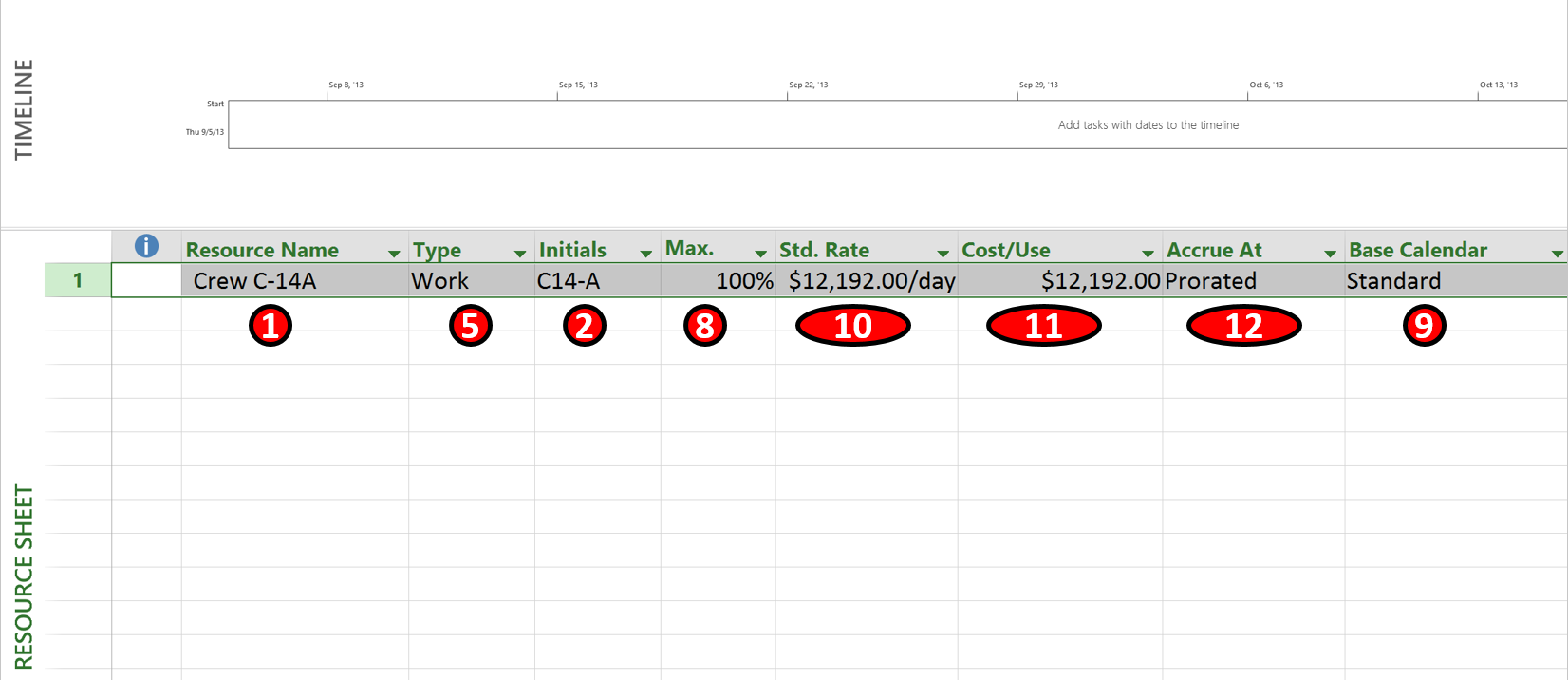
Figure 6 - Showing the Cost and Related Information
Source: Giammalvo, Paul D (2015) Course Materials. Contributed Under Creative Commons License BY v 4.0 In Figure 6 above, Items 1, 5, 2, 8 and 9 correspond to the same numbers on the Resource Information Table shown in Figure 4. The three additional pieces of information which need to be included are:
(10) Standard Billing Rate, which from our case study we know is $12,192 per day
(11) Cost Per Use- As we will only assign this resource on a full day and not a partial day, the Cost/Use is the same as the Standard Day Rate, however if this resource performed the same set of tasks repeatedly, the Cost/Use would be the day rate X the number of days the task took.
(12) Are the costs PRORATED meaning they change with the duration and/or resources assigned or are they FIXED
 Figure 7 - Showing the options available which link the duration, resources and work.Source: Giammalvo, Paul D (2015) Course Materials. Contributed Under Creative Commons License BY v 4.0
When we create an activity and assign resources we can select from 3 variables which determines how changes in one variable will impact the other two variables.
1.a- Fixed Units- Using our case study above, choosing this option assumes that the Units shown on the Bill of Materials/Bill of Quantities is correct. Thus if we make a change to the units then that will have a proportional impact on both the duration and the Costs (Work)
1.b- Fixed Duration- If we choose this option, it assumes the duration is the driving force, thus if the duration is shortened or lengthened the quantities (UNITS) and the costs (WORK) will change proportionally.
1.c- Fixed Work- This option assumes that the cost if FIXED and that any changes to the COSTS will have a proportional impact on both Duration and Resources.
2 Resource Driven vs Schedule Driven- by choosing from these options, we can tell the program:
- a. Resource Driven to apply the rule chosen above (1.a, 1.b or 1.c)
- b. Schedule Driven to IGNORE the rules shown in 1.a, 1.b or 1.c and do NOT make any changes to cost or resources if the duration changes.
This is the essential point where the cost estimator/quantity surveyor and planner/scheduler need to be working together collaboratively as the planner/scheduler deals primarily in time while the cost estimator/quantity surveyor deals primarily in cost. However, if a project controller was building the schedule they would handle both the time and cost elements and this coordination would therefore not be necessary.
This is the point where the Cost Budget is merged with the CPM Schedule. Whether it is done by the planner/scheduler (who handles time) working in collaboration with the Cost Estimator/Quantity Surveyor (who handles cost) or it is done concurrently or simultaneously by the Project Controller (who handles time and cost) it is important that the work to optimize the schedule, taking into account both time and cost trade-offs.
For example, it is now that we find out from the schedule dates that concrete is going to be placed in the winter months. As this will double the unit cost of the concrete in place, the planner/scheduler and cost estimator and/or project controller have to explore ways that the concreting activities can be moved out of the winter months OR if that is not possible that the budget increases are approved to cover the cost of concrete placement in winter conditions.
These and other adjustments will be covered in more detail in Module 8 - Managing Cost Estimating and Budgeting but for the time being, the planner/scheduler needs to know and understand that merging the cost estimate and the schedule is an important task and that it is the planner/scheduler who need to take the lead in facilitating the necessary schedule meetings to make it happen.
For a full description of Resources, Effort and Productivity refer to Module 6 - Managing Resources.
07.5.4 OUTPUTS
- Resource Availability Has Been Verified And Validated (See Module 6 - Managing Resources)
- Resource Productivity Has Been Verified And Validated (See Module 6 - Managing Resources)
- Resources (People, Material & Equipment) Have Been Assigned To Each Activity
- Money Has Been Assigned To Each Activity (See Module 8 - Managing Cost Estimating And Budgeting)
Best Practices Checklist: Assigning Resources to all Activities: (Adapted from GAO “Best Practices in Scheduling”)
- The amount of available resources, whether labor or non-labor, affects estimates of work and its duration, as well as the availability of resources for subsequent activities.
- The schedule should realistically reflect the resources that are needed to do the work and—compared to total available resources—should determine whether all required resources will be available when they are needed.
- Resources are either labor or non-labor, where labor refers to humans and non-labor can refer to subcontracts, consumable material, machines, and other purchased equipment. Resources are identified as fixed or variable.
- Significant material and equipment resources are captured within the schedule along with other equipment resources that facilitate the project.
- Budgets for direct labor, overhead, and material are assigned to both work and planning packages so that total costs to complete the program are identified at the outset.
- If EVM is used to monitor the program, the fully loaded schedule, including materials, equipment, direct labor, overhead, and LOE activities, is the basis for the PMB.
- Activity owners are able to explain the logic behind their resource estimates.
- The same assumptions that formed resource estimates for the lifecycle cost estimate are applied to the estimated resources loaded into the schedule and are documented in the basis of estimate. Underlying resource assumptions for the entire estimated scope of work are documented in the schedule baseline document at an appropriate level of detail.
- Resource information is stored in the schedule in the form of assignments. If resource management is performed outside the schedule, a documented process feeds resource assignments back into the schedule so that it reflects the resolution of resource issues conducted separately.
- Once the schedule is resource loaded, total resources in the schedule are crosschecked with the program budget and contractual cost constraints.
- Resource peaks are examined for the feasibility of the available budget, the availability of resources, and the timeliness of the peaks.
- If the cumulative overlay of resources against major milestones shows resource peaks just beyond major milestone points, resources may have to be reallocated.
- Managers and planners have assessed whether bow waves exist in the high-level resource allocation profile.
- Resource leveling has been performed—that is, the scheduled time of activities or the assignment of resources has been adjusted to account for the availability of resources.
- In general, activities that are delayed through resource leveling have the greatest free float available and the least amount of resources assigned.
- If critical resources delay the entire project, changes to resolve the resource conflicts are thoroughly documented in the schedule narrative and understood by all.
- Planners and managers carefully examine and temper or adjust where necessary.
- Resource leveling occurs only on detail schedules that include detailed resource estimates supported by historical data and sound estimating methodologies.
07.5.5 REFERENCES & TEMPLATES
- GAO “Best Practices In Scheduling” Best Practice 1 Pages 10-24
- GAO "Cost Estimating And Assessment Guide Best Practices For Developing And Managing Capital Program Costs”
07.6 - Module 07-6 - Calculate the Duration of Each Activity
07.7 - Module 07-7 - Calculating Float & the Critical Path
07.8 - Module 07-8 - Validate the Critical Path & Completed Dates
07.9 - Module 07-9 - Validating Horizontal & Vertical Integration
07.10 - Module 07-10 - Conducting a Schedule Risk Analysis
07.11 - Module 07-11 - Baselining & Communicating the Schedule
GPCCAR M07-5, Revision 1.02