11.0 - MANAGING PROJECT DATABASES
11.1 - INTRODUCTION TO MANAGING PROJECT DATABASES
11.1.1 - WHAT IS THE PURPOSE OF MANAGING PROJECT DATABASES?
The purpose of the Managing Databases is to introduce the tools, techniques and methodologies, deemed appropriate to designing, creating, updating and otherwise managing databases, that have been identified as being “best tested and proven” practices and which have been found to work on “most projects, most of the time”; provide a logical or rationale sequence showing when those tools or techniques would normally and customarily be used and in selected instances, show how to use those tools/techniques and/or where to find additional information on how to use or apply them.
In terms of the change management processes, there is not any major or significant difference between how owners and contractors design, create, update or otherwise manage databases, and in fact, in the case of commercial databases, (i.e. RS Means, Richardsons, Compass etc) the same database can be used as least as a starting point by both owners and contractors.
So what is a database? A database is a collection of information either in written or numeric form, which is stored for a specific purpose and organized in a manner that allows its contents to be easily accessed, managed, and updated. Although this definition includes stored data collections such as libraries, file cabinets, and address books, when we talk about databases we almost invariably mean a collection of data that is stored on a computer.
There are two basic categories of database. The most commonly encountered category is the transactional database, used to store dynamic data, such as inventory contents, which is subject to change on an ongoing basis. The other category is the analytical database, used to store static data, such as geographical or chemical test results, which is rarely altered. For project control professionals, the classic example of a transactional database is the cost and productivity databases, while most “lessons learned” databases tend to be more static.
Strictly speaking, a database is just the stored data itself, although the term is often used, erroneously, to refer to a database and its management system (DBMS).
Given that we are seeing more “planning and scheduling” and “cost estimating” being automated through the use of computer software and building information modelling (BIM), the role of the “project control professional” of the future is more likely going to be less focused on producing quantity take-off’s, bills of material or bills of quantities or even on creating CPM schedules, but more on the creation and expansion of the coding structures as well as the development, maintenance and expansion of the databases of information necessary in order to enable this automation to be possible.
- For Planners / Schedulers this means we are going to have to focus on capturing, analysing and coding productivity rates, learning curves and procurement lead times than we are actually creating the activities and the logic. As practitioners we often maintain "libraries" of data which often consist if previous project schedules, production rates, build and procurement times, sample fragnets, reports, presentations, procedures and narratives etc, all of which we use and utilise as part of our planning and scheduling duties.
- For Cost Estimators, it means that instead of spending our time doing quantity take-offs and producing bills of materials or bills of quantities, more of our time is going to be spent keeping the cost estimating databases current and updated, especially the need to develop location factors for different cities or regions around the world.
And even our Forensic Analysts need to be able to access and use the same databases as the planners, schedulers and cost estimators plus they need to be able to access, use and understand the various legal databases, such as Lexus/Nexus.
All of the above are kept in databases of various forms; in its simplest form it could simply be a coordinated suite of folders on a computer holding reports and useful information, an excel spreadsheet which simply has many "rows" storing the information, or even a more complex excel database capable of being filtered and sorted. Taken to the next level we can use databases from bespoke and off the shelf software solutions to build complex databases into which we can place either historic or current project scheduling and cost data and complete "relational" or "interlinked databases" which integrate project time, cost and accounting content.
Summarized, the future of “project controls” is more than likely going to shift to more emphasis on data collection, data analysis and normalization, data codification and data mining, all of which requires a complete understanding of database systems and database management.
11.1.2 - WHAT ARE THE PROCESS MAPS FOR MANAGING PROJECT DATABASES?
At the 1,000 meter level of detail this is what the process flow chart looks like to manage change. While this process applies equally to both the Owner and Contractor organizations there subtle but important differences which is why we show separate process maps for each.
With exception of the acquisition of the initial database, which is normally done by owners and to a lesser extent by contractors, the process of designing, creating, updating and otherwise managing databases is largely an internal process, although the levels of detail between an owner’s database and that of a contractors is likely to be different.
Thus once the initial database template is purchased or created, it is updated to reflect the scope of work normally and customarily performed by the owner (Module 3- Scope Definition) and is (or at least should be) based on actual performance (in terms of costs and productivity) coming from progress on real projects. (Module 9- Managing Progress). As actual cost and productivity data comes in from the field, the owner’s project control analyzes this productivity, normalizes and adjusts it and ideally, that “real time” data is used as the basis to estimate the costs and durations of tomorrow’s projects.
In addition to the more obvious cost and productivity data, which provides key inputs to Modules 7- Managing Planning and Scheduling and Module 8- Managing Cost Estimating and Budgeting, consistent with the Guild’s advocating the use of Double Loop Learning, it is expected that the owner’s project control team will also assume responsibility to research, analyze and share “lessons learned” from previous projects as part of the risk/opportunity management process (Module 4) and selection of the best or most appropriate contracting method and type (Module 5), with the objective to minimize or mitigate claims and disputes (Module 12- Managing Forensic Analysis).
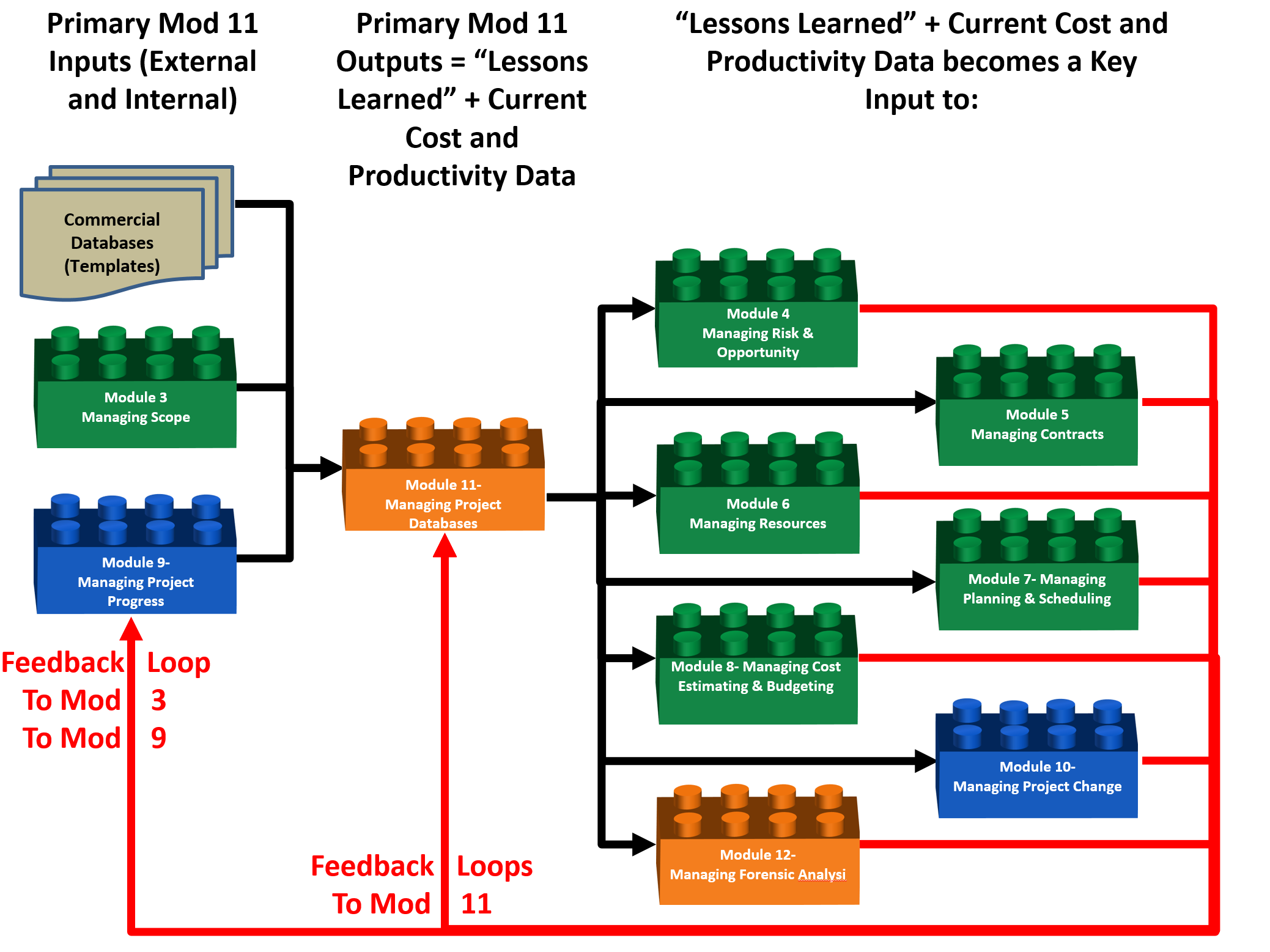
Figure 1 - 1,000 Meter Level Process Flow Chart for Module 10- Managing Change, from the OWNER ORGANIZATION PERSPECTIVE
Source: Guild of Project Controls
While in terms of the PROCESS elements, their relationships and sequencing, there is very little difference between the owner and contractor’s perspectives an important difference which is worth noting is the fact that scope definition from the OWNER’S perspective derives from Module 3- Scope Definition in the form of the Work Breakdown Structure (WBS) for a CONTRACTOR, scope definition derives from the CONTRACT, meaning that the key input for CONTRACTORS is the contract documents, which form the basis of the Contractual Work Breakdown Structure (CWBS).
Another important difference worth noting is that because of the highly competitive nature of contracting, combined with the fact that most contractors are working on single digit EBIT margins, contractors very rarely use commercial databases with significant modifications to them, both in terms of crew sizes and allocations as well as the productivity calculations. As these important nuances are what give contractors a real or perceived competitive advantage in the marketplace, while the commercial databases are often purchased to provide the standardized coding structures the actual cost and productivity numbers are almost sure to be modified. This is the reason that for contractors, “lessons learned” databases are essential as even small improvements to the processes yield a significant competitive advantage.
Thus while owner organizations can get away with less level of detail for use in “top down” estimating methods, contractors generally require more detail, as they are producing cost and duration estimates using “bottom up” methods.
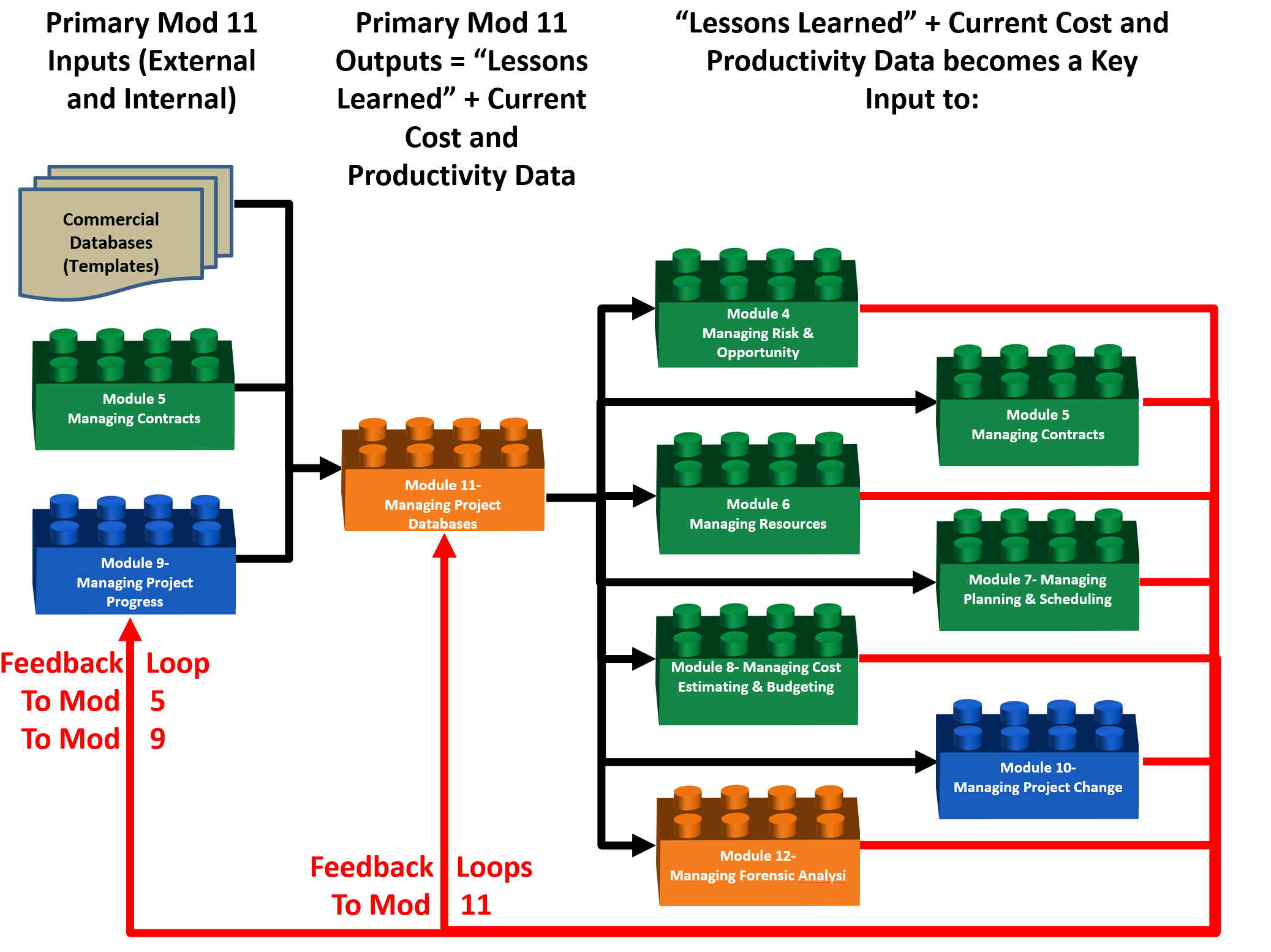
Figure 2 - 1,000 Meter Level Process Flow Chart for Managing Change, from a CONTRACTOR’S ORGANIZATION PERSPECTIVE
Source: Guild of Project Controls
Notice from the figure above that Module 5- Managing Contracts has replaced Module 3- Managing Scope from Figure 1 showing the Owner’s perspective, as a key input into managing databases. This difference, while it may appear to be small, has important implications for project control practitioners, especially those who have or plan to work for both owners ad contractors.
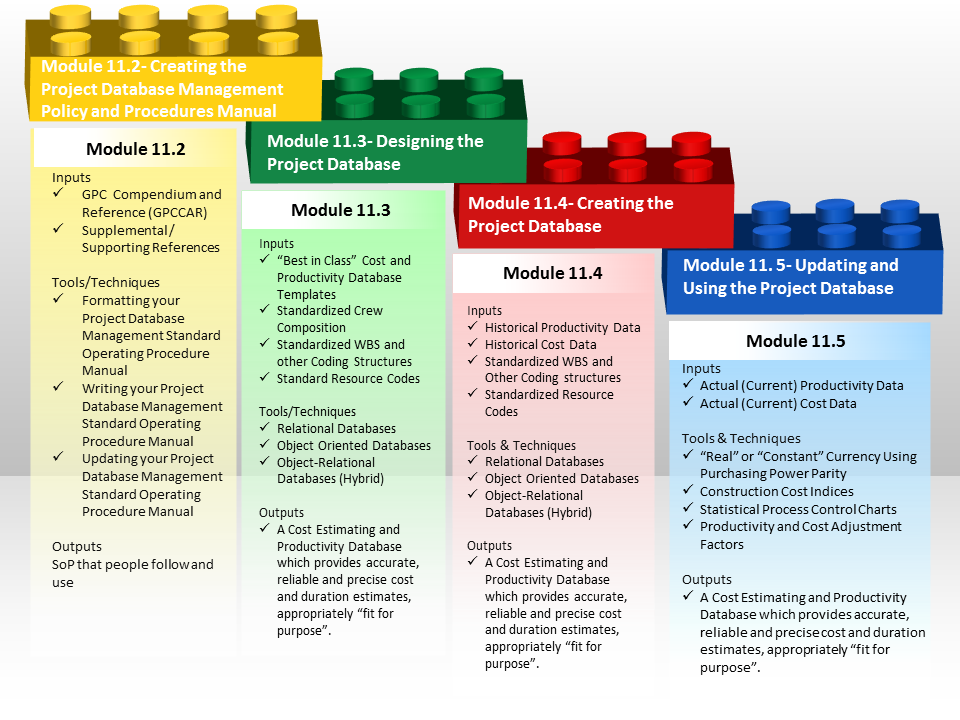
Figure 3 - 100 Meter Level Process Flow Chart for Managing Change, from both the OWNER’S and CONTRACTOR’S ORGANIZATION PERSPECTIVE
Source: Guild of Project Controls
Database development is a four-step process:
- In the first step, it is important to create a policy and procedures manual for database management that is easy to understand and to follow. Failure to do this will result in people creating their own modifications, which may or may not work the way the management needs or wants.
- In the second step, you should create the logical design for the database, based solely on the data you want to store, rather than thinking of the specific software that will be used to create it, or the types of reports that will be created from it. This is why many owners and contractors begin the process by purchasing an existing “Commercial Off the Shelf” (COTS) database and then CUSTOMIZING it to be “fit for purpose”. In this step, you define tables and fields, and establish primary and foreign keys and integrity constraints. In the event your organization chooses to create your own, the Guild has included templates, which have been “tested and proven to work over many years of actual use in the marketplace” rather than just some theoretical design.
- In the third step, you implement your plan within the database software program, which for owners includes making adjustments for location, currency fluctuations or inflation and for contractor’s means optimizing crew sizes and compositions and enhancing productivity wherever possible.
- In the fourth and final step, you develop the end-user application that will allow your user(s) to interact with the database, including the most critical responsibility for project control professionals which is to ensure that the database is continually updated with “real time” (current) cost and productivity information as well as capturing “lessons learned”. It is this last step where the use of STANDARDIZED CODING STRUCTURES (WBS, CBS, CREW and RESOURCE DICTIONARY ID’s) becomes of critical importance, especially if the project has been designed using Building Information Modeling. (BIM) Failure to adopt the standardized coding structures which are pre-loaded with each object in the design will require the project control team who has not adopted the standardized coding structures, to write translator programs to enable their “home grown” or “ad hoc” coding structures to “talk” to or exchange data with the BIM software packages.
While the 100 Meter level of detail provides a more granular look of the processes and how they interact than the 1,000 Meter view, there is yet another deeper level of detail which the Guild calls the “ground” or “working level”. It is the next level deeper which contains the explanation for each of the modules shown above, telling more about what inputs are required, including providing some examples; what tools, techniques are typically used, including providing examples or templates, and in selected instances, specific step by step instructions or links to additional resources, showing how to use each of these tools or techniques consistent with the Guild’s commitment to identify and advocate “best tested and proven” practices.
11.1.3 - BACKGROUND INFORMATION FOR MANAGING PROJECT DATABASES
Given the rapid proliferation of Building information modeling, it is becoming increasingly obvious that the “project control professional” of tomorrow is going to be less involved in doing quantity take offs, and cost estimates or creating schedules, which already can be done faster and arguably enough, more accurately, by computer software than doing it by hand, which means that the real “added value” services which still require a human to perform is the creation, populating, updating and maintaining the cost and productivity databases which the 4D, 5D and 6D BIM require in order to produce “realistic” durations, cost estimates and cost budgets. Without these databases developed and updated in real time, results in the old “Garbage In/Garbage Out” paradigm.
For this reason the Guild has included a separate Module on this topic as this is likely to become one of the most important responsibilities we have in the very near future.
What is a database ?
A database is a collection of data that is stored for a specific purpose and organized in a manner that allows its contents to be easily accessed, managed, and updated. Although this definition includes stored data collections such as libraries, file cabinets, and address books, when we talk about databases we almost invariably mean a collection of data that is stored on a computer.
There are two basic categories of database. The most commonly encountered category is the transactional database, used to store dynamic data, such as inventory contents, which is subject to change on an ongoing basis. The other category is the analytical database, used to store static data, such as geographical or chemical test results, which is rarely altered.
Strictly speaking, a database is just the stored data itself, although the term is often used, erroneously, to refer to a database and its management system (DBMS).
Given that we are seeing more “planning and scheduling” and “cost estimating” being automated through the use of computer software and building information modelling, the role of the “project control professional” of the future is more likely going to be less focused on producing quantity take off’s, bills of material or bills of quantities or even on creating CPM schedules, but more on the creation and expansion of the coding structures as well as the development, maintenance and expansion of the databases of information necessary in order to enable this automation to be possible.
- For Planners / Schedulers this means we are going to have to focus on capturing, analysing and coding productivity rates, learning curves and procurement lead times than we are actually creating the activities and the logic. As practitioners we often maintain "libraries" of data which often consist if previous project schedules, production rates, build and procurement times, sample fragnets, reports, presentations, proceedures and narratives etc, all of which we use and utilise as part of our planning and scheduling duties.
- For Cost Estimators, it means that instead of spending our time doing quantity take-offs and producing bills of materials or bills of quantities, more of our time is going to be spent keeping the cost estimating databases current and updated, especially the need to develop location factors for different cities or regions around the world.
- And even our Forensic Analysts need to be able to access and use the same databases as the planners, schedulers and cost estimators plus they need to be able to access, use and understand the various legal databases, such as Lexus/Nexus.
All of the above are kept in databases of various forms; in its simplest form it could simply be a coordinated suite of folders on a computer holding reports and useful information, an excel spreadsheet which simply has many "rows" storing the information, or even a more complex excel database capable of being filtered and sorted. Taken to the next level we can use datbases from bespoke and off the shelf software solutions to build complex databases into which we can place either historic or current project scheduling and cost data and complete "relational" or "interlinked databases" which integrate project time, cost and accounting content.
Summarized, the future of “project controls” is more than likely going to shift to more emphasis on data collection, data analysis and normalization, data codification and data mining, all of which requires a complete understanding of: database management.
Before getting started we need to ensure that database terminology is known and understood by all.
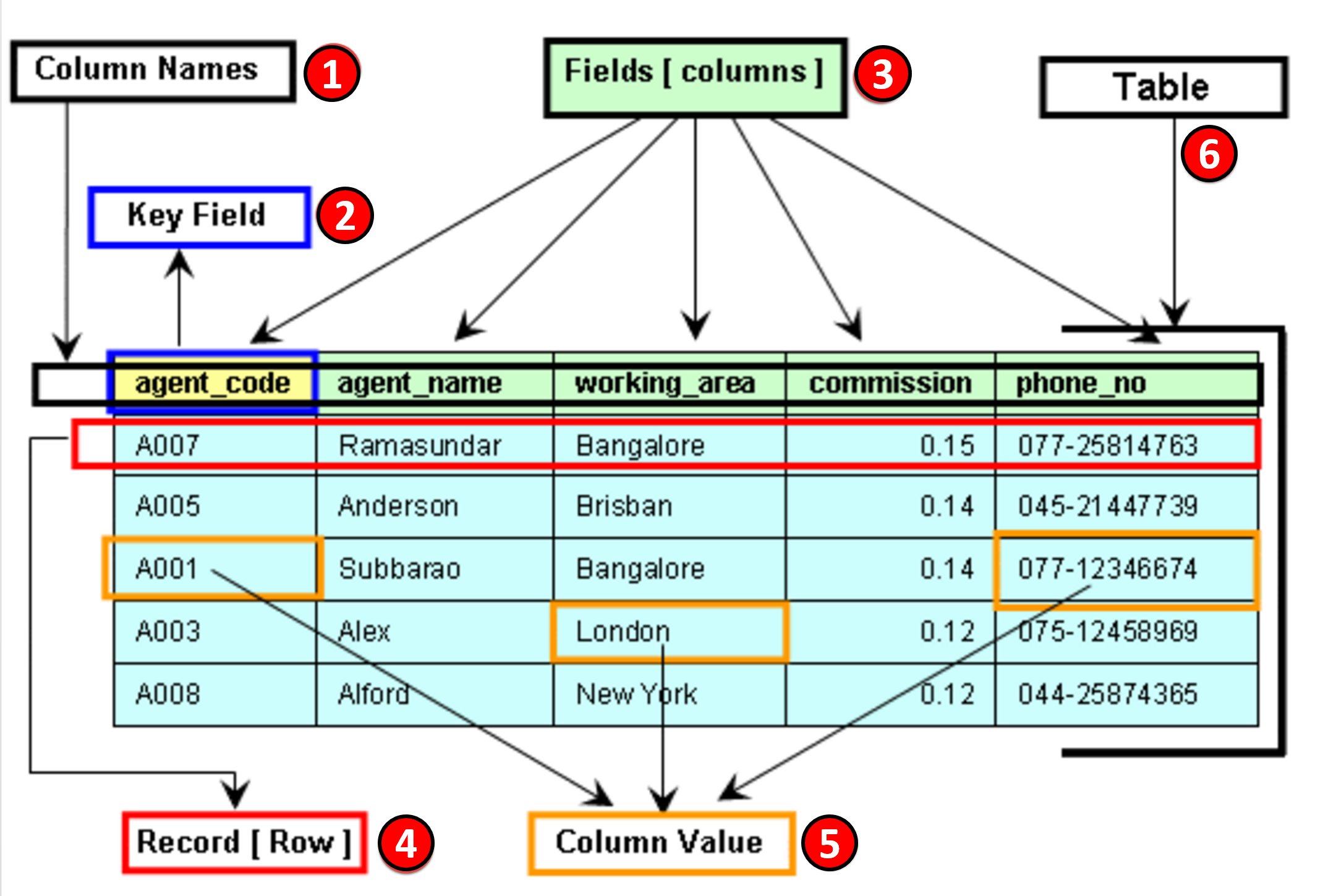
Figure 1 - Basic Database Nomenclature
Source: W3Resource - Components of a table (of a database)
- Column Names- All columns need to be named and in any table, no two columns can have the same name. All column names need to be unique
- Key Fields- There needs to be one or more “key fields” which enables different tables (databases) to share or exchange information. Examples of Key Fields would be the Activity ID in Primavera or the Omniclass Tables or Norsok Z-014 Tables
- Fields- Information in a table with is relevant to a specific column header or heading. Fields are also called “Attributes”.
- Record- Each ROW of data is called a RECORD which contains all of the available information. For project control professionals the “record” we most commonly deal with is an ACTIVITY. Records are also known as Tuples.
- Column Value- These are the specific pieces of information for a given record which are relevant or appropriate for each field. A column value can be left blank, but if left blank will not be able to sorted or filtered using that field.
- Table- A table is a set of one or more RECORDS and it takes one or more tables to form a database. Explained another way, a table is the mass storage of information cross referenced by RECORD (Row) and FIELD (Column)
As explained above "databases" can come in many forms and the CPM Schedule is just one of those:
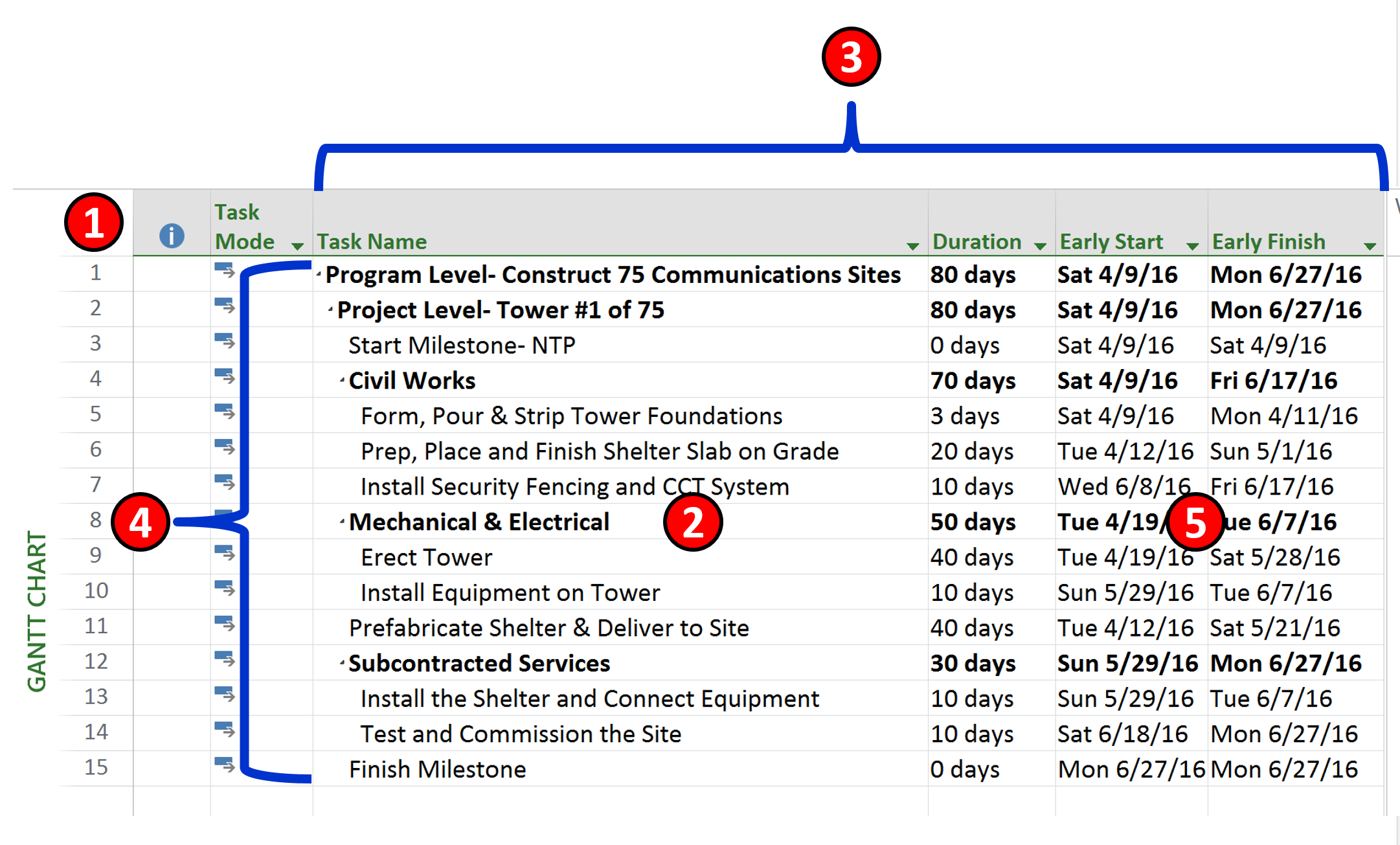
Figure 2 - Database Example from CPM Schedule Software
Source: Giammalvo, Paul D (2015) Course Materials Contributed Under Creative Commons License BY v 4.0
- We see the “Key Field” is the Activity Number which there can be one and only one with that single unique identifier.
- This is a single ROW
- These are examples of FIELDS or ATTRIBUTES that are associated with each ROW
- This is the TABLE containing all the data
- Here are examples of VALUES some of which are entered manually (i.e. Duration) or others which are calculated. (i.e. early and late finish dates)
Having made certain everyone knows the nomenclature and understands how it applies in the world of project controls we can walk you through how to create and maintain your database.
The following introduction was copied in its entirety from Learn IT- The Power of the Database consistent with the GPC belief that there is no need to “reinvent the wheel”, we believe this is a great explanation of what a database is and how to use it in the context of project control databases.
A Brief History of the Database:
The first attempts at computer databases arose around the mid-twentieth century. Early versions were file-oriented. A database file became known as a table because its structure was the same as a paper-based data table. For the same reason, the columns within a table were called fields and the rows were called records. Computers were evolving during that same time period, and their potential for data storage and retrieval was becoming recognized.
The earliest computer databases were based on a flat file model, in which records were stored in text format. In this model, no relationships are defined between records. Without defining such relationships, records can only be accessed sequentially. For example, if you wanted to find the record for the fiftieth customer, you would have to go through the first 49 customer records in sequence first. The flat file model works well for situations in which you want to process all the records, but not for situations in which you want to find specific records within the database.
The hierarchical model, widely used in mainframe environments, was designed to allow structured relationships that would facilitate data retrieval. Within an inverted tree structure, relationships in the hierarchical model are parent-child and one-to-many. Each parent table may be related to multiple child tables, but each child table can only be related to a single parent table. Because table structures are permanently and explicitly linked in this model, data retrieval was fast. However, the model's rigid structure causes some problems. For example, you can't add a child table that is not linked to a parent table: if the parent table was "Doctors" and the child table was "Patients," you could not add a patient record independently. That would mean that if a new patient came into a community's health care system, under this system, their record could not be added until they had a doctor. The hierarchical structure also means that if a record is deleted in a parent table, all the records linked to it in child tables will be deleted as well.
Also based on an inverted tree structure, the next approach to database design was the network model. The network model allowed more complex connections than the hierarchical model: several inverted trees might share branches, for example. The model connected tables in sets, in which a record in an owner table could link to multiple records in a member table. Like the hierarchical model, the network model enabled very fast data retrieval. However it also had a number of problems. For example, a user would need a clear understanding of the database structure to be able to get information from the data. Furthermore, if a set structure was changed, any reference to it from an external program would have to be changed as well.
In the 1970s, the relational database was developed to deal with data in more complex ways. The relational model eventually dominated the industry and has continued to do so through to the present day. We'll explore the relational database in some detail in the next segment. For more refer to Learn IT- The Power of the Database.
Related Links:
- SearchDatabase offers a selection of resources for Database Backgrounders and General Information.
- Selena Sol's interesting and informative article, "What is a Database? " explores the historical development of databases.
- The Database Journal offers Ian Gilfillan's "Introduction to Relational Databases".
What is a Relational Database?
In the relational database model, data is stored in relations, more commonly known as tables. Tables, records (sometimes known as tuples), and fields (sometimes known as attributes) are the basic components. Each individual piece of data, such as a last name or a telephone number, is stored in a table field and each record comprises a complete set of field data for a particular table. In the following example, the table maintains customer shipping address information. Last_Name and other column headings are the fields. A record, or row, in the table comprises the complete set of field data in that context: all the address information that is required to ship an order to a specific customer. Each record can be identified by, and accessed through, a unique identifier called a primary key. In the Customer_Shipping table, for example, the Customer_ID field could serve as a primary key because each record has a unique value for that field's data.
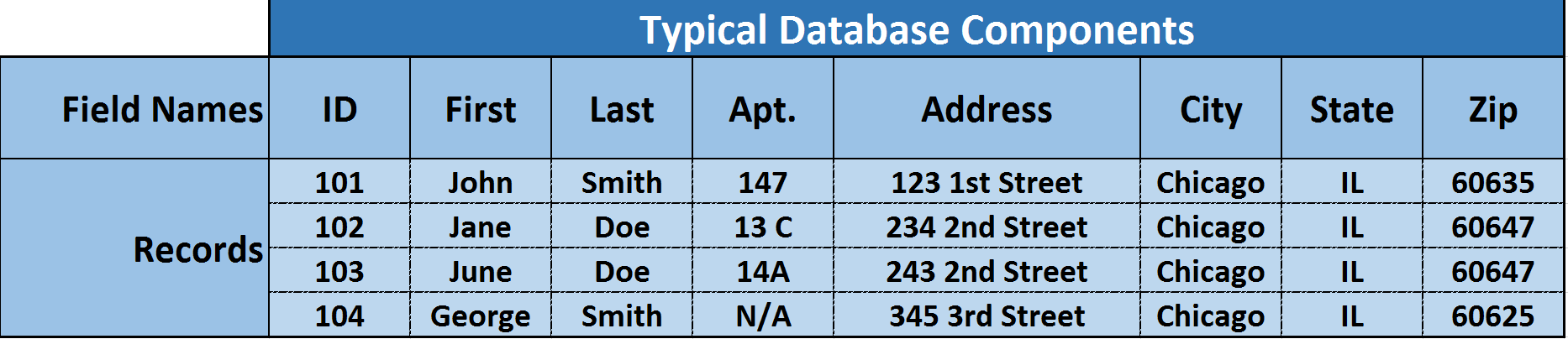
Figure 3 - Showing Data for the Example Above- Customer_Shipping
Source: Learn IT- The Power of the Database.
The term relational comes from set theory, rather than the concept that relationships between data drive the database. However, the model does, in fact, work through defining and exploiting the relationships between table data. Table relationships are defined as one-to-one (1:1), one- to-many (1:N), or (uncommonly) many-to-many (N:M):
- If a pair of tables has a one-to-one relationship, each record in Table A relates to a single record in Table B. For example, in a table pairing consisting of a table of customer shipping addresses and a table of customer account balances, each single customer ID number would be related to a single identifier for that customer's account balance record. The one-to-one relationship reflects the fact that each individual customer has a single account balance.
- If a pair of tables has a one-to-many relationship, each individual record in Table A relates to one or more records in Table B. For example, in a table pairing consisting of a table of university courses (Table A) and a table of student contact information (Table B), each single course number would be related to multiple records of student contact information. The one-to-many relationship reflects the fact that each individual course has multiple students enrolled in it.
- If a pair of tables has a many-to-many relationship, each individual record in Table A relates to one or more records in Table B, and each individual record in Table B relates to one or more records in Table A. For example, in a table pairing consisting of a table of employee information and a table of project information, each employee record could be related to multiple project records and each project record could be related to multiple employee records. The many-to-many relationship reflects the fact that each employee may be involved in multiple projects and that each project involves multiple employees.
Where did the Relational Model Come From?
The relational database model developed from the proposals in "A Relational Model of Data for Large Shared Databanks," a paper presented by Dr. E. F. Codd in 1970. Codd, a research scientist at IBM, was exploring better ways to manage large amounts of data than were currently available. The hierarchical and network models of the time tended to suffer from problems with data redundancy and poor data integrity. By applying relational calculus, algebra, and logic to data storage and retrieval, Codd enabled the development of a more complex and fully articulated model than had previously existed.
One of Codd's goals was to create an English-like language that would allow non-technical users to interact with a database. Based on Codd's article, IBM started their System R research group to develop a relational database system. The group developed SQL/DS, which eventually became DB2. The system's language, SQL, became the industry's de facto standard. In 1985, Dr. Codd published a list of twelve rules for an ideal relational database. Although the rules may never have been fully implemented, they have provided a guideline for database developers for the last several decades.
Codd's Rules:
- The Information Rule: Data must be presented to the user in table format.
- Guaranteed Access Rule: Data must be reliably accessible through a reference to the table name, primary key, and field name.
- Systematic Treatment of Null Values: Fields that are not primary keys should be able to remain empty (contain a null value).
- Dynamic On-Line Catalog Based on the Relational Model: The database structure should be accessible through the same tools that provide data access.
- Comprehensive Data Sublanguage Rule: The database must support a language that can be used for all interactions (SQL was developed from Codd's rules ).
- View Updating Rule: Data should be available in different combinations (views) that can also be updated and deleted.
- High-level Insert, Update, and Delete: It should be possible to perform all these tasks on any set of data that can be retrieved.
- Physical Data Independence: Changes made to the architecture underlying the database should not affect the user interface.
- Logical Data Independence: If the logical structure of a database changes, that should not be reflected in the way the user views it.
- Integrity Independence: The language used to interact with the database should support user constraints that will maintain data integrity.
- Distribution Independence: If the database is distributed (physically located on multiple computers) that fact should not be apparent to the user.
- Non-subversion Rule: It should not be possible to alter the database structure by any other means than the database language.
Related Links:
- ITWorld goes into more detail about Codd's 12 Rules.
- The DB Group provides "A Brief History of Databases"
- The NAP Reading Room offers a chapter on "The Rise of Relational Databases" from the book Funding a Revolution.
What other Types of Database are there?
Although the relational model is by far the most prevalent one, there are a number of other models that are better suited to particular types of data. Alternatives to the relational model include:
- Flat-File Databases: Data is stored in files consisting of one or more readable files, usually in text format.
- Hierarchical Databases: Data is stored in tables with parent/child relationships with a strictly hierarchical structure.
- Network Databases: Similar to the hierarchical model, but allows more flexibility; for example, a child table can be related to more than one parent table.
- Object-Oriented Databases: The object-oriented database model was developed in the late 1980s and early 1990s to deal with types of data that the relational model was not well-suited for. Medical and multimedia data, for example, required a more flexible system for data representation and manipulation.
- Object-Relational Databases: A hybrid model, combining features of the relational and object-oriented models.
RelatedLinks:
- Phil Howard's article on SearchDatabase explores "A proliferation of database types".
- Ryan Stephens and Ronald Plew offer a tip on "Alternatives to the relational database" from their book Teach Yourself Database Design.
What "languages" are used to Interact with Databases?
SQL (Structured Query Language) is by far the most common language used to interact with relational databases. Originally developed for use with IBM's DB2, the standard -- often pronounced "sequel" -- is promoted in various formats by both the American National Standards Institute (ANSI) and the International Standards Organization (ISO).
SQL commands are fairly straightforward and easy to understand. For example, if you wanted a list of all your customers within a specific zip code area, the following command (based on the table in the response to question #2, above) for example, will return that information, which in this case would be "George Smith."
- select First_Name, Last_Name from Customer_Shipping where Zip = '60625';
Most databases use SQL, although many use proprietary extensions specific to their own products.
Related Links:
- SearchDatabase.com has more in depth information in their Learning Guide: SQL.
- You can browse through hundreds of questions answered by SearchDatabase SQL expert Rudy Limeback or ask him about something you don't see answered here.
- Search400 offers a selection of Best Web Links for SQL and Query.
- SQLCourse.com is a free, interactive SQL tutorial with a beginner's level followed by more advanced sections.
How can I Ensure a Good Database Design?
Hands down, the most important thing you can do to ensure a successful database design is to put enough resources into the planning stage. The proliferation of off- the-shelf databases and database applications has led many people to a number of erroneous conclusions, such as:
- Off-the-shelf databases can be easily customized.
In fact, although there are ready-made databases available for any number of applications, their design typically differs significantly from the ideal model for your specific needs. And tailoring them to fit is often more complicated than starting from scratch.
Anyone can create a perfectly functional database.
In fact, almost anyone could create a perfectly functional database -- if they took the time to learn what they needed to know before they started to develop.
You can jump right into the development process, making adjustments as you go along.
In fact, you could build a database without a carefully constructed plan. You could also build a house in that manner -- but it's not advisable. Databases are complicated constructions. Whether or not major problems rear their ugly heads through the development phase, they are bound to pop up in implementation. Fixing those problems can be difficult, time-consuming, and expensive. Furthermore, because of the intricate ways that data is connected in a database, a problem in one area can affect data in other areas in surprising ways.
Databases came into being because of the computer, and the two have enjoyed a mutually beneficial symbiotic relationship ever since, each helping the other grow by leaps and bounds. Somewhat ironically, however, the best way to start a plan for database development is to take out paper, a pencil -- and a big eraser.
Database development is a three-phase process. In the first phase, you should create the logical design for the database, based solely on the data you want to store, rather than thinking of the specific software that will be used to create it, or the types of reports that will be created from it. In this phase, you define tables and fields, and establish primary and foreign keys and integrity constraints. In the second phase, you implement your plan within the database software program, and in the third phase, you develop the end-user application that will allow your user(s) to interact with the database.
What are the most important things to keep in mind during the design phase?
- Create your design on paper first, as completely as possible.
- Eliminate as much redundancy of data as possible.
- Start from scratch -- don't try to use parts of a database with structural problems.
- Make sure that each table represents a single subject.
- Assign a primary key whose value clearly identifies each record, and only a single record.
- Ensure that each field represents a single value.
- Take the time to be certain of data integrity.
Related Links:
- Michael J. Hernandez has a handy tutorial on Database Design Tips.
- SearchDatabase offers a selection of resources for Database Languages and Development.
- Hernandez's Database Design for Mere Mortals is available from the TechTarget Bookstore.
What is normalization and why do I need to know about it?
In short:
- Well normalized data makes programming (relatively) easy, and works very well in multi-platform, enterprise wide environments. Non-normalized data leads to heartbreak. -- Steve Litt
Normalization is a guiding process for database table design that ensures, at four levels of stringency, increasing confidence that results of using the database are unambiguous and as intended. Basically a refinement process, normalization tests a table design for the way it stores data, so that it will not lead to the unintentional deletion of records, for example, and that it will reliably return the data requested.
Normalization degrees of relational database tables:
First normal form (1NF)
- This is the "basic" level of normalization and generally corresponds to the definition of any database, namely:
- It contains two-dimensional tables with rows and columns corresponding, respectively, to records and fields.
- Each field corresponds to the concept represented by the entire table: for example, each field in the Customer_Shipping table identifies some component of the customer's shipping address.
- No duplicate records are possible.
- All field data must be of the same kind. For example, in the "Zip" field of the Customer_Shipping table, only five consecutive digits will be accepted.
Second normal form (2NF)
- In addition to 1NF rules, each field in a table that does not determine the contents of another field must itself be a function of the other fields in the table. For example, in a table with three fields for customer ID, product sold, and price of the product when sold, the price would be a function of the customer ID (entitled to a discount) and the specific product.
Third normal form (3NF)
- In addition to 2NF rules, each field in a table must depend on the primary key. For example, using the customer table just cited, removing a record describing a customer purchase (because of a return perhaps) will also remove the fact that the product has a certain price. In the third normal form, these tables would be divided into two tables so that product pricing would be tracked separately. The customer information would depend on the primary key of that table, Customer_ID, and the pricing information would depend on the primary key of that table, which might be Invoice_Number.
Domain/key normal form (DKNF)
- In addition to 3NF rules, a key, which is a field used for sorting, uniquely identifies each record in a table. A domain is the set of permissible values for a field. By enforcing key and domain restrictions, the database is assured of being freed from modification anomalies. DKNF is the normalization level that most designers aim to achieve.
Related Links:
- Steve Litt's Normalization tutorial explains the practice and the processes involved.
- Tom Russell and Rob Armstrong's SearchDatabase article describes "13 reasons why normalized tables help your business."
- Database Journal has Ian Gilfillan's tutorial on Database Normalization.
- Database Words-to-Go Glossary: Browse through database vocabulary in a printable glossary.
Database development is a Three-Phase Process - in the first phase, you should create the logical design for the database, based solely on the data you want to store, rather than thinking of the specific software that will be used to create it, or the types of reports that will be created from it. In this phase, you define tables and fields, and establish primary and foreign keys and integrity constraints. In the second phase, you implement your plan within the database software program, and in the third phase, you develop the end-user application that will allow your user(s) to interact with the database.
11.2 - Module 11-2 - Develop the Managing Project Databases Policies and Procedures Manual
11.3 - Module 11-3 - Designing the Project Databases
11.4 - Module 11-4 - Creating the Project Databases
11.5 - Module 11-5 - Updating and Using the Project Databases
GPCCAR M11-1, Revision 1.02