11.0 - MANAGING PROJECT DATABASES
11.1 - Module 11-1 - Introduction to Managing Project Databases
11.2 - Module 11-2 - Develop the Managing Project Databases Policies and Procedures Manual
11.3 - Module 11-3 - Designing the Project Databases
11.4 - MODULE 11-4 - CREATING THE PROJECT DATABASE(S)

Figure 1 - The Creating the Project Databases Process Map
Source: Guild of Project Controls
11.4.1 - INTRODUCTION
The best way to demonstrate how to create a project database is by showing a real example of one creating in Excel, understanding that knowing the Records and Fields required, you can start with this template and modify or adapt it to suit your needs. Here is the URL to download this template and you can use it to follow along - Class A Cost Estimate Template
11.4.2 - INPUTS
- “Best In Class” Cost And Productivity Database Templates
- Standardized Crew Composition
- Standardized WBS And Other Coding Structures
- Historical Productivity Data
- Historical Cost Data
11.4.3 - TOOLS & TECHNIQUES
11.4.3.1 Cost & Productivity Database Home Page/Demographics
As seen from the example below, we have a number of fields which should be included in our own internal databases. This is important because when we are tendering / budding for new projects, we need to know not only the location but the year of construction, time of year the construction was being done and any other information which will enable us to select comparable projects which are as close to the new project as possible.
By including as much demographic data as possible, the objective is to be able to quickly sort through what can grow to be a very large database, to find as many projects as possible which are similar to the one you are currently estimating. Consistent with fundamental statistical theory, the more sample population you can find, the smaller the variance is likely to be. The smaller the variance, the more ACCURATE and RELIABLE the cost estimate you produce is likely to be.
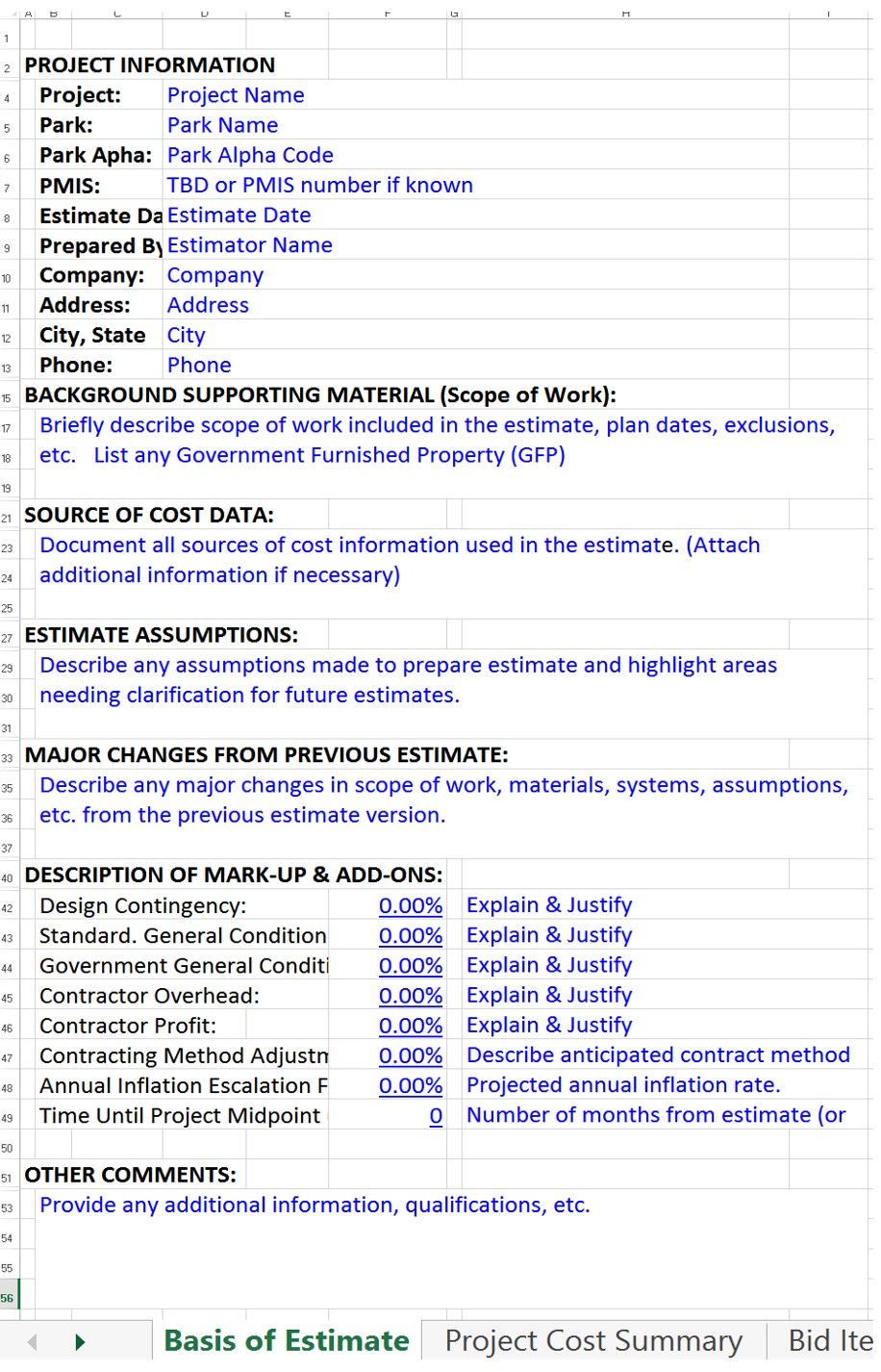
Figure 2 - Basis For Estimate Home Page (For completed sample go here)
Source: US National Park Service Cost Estimating Handbook (2011)
For those who want to include photos, scanned documents, audio or video files, these too can be embedded into the spreadsheet. This is also where you would put the KEY WORDS if you have set up your database in a way which could be searched and filtered based on key words.
There are any number of cost estimating templates for both owners and contractors available, either in “hard copy” (paper based) or more commonly, spreadsheets.
The best examples for both owner and contractor that the Guild has been able to locate in our research are the templates provided at no cost and under open source licensing are those offered by the US Parks Department.
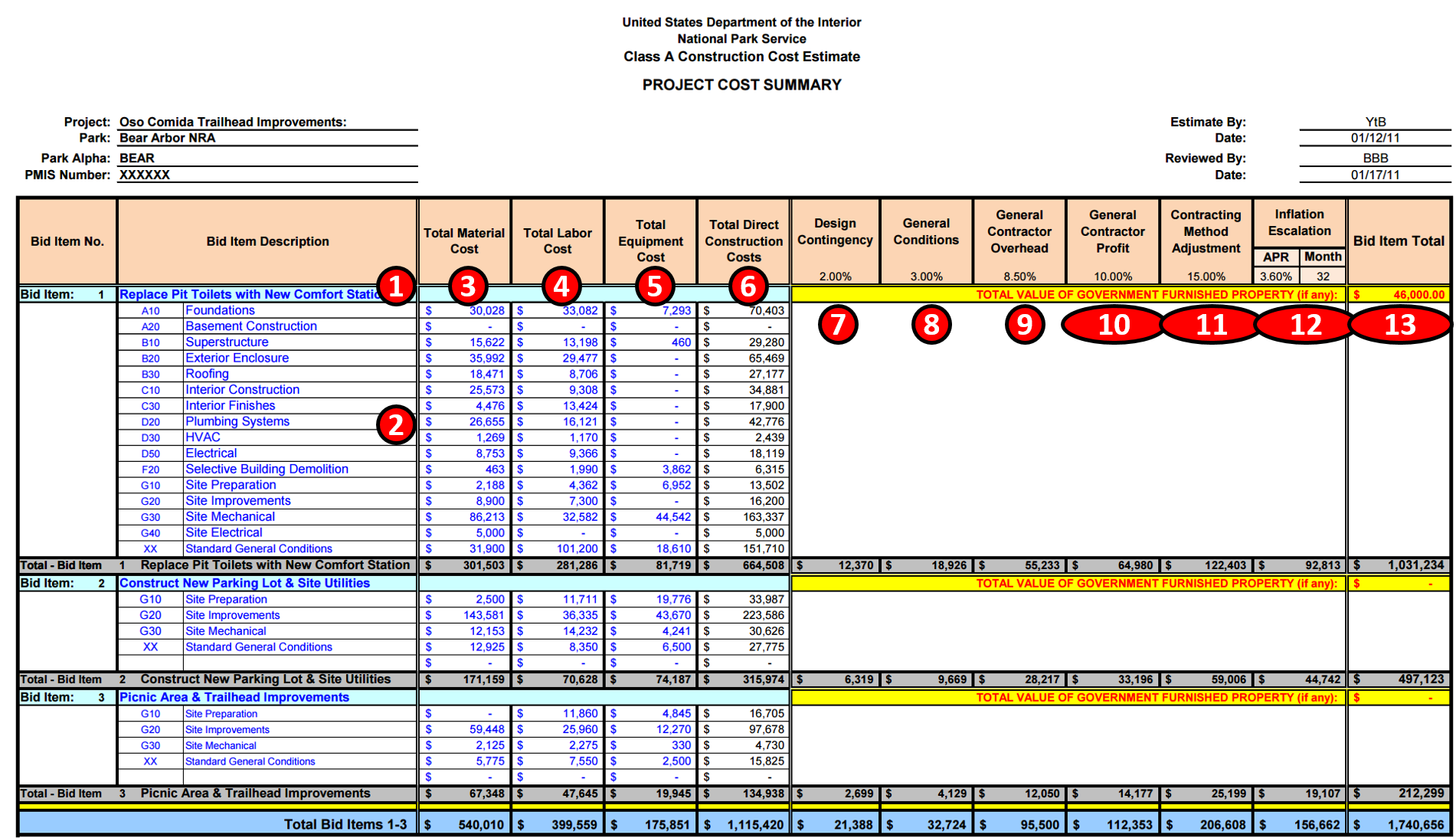
Figure 3 - Summary Level Cost Estimating Template (Owners)
Source: US National Park Service Cost Estimating Handbook (2011)
The example above shows what any cost estimating database should contain for information, whether Owner or Contractor:
- 1) Activity Name- Below are some examples of well-written Activity Names: Below are some examples of well-written Activity Names:
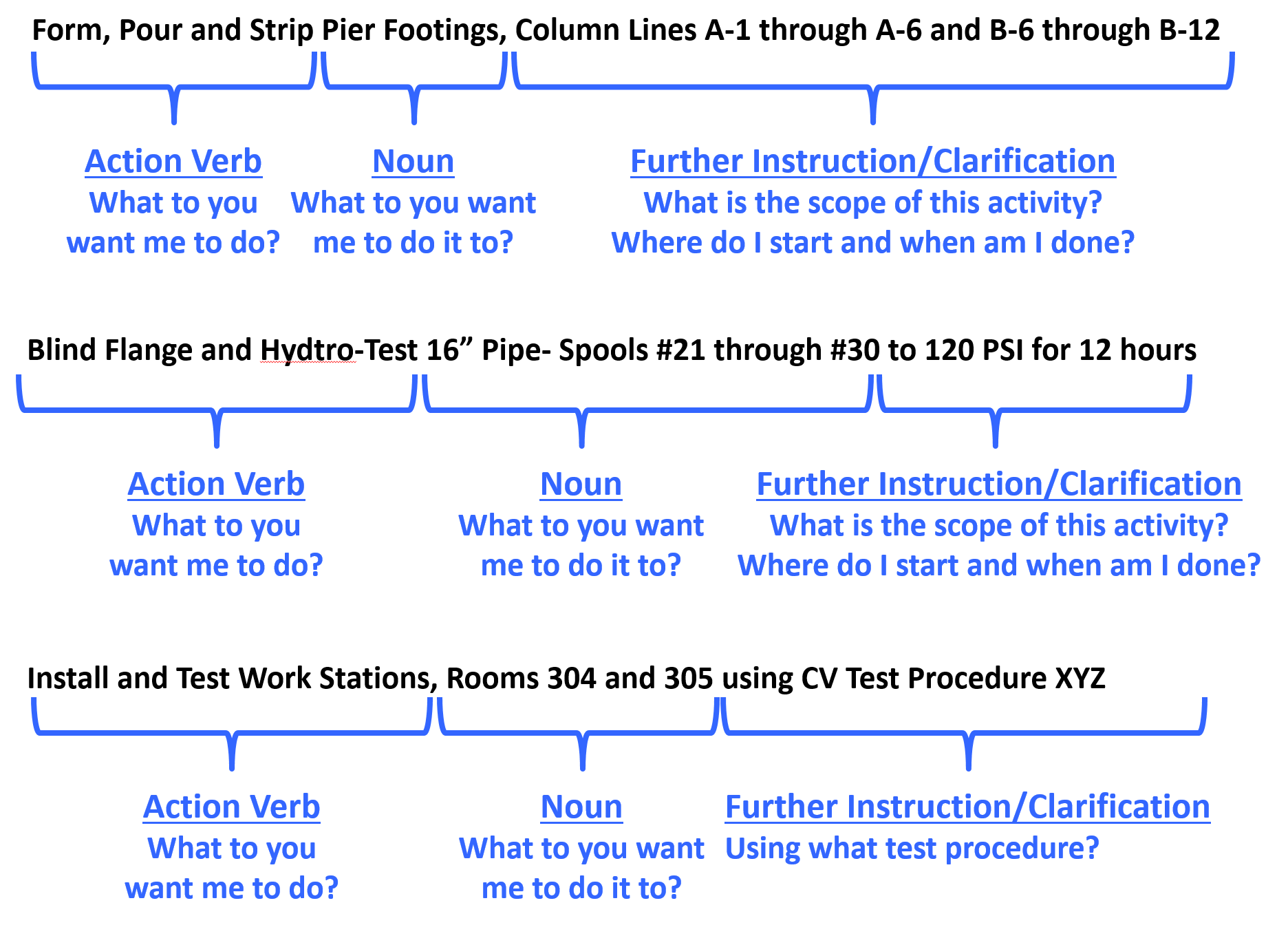
Figure 4 - Well Written Activity Names
Source: Giammalvo, Paul D (2015) Course Materials Contributed Under Creative Commons License BY v 4.0
However, in the example shown above because this is an owner’s cost summary, they rolled it up by bid items rather than by the more detailed activity names likely to be used by contractors or owners for any “self-performed” work.
- 2) Coding Structure Sub Sort- In this case, the US Parks Department has opted to use CSI’s Uniformat as the basis to “roll up” their project costs. For more examples of CSI Uniformat download this reference which takes you to Level 3 of Uniformat for each of the main headings or you can download the Omniclass Table 21, which takes you to Level 5 for all headings.
Worth noting is that OWNER’s generally like using Uniformat/CSI Table 21 as it enables them to develop databases which are useful in the early phases of the project to develop cost estimates, while on the other hand, contractors tend to prefer using Masterformat/CSI Table 22 as it provides for much greater level of detail than does Uniformat.
- 3) Material Cost- This should be self-explanatory but for cost estimators we need to be sure to check as materials prices vary significantly depending on location. The more remote the site, generally the more expensive materials are, because of shipping and storage costs.
- 4) Labor Costs- Another largely self-explanatory heading but again, there are many factors which go into calculating labor costs, not the least of which is the actual productivity.
- 5) Equipment Costs- Self-explanatory with the note that getting equipment to and from any given site (mobilization and demobilization costs) can often be significant and that has to be factored into the equipment costs along with the daily or hourly rental fee or cost of ownership.
- 6) Total Direct Costs- Simply the sum of 3, 4 and 5 above. Now in this example above, because the contract is a cost plus type, the owner has every right to ask for and receive this information. However, if the contract was being let on a “firm fixed price” basis, then the owner would never see this level of detail. However, the contractor should have gone through the same process.
- 7) Design Contingency- This is a RISK ALLOWANCE to cover the probability of design changes.
- 8) General Conditions- This is what is known as the “Project Indirect” costs and covers things like the fencing/hoarding around the project, the site offices, electricity, fuel, QA/QC, Safety, Protective Equipment etc and other items identified in CSI Division 1/CSI Table 22 “General Conditions”.
- 9) Contractors Home Office Overhead- This is a very real yet often contentious expense, which covers the salaries and facilities associated with the contractor’s home office. As this is generally considered a fixed expense, the percentage allocated to any project can vary, depending on the volume of work.
- 10) Contractors Profit Margin- As noted previously, single digit EBIT margins are the norm for contractors around the world. So even if you go in with 10% target every mistake, error or omission the contractor makes comes out of that amount. Which is why we explain that for a contractor, his/her profit margin is the “Management Reserve”.
- 11) Contracting Method Adjustment- This too is a “risk contingency” adjustment applied at the project level (as opposed to activity level) which covers such risk events as remote site construction, labor shortages/inefficiencies or working in adverse climates, either very hot and/or humid or very cold and dry. Again while it is unusual to see an owner organization recognizing this, if you are an owner’s project control professional then you need to recognize that this adjustment is or should be made by your contractors in putting together their cost estimate for bidding.
- 12) Inflation Adjustment Factor- Again, self-explanatory with the caution that we tend to under-estimate what it really is. Given most governments lie about what the real or true inflation rate is in their country (the US underestimates inflation by a factor of 50%) the competent cost or project controls practitioner will take material and labor prices over a period of time and use those to project into the future what the real or true inflation rate is likely to be. Also for those who are working on International projects, don’t forget to factor in the exchange rate fluctuations. Many times those have a far worse impact than does inflation, especially in today’s global marketplace.
- 13) Marked Up “Selling” price- This is a summation of the direct costs (6) plus the adjustments (7-11) to give us the CONTRACTORS SELLING PRICE which, when the work has been done and is billed by the contractor, becomes the OWNERS ACTUAL COST OF the WORK PERORMED (ACWP or AC)
Description of Mark Ups and Contingency (Cost Reimbursable Contract)
As for owners, a project is a cost or investment center, they do not mark up the price for profit, however, they DO need to mark up the quote the contractor submits to cover:
- Owner’s Project Management Overhead
- Owner’s Home Office Overhead (i.e. Finance charges)
- Owner Supplied Equipment/Materials or Services
- Owner Contingency (NOT Management Reserve as that does not belong to the project unless asked for and approved by management) Keep in mind that for a contractor, the profit margin is their “management reserve”.
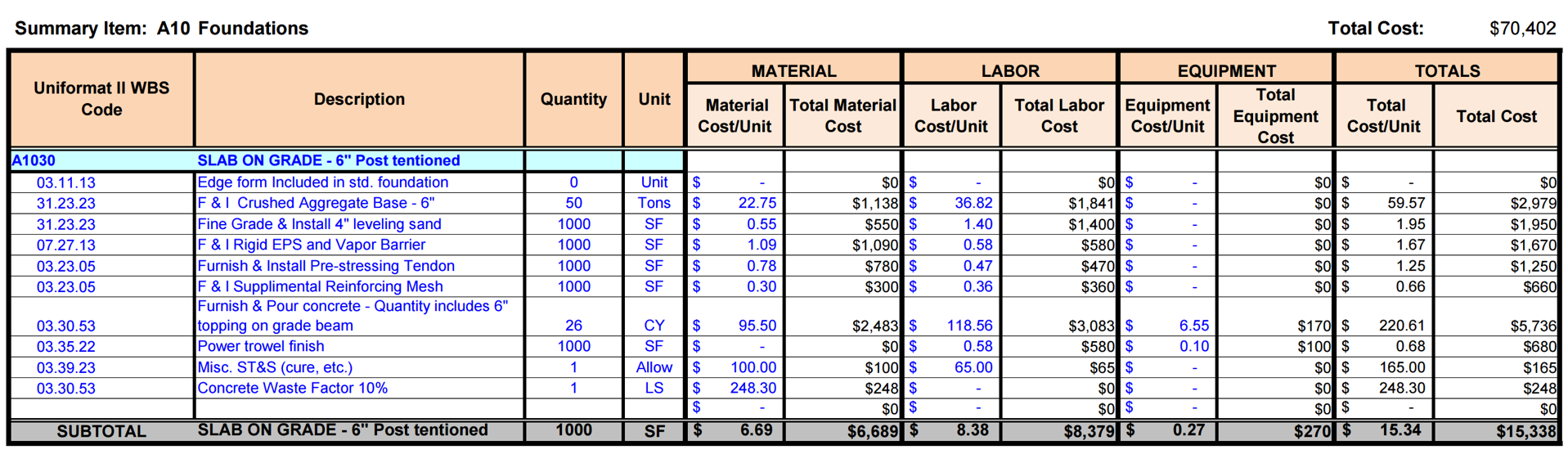
Figure 5 - Cost Summary Based on BID ITEM sub-sorted by CSI Uniformat Coding Structure (OmniClass Table 21 Elements)
Source: US National Park Service Cost Estimating Handbook (2011)
In the example above, what we see is a Level 3 Cost Estimate. This is the level contractors would normally provide to the owner under and this is the level of detail they would normally report their progress against as well as bill against.
OmniClass defines an Element to be “a major component, assembly, or "construction entity part which, in itself or in combination with other parts, fulfills a predominating function of the construction entity" (ISO 12006-2). Predominating functions include, but are not limited to, supporting, enclosing, servicing, and equipping a facility. Functional descriptions can also include a process or an activity. A Designed Element is an "Element for which the work result(s) have been defined." (ISO 12006-2).”
Assuming we are using a relational, object oriented or hybrid database, we can assign MORE than one code, thus enabling multiple sorts and/or combinations of sorts.
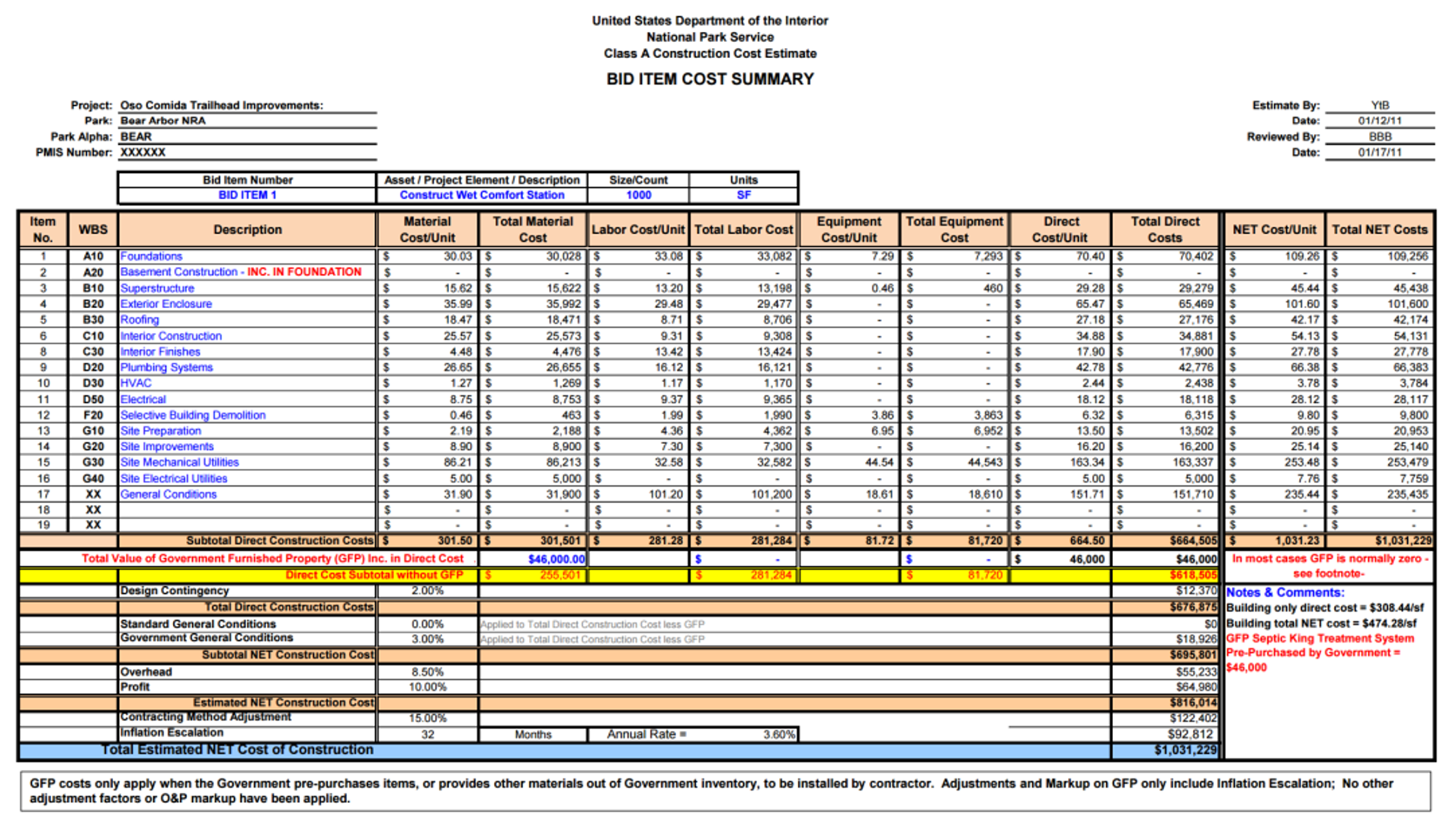
Figure 6 - Bid Item Detail Showing Detail by CSI Uniformat Coding Structure (OmniClass Table 21 Elements)
Source: US National Park Service Cost Estimating Handbook (2011)
In this example you can see that the level of detail is quite extensive which is the same level of detail that a contractor would be expected to create for their own in house SUMMARY level database. (Level 4 of the WBS)
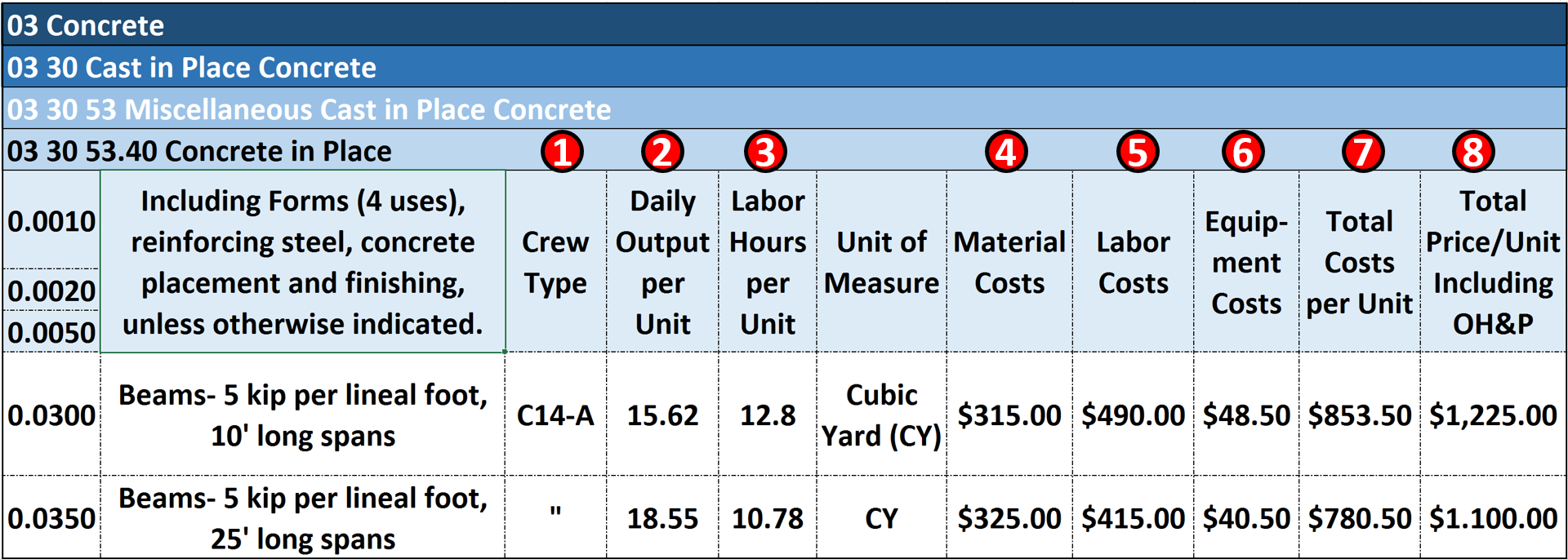
Figure 7 - Modifying the US Park Cost Estimating Database for Use in Scheduling Databases
Source: Giammalvo, Paul D (2015) Course Materials Contributed Under Creative Commons License BY v 4.0
For those wanting to adopt/adapt this model, you could follow the R.S. Means template shown above and by adding fields named “Crew”, “Daily Output” and “Labor Hours” to the Excel template would enable you to link this to your schedule software database.
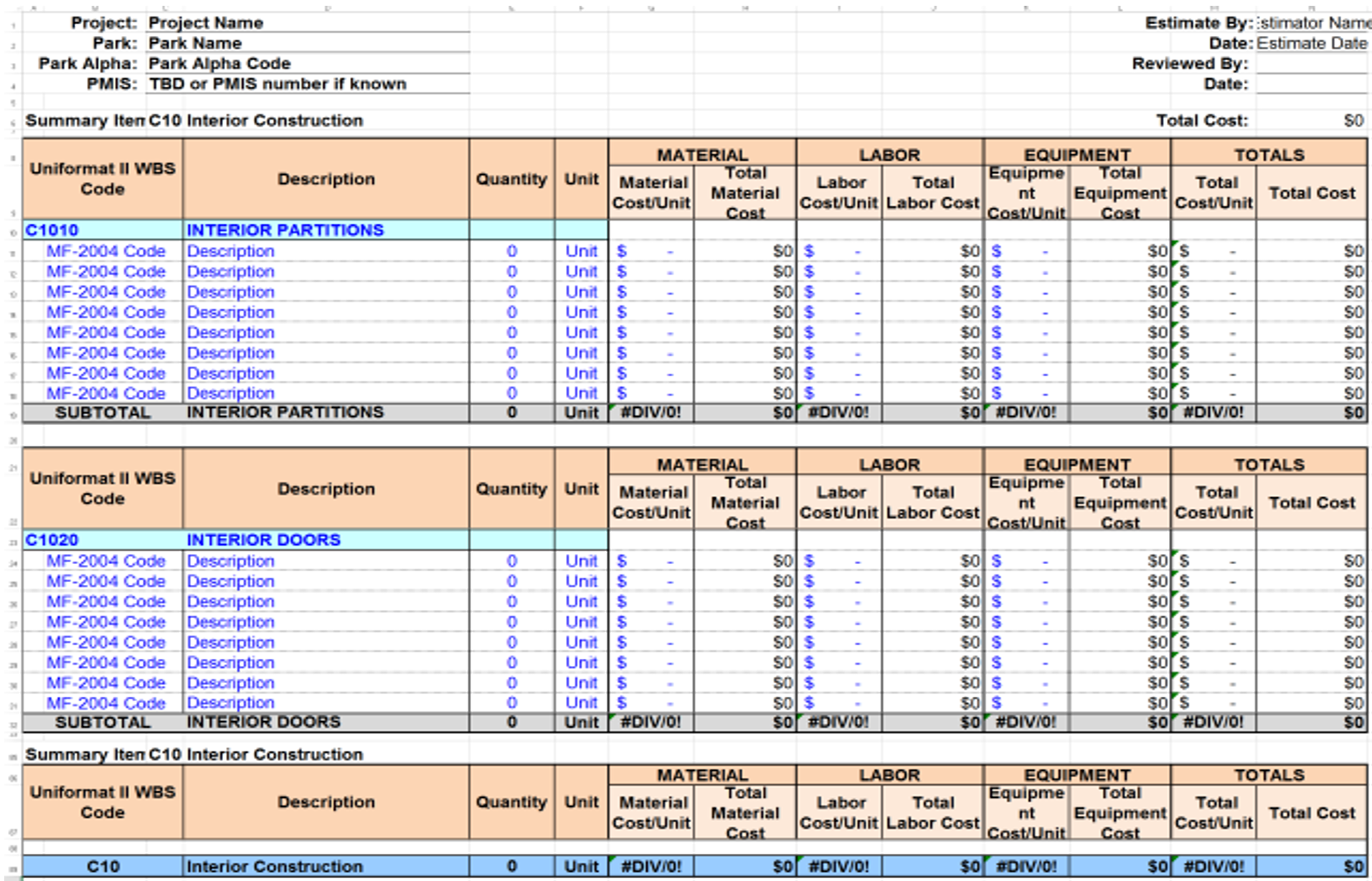
Figure 8 - Showing a Level 5 WBS Cost Estimating Detail
Source: US National Park Service Cost Estimating Handbook (2011)
Figure 8 provides an example of a Level 5 Cost Estimate, using Activity Based Costing (ABC). Notice that in the first column (field) while the costs have been summarized using Uniformat/OmniClass Table 21, that at the individual activity level, we see Masterformat/OmniClass Table 22 being used. Rarely would owners go to this level of detail however for work being done “in house” by your own teams this would be the recommended level of detail if you are serious about project management and project controls as a core competency.
As with the previous examples, to modify this Excel spreadsheet (Access database) for use with scheduling databases, requires the addition of fields named “Crew”, “Daily Output” and “Labor Hours” along with the appropriate data.
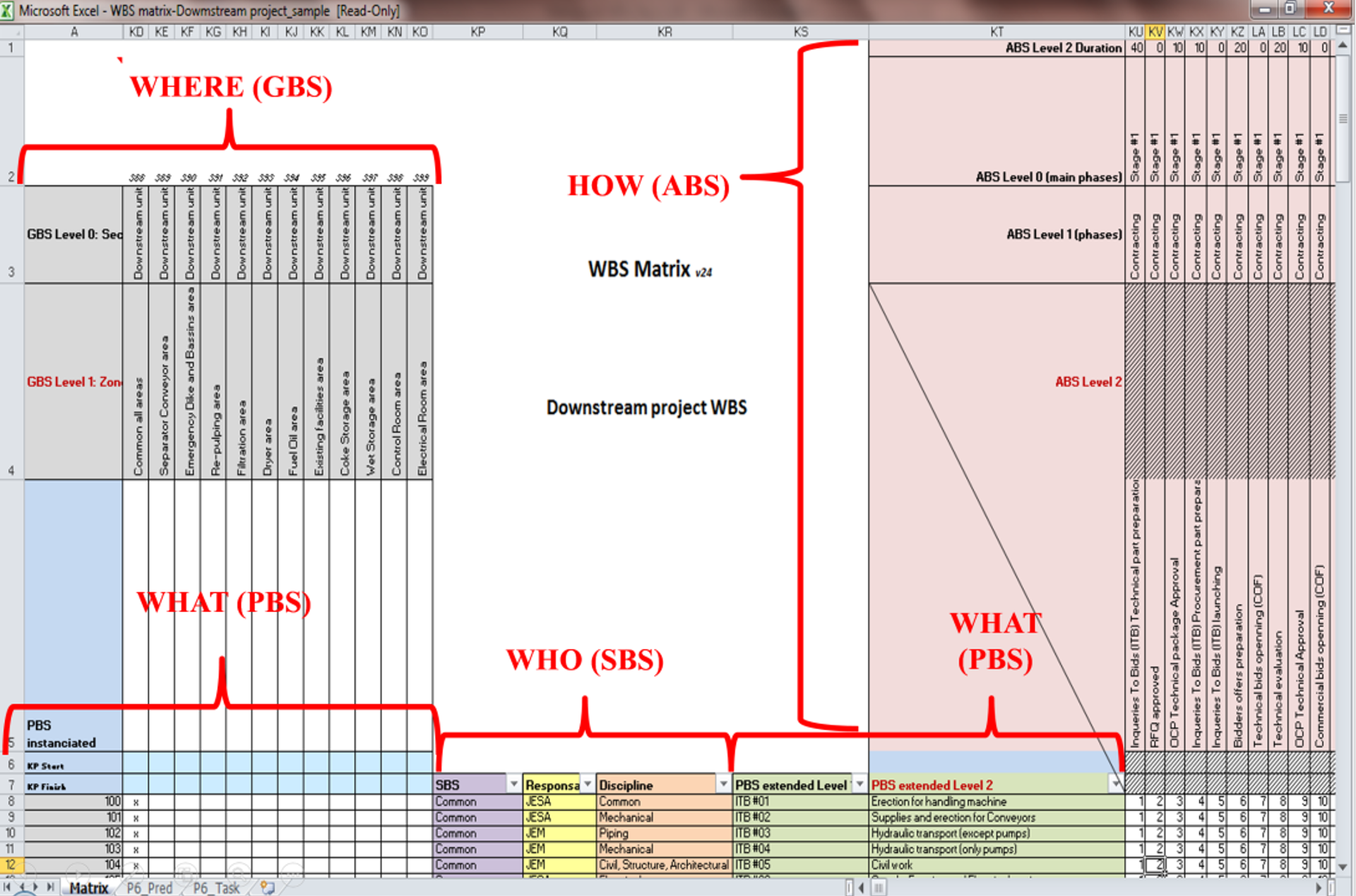
Figure 9 - Example of an Excel Table Designed to enable the schedule data to entered into MS Excel and then be imported into Primavera P6 or MS Project
Source: Moine, Jean Yves, Leynaud, Xavier and Giammalvo, PD (2015) Creating and Using Multi-Dimensional WBS Structures
In the example above, you can see an Excel template (Access Database) set up to import directly into Primavera’s P6 or MS Project 2013. In addition to the Durations (See Row 1 ABS Level 2 Duration) we can also import the costs, crew assignments and any other fields created in the database. However, the key to this is determining which coding structures your stakeholders need and want and then instead of creating “home built” coding structures, adopt one of the standardized coding structures, such as OmniClass or Norsok Z-014. For those organizations or sectors who do not yet have a standardized WBS, Resource Code etc there is a great opportunity for the more entrepreneurial people out there to create one.
The Figure below also taken from R.S. Means 2008 Facilities Cost Estimating Database is typical for the USA. While other countries will undoubtedly vary, the concept remains the same. For cost estimators who are preparing costs for projects in countries other than their own, need to check to find out what the mark up requirements are for Labor especially.
These database values need to be updated annually and/or whenever a new labor agreement is signed if working with unionized labor forces or whenever new regulations are issued by the relevant ministry of manpower.
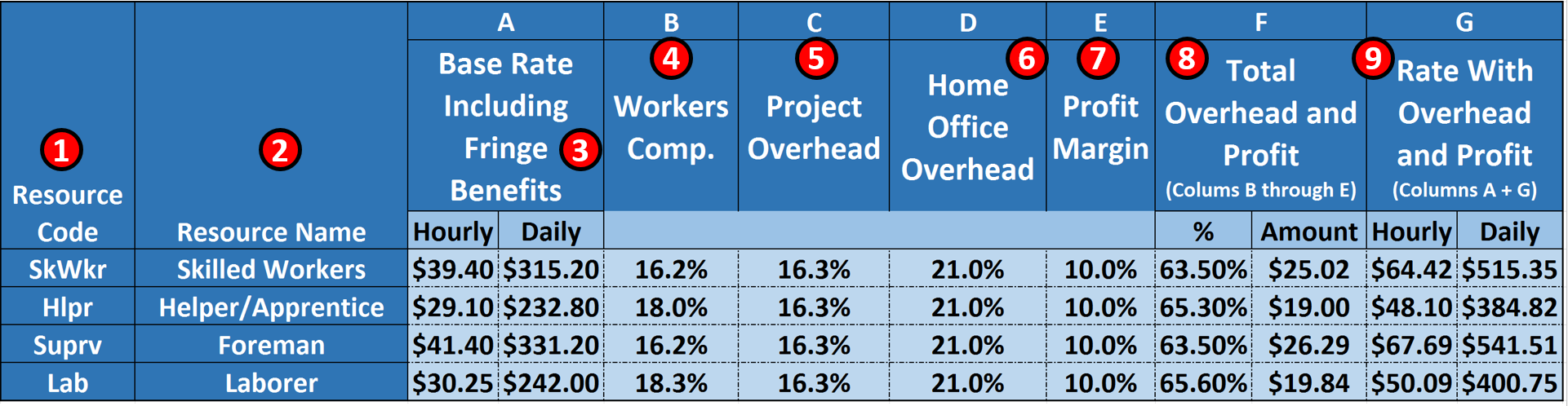
Figure 10 - R.S. Means 2008 Facility Cost Estimating Database Back Cover Showing Labor Rate Markups
Source: R.S. Means 2008 Facility Cost Estimating Database Back Cover Showing Labour Rate Markups
Explaining Figure 10 above-
- 1) CODING STRUCTURE- as defined in the RESOURCE DICTIONARY. As with all other coding structures, it needs to be standardized to as great an extent as possible, not only within an organization but within an industry.
- 2) RESOURCE NAME- This could be generic or it could be real people’s names
- 3) BASE RATE- including fringe benefits (i.e. vacation, insurance) This is the taxable income as shown on your weekly or monthly pay stub.
- 4) WORKER COMPENSATION INSURANCE- this insurance is to cover your expenses in the event you are hurt while working on the job.
- 5) PROJECT OVERHEAD- are all the indirect costs directly attributable to the project but NOT identifiable to any single activity or work package. This includes the project manager’s salary, site offices, fuel for the vehicles, temporary heat, electricity and water. Basically any of the Division 1 (General Requirements) on the project. In accounting terms, these are often known as “above the line” or “Cost of Goods Sold”
- 6) HOME OFFICE OVERHEAD- this is the owner’s salary and payroll for accounting, legal and the bidding team, the rent, heat, electricity and water for the home office. In accounting terms, these are known as “below the line” costs or General, Sales and Administrative expenses (GS&A)
- 7) PROFIT MARGIN- which as has been noted, is normally targeted at 10% but often ends up less as for a contractor, this is his/her “management reserve”. Meaning if there are any “unknown-unknown” risk events that there was no budget or contingency allocated, the cost comes out of the profit margin.
- 8) TOTAL OVERHEAD and PROFIT- % is the sum of Columns 4-7 while
- 9) Total OH&P Amount- is the total % (8) X the Hourly Base Rate (3)
- 10) HOURLY BILLING RATE- is the amount from 9 plus the hourly billing rate from 3
- 11) DAILY BILLING RATE- is the Hourly Rate from 9 X 8 hour working day
11.4.3.2 “Lessons Learned” Databases
Consistent with the Guild’s belief in the importance and relevance of Argyris and Schon’s “Double Loop Learning” there is another important database we, as project controllers should create and maintain and that is a repository where we can catalogue, file and be able to locate the many supporting pieces of information which may or may not lend themselves to entry as data points but which are important as supporting or supplemental references. This includes journal articles, photos, videos, frag nets, case studies or legal briefs- any and all documents which contain valuable and/or useful information but do not lend themselves to being entered as data into the database.
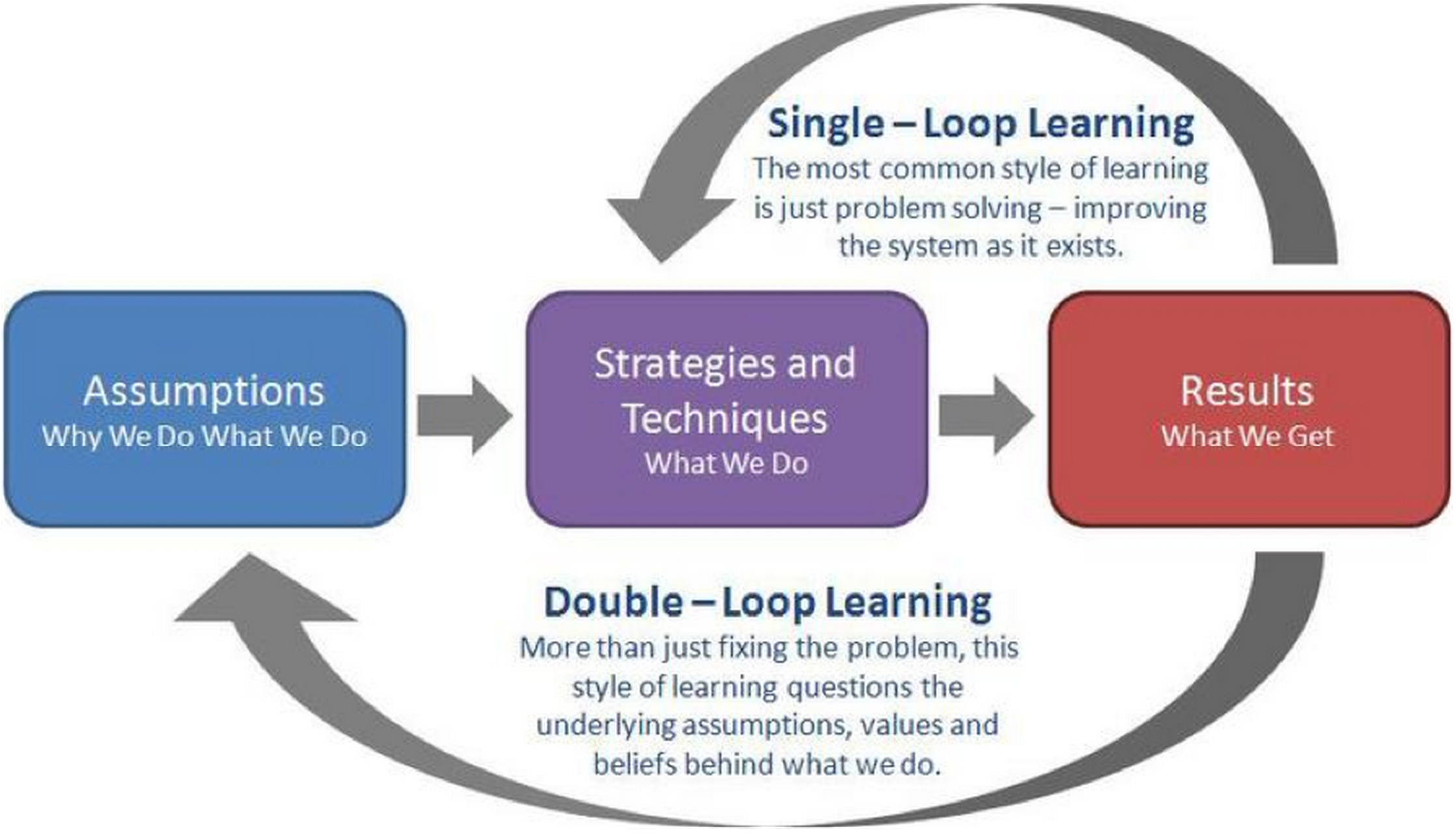
Figure 11 - Argyris and Schon’s Double Loop Learning Model
Source: Bryant, Andrew, Double Loop Learning (2010)
To make this relevant to database management, we continue to make the same mistakes over and over again so how can we capture “lessons learned” in a way that we can quickly share them with others so they too don’t make the same mistakes?
There are three ways we can approach this from a database management perspective:
- One is to scan the documents as Acrobat files (.pdf) or upload them as audio (i.e. .MP3, .WMA or .WAV) or video files (i.e. .MOV, .AVI, .FLV, .MP4, and MXF) and then EMBED them in the design object (assuming an object oriented or hybrid database) With Building Information Modelling, this is how documents such as installation instructions, operating and maintenance manuals and HAZOPS reports and hazardous materials sheets are being handled. Given a choice this is probably what the future will look like so whenever possible, this would be the “better” or “best recommended” practice. Using this approach those in the field who are using mobile technology have all these documents at their fingertips in real time. Ideally this would include comments and recommendations from those who had previously installed this same piece of equipment or performed the same task so they can be aware of any tricks they should be aware of.
- The second way is to scan these document, converting them to Acrobat (.pdf) files or upload them as audio (i.e. .MP3, .WMA or .WAV) or video files (i.e. .MOV, .AVI, .FLV, .MP4, and MXF) and then using a relational or flat file database, archive them, creating a “key word” field so that others in the organization can find these files. While this method too can be accessed using mobile technology, by not linking the documents to an object, but requiring a key word search slows down the process and is subject to important information being missed if the key words don’t match up.
- Lastly there is the old fashioned way of storing the documents in a filing cabinet, and while this has worked well enough for at least 100 years, it is no longer an appropriate method given the technology we have today and the technological trends of the future.
Another example supporting the trend AWAY from paper based systems in favour of digitization are the number of companies in the business to digitize architectural and engineering drawings: Smithsonian Institute- University of Florida- Archive Journal (2012) CentriPlan.
To summarize, the era of archiving documents in file cabinets (or shoe boxes) has ended and the professional project control practitioner of the future knows how to turn these documents into a format which can be uploaded as part of a database, accessible in real time to those who need to know. Implicit in this is the data is accessible electronically and that the people who need to access this information know how to do it.
11.4.3.3 Source of Legal Databases
For our Forensic specialists, below is a list of Legal Databases:
- New York Law School- http://www.nyls.edu/library/library_services/dragnet1/dragnet/
- University of Oxford, Bodleian Law Library- http://www.bodleian.ox.ac.uk/law/popular-links/databases
- Duke University Law Library- https://law.duke.edu/lib/lresources/
- Stanford University Law Library- https://law.stanford.edu/robert-crown-law-library/research-resources/le…
- University of Sydney Law Library- http://www.library.usyd.edu.au/databases/law_databases.html
For more on how these can or should be used refer to Module 12- Managing Forensic Analysis.
However, suffice it to say that the project controls department should have access to these libraries even if there is a fee to do so.
11.4.3.4 Additional Cost & Productivity Databases
For no other reason that R.S Means is probably the oldest (100+ years) and arguably has the largest or most complete databases, we have been using R.S. Means for our examples. (With their permission of course)
However, here are many other organizations who offer both general and specialized cost databases:
- SPONS- http://www.franklinandrews.com/publications/spons/
- Hutchins- http://www.franklinandrews.com/publications/hutchins/
- Griffiths- http://www.franklinandrews.com/publications/griffiths/
- Richardson’s- http://www.costdataonline.com/
- Compass- http://www.compassinternational.net/
- Marshal & Swift- https://www.marshallswift.com/faq-43.aspx
- Building News International- http://www.bnibooks.com/
From the perspective of practicality, instead of “reinventing the wheel” it is often preferable to purchase one of these commercial databases just for the structure and coding, and then modify the cost, crew productivity and other numbers to fit your area of operations than it is to try to create your own from scratch.
11.4.4 - OUTPUTS
- A Cost Estimating And Productivity Database Which Provides Accurate, Reliable And Precise Cost And Duration Estimates, Appropriately “Fit For Purpose”.
11.4.5 - REFERENCES & TEMPLATES
- US Parks Department (2011) Cost Estimating Standards Http://Www.Nps.Gov/Dscw/Ds-Cost-Estimating.Htm
- US Parks Department (2011) Class A (Level 5) Cost Estimate Case Study Http://Www.Nps.Gov/Dscw/Upload/Classaconstcostestimatesample_1-26-11.Pdf
- US Parks Department (2011) Class C (Level 3) Cost Estimate Case Study Http://Www.Nps.Gov/Dscw/Upload/Classcconstcostestimatesample_1-26-11.Pdf
- US Parks Department (2011) Forms, Templates, Samples And Guidelines Http://Www.Nps.Gov/Dscw/Publicforms.Htm
11.5 - Module 11-5 - Updating and Using the Project Databases
GPCCAR M11-4, Revision 1.02