10.0 - MANAGING CHANGE
10.1 - Module 10-1 - Introduction to Managing Change
10.2 - Module 10-2 - Develop The Managing Change Policies & Procedures Manual
10.3 - Module 10-3 - Managing Change - The Owner's Perspective
10.4 - Module 10-4 - Managing Change - The Contractor's Perspective
10.5 - MODULE 10-5 - MANAGING CHANGE - CONFIGURATION MANAGEMENT
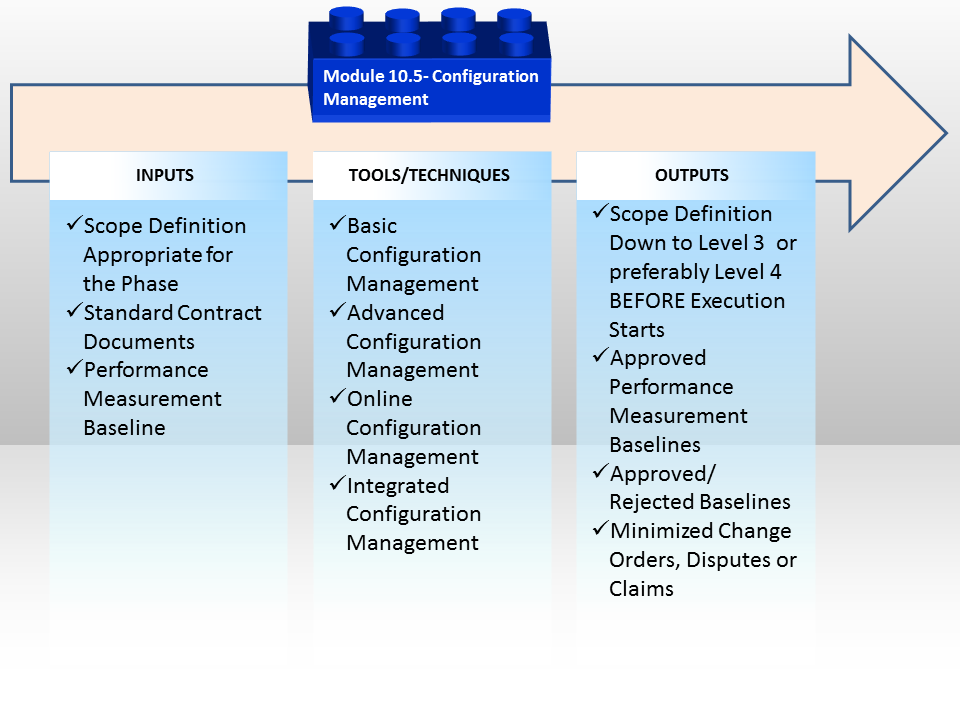
Figure 1 - Managing Change - Configuration Management
Source: Guild of Project Controls
10.5.1 INTRODUCTION
Configuration Management is just another name for project change management but applied to IT and Systems Engineering projects, especially those in the defence and related industries.
As with most government funded projects the process tends to be heavy on bureaucracy but given the complexity of billion dollar aircraft and science projects like those done by NASA, the lessons learned should be reviewed by project control practitioners no matter whether they work for owners or contractors or what sector you happen to work in. There are some excellent templates for you to review in the event your organization does not yet have a robust change management system in place and from a pragmatic perspective of “job security” the more familiar you are with how different sectors manage change makes you a more valuable practitioner, regardless of what your job is today or may be in the future.
- “Configuration management (CM) is the detailed recording and updating of information that describes an enterprise's hardware and software. Such information typically includes the versions and updates that have been applied to installed software packages and the locations and network addresses of hardware devices. Special configuration management software is available. When a system needs a hardware or software upgrade, a computer technician can access the configuration management program and database to see what is currently installed. The technician can then make a more informed decision about the upgrade needed." - Rouse, Margaret (2014)
An advantage of a configuration management application is that the entire collection of systems can be reviewed to make sure any changes made to one system do not adversely affect any of the other systems.
Configuration management is also used in software development, where it is called Unified Configuration Management (UCM). Using UCM, developers can keep track of the source code, documentation, problems, changes requested, and changes made.” The reason this topic becomes important for project control professionals to know and understand is because when we get into the next module- Module 13- Managing Project Databases, we are going to have to understand the concept as a major part of the future of project controls is likely to be focused on managing the cost and productivity databases, such as the examples found in R.S. Means.
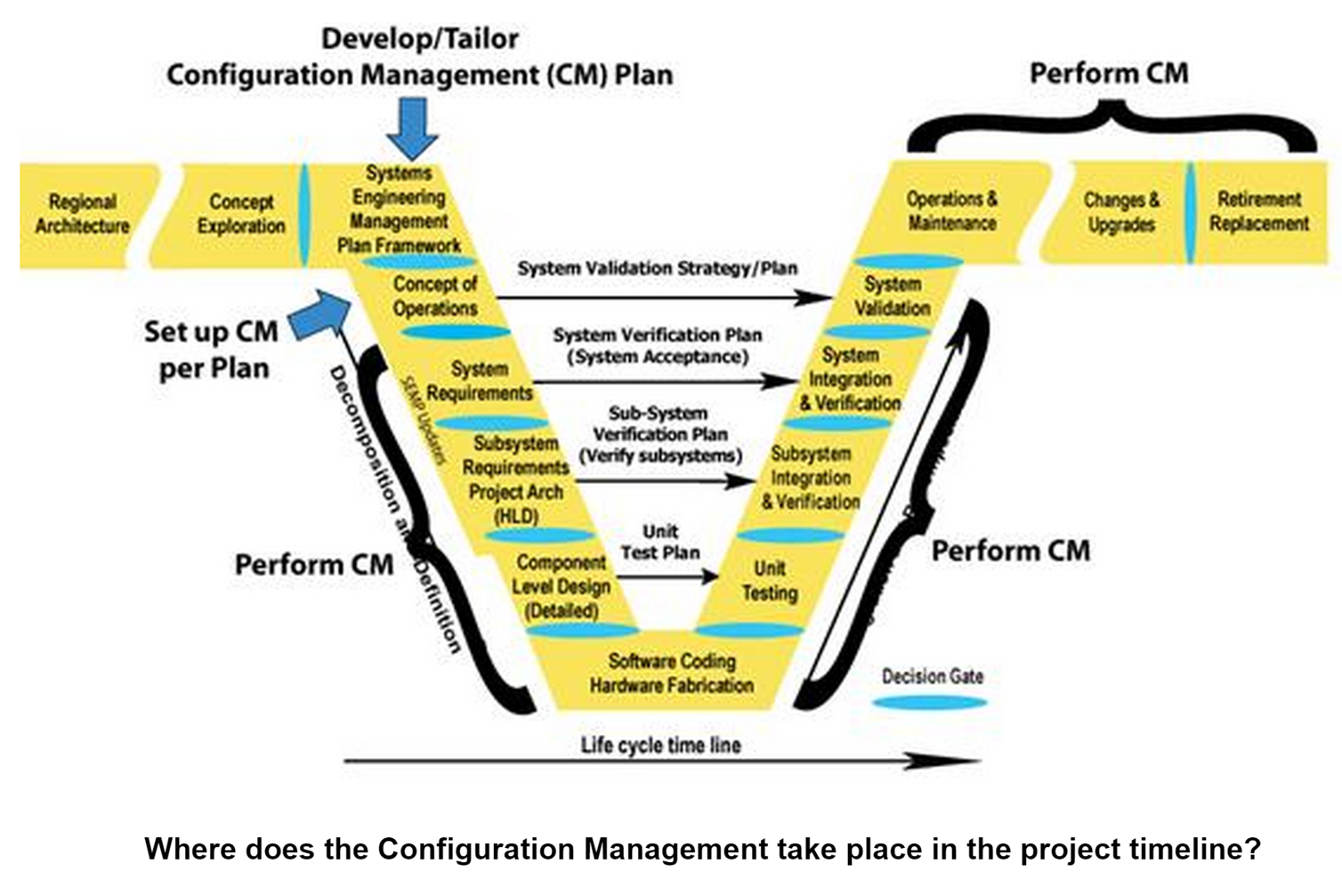
Figure 2 - Configuration Management Life Span as a Function of the ASSET life span
Source: Caltrans Configuration Management
Technically speaking, the model shown in Figure 2 above shows not just the PROJECT life span but also the ASSET life span. (Whatever product, service our change it was that the project was undertaken to create). We can see this as it follows the asset life span all the way through to retirement or replacement.
A more detailed level look at the Configuration Management Process can be seen below. As we can see, despite the name, the process is largely the same as that described in Module 10-3 Managing Change from the OWNERS perspective. However, CONFIGURATION MANAGEMENT can be adopted by either OWNER or CONTRACTOR, as it tends to be context or application specific to the IT, Telecommunications and other deliverable which require extensive computer to machine interfaces.
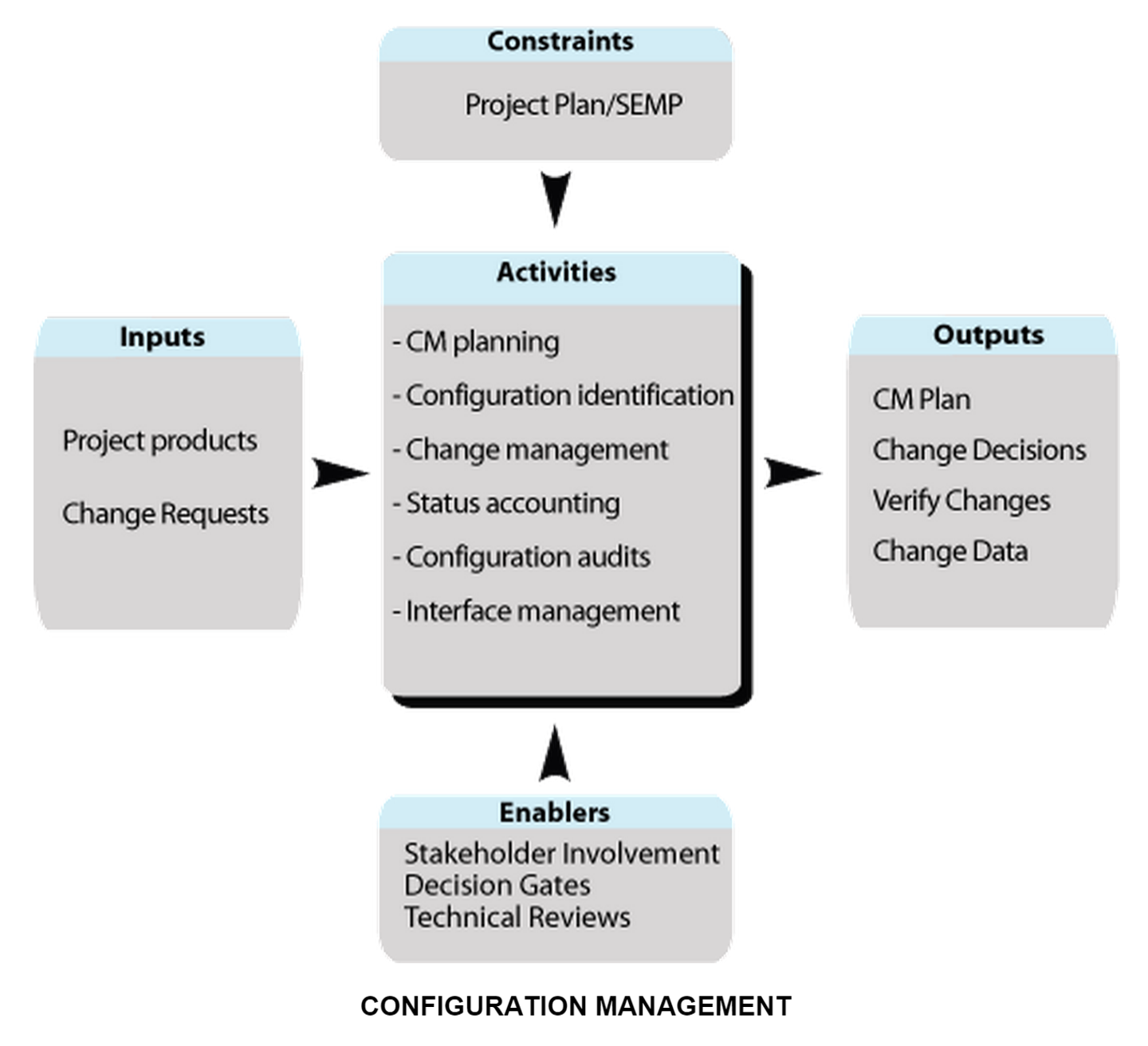
Figure 3 - Configuration Management Process Map Source: Caltrans Configuration Management
10.5.2 INPUTS
- Cost Estimating Database
- Scheduling Database
- Productivity Databases
10.5.3 TOOLS & TECHNIQUES
10.5.3.1 Basic Configuration Management
Basic toolsets are listed below:
(1) A basic toolset should permit the structured definition, identification and storage of configuration items. The file systems of operating systems allows storage of CIs in files. A file system should object if the user tries to create a file with the same name as an existing file, i.e. it should ensure that names are unique.
(2) A basic toolset should permit the structured storage of configuration items. The file systems of operating systems should allow the creation of directory trees for storing files.
(3) A basic toolset should provide a librarian system that supports: - insertion of modules; - extraction of modules; - replacement of modules by updated modules; - deletion of modules; - production of cross-reference listings to show which modules refer to which; - storage of the transaction history; - all the above features for both source (i.e. text) and object (i.e. binary) files.
(4) A basic toolset should provide facilities for building executable software from designated sources. This implies the capability to create a command file of build instructions with a text editor.
(5) A basic toolset should provide security features so that access to CIs can be restricted to authorised personnel. This means that the operating system should allow the owner of a file to control access to it.
(6) A basic toolset should provide facilities for comparing source modules so that changes can be identified. Most operating systems provide a tool for differencing ASCII files.
(7) A basic toolset should include tools for the systematic backup of CIs. Specifically: - automatic electronic labelling of media; - complete system backup; - incremental backup; - restore; - production of backup logs. Most operating systems have commands for backing-up and restoring files
10.5.3.2 Advanced Configuration Management
Advanced toolsets supplement the basic toolset with standalone tools such as source code control systems and module management systems. The extra capability requirements for an advanced toolset are listed below.
(1) An advanced toolset should provide a locking system with the library to ensure that only one person can work on a module at a time. Most operating system librarians do not provide this feature; it is a characteristic of dedicated software configuration management librarian tools.
(2) An advanced toolset should minimise the storage space needed. One way to do this is store the latest version and the changes, usually called ‘deltas', required to generate earlier versions.
(3) An advanced librarian tool should allow long names to be used in identifiers. Some operating systems force the use of shorter names than the compiler or programming language standard allows, and this can make it impossible to make the configuration identifiers contain the names used in design.
(4) An advanced toolset should permit rollback, so that software configuration management operations can be undone. A simple but highly desirable type of backtracking operation is the ‘undelete'. Some tools can reverse deletion operations.
(5) An advanced toolset should provide facilities for rebuilding executable software from up-to-date versions of designated sources. This capability requires the build tool to examine the dependencies between the modules in the build and recompile those modules that have been changed since the last build.
(6) An advanced toolset should record the version of each module that was used to build a product baseline, so that product baselines can always be reproduced.
(7) An advanced toolset should provide facilities for the handling of configuration status accounts, specifically:
- insertion of new RID, SPR, SCR and SMR status records;
- modification of RID, SPR, SCR and SMR status records;
- deletion of RID, SPR, SCR and SMR status records;
- search of RID, SPR, SCR and SMR records on any field;
- differencing of configuration status accounts, so that changes can be identified; - report generation.
10.5.3.3 Online Configuration Management
Online toolsets supplement the capabilities of advanced toolsets by providing facilities for interactive entry of change control information. The extra capability requirements for an online toolset are listed below:
(1) An online toolset should provide facilities for the direct entry of RID, SPR, SCR and SMR information into the database;
(2) An online toolset should provide an authentication system that permits online approval of changes.
10.5.3.4 Integrated Configuration Management
Integrated toolsets supplement the capabilities of online toolsets by extending the change control system to documentation. Integrated Toolsets form part of so-called ‘Integrated Project Support Environments' (IPSEs), ‘Project Support Environments' (PSEs) and ‘Software Development Environments' (SDEs). The extra capabilities of an integrated toolset are listed below:
(1) An integrated toolset should recognise all the dependencies between CIs, so that consistency can be controlled. This capability requires a super-library called a ‘repository'. The Online Toolset has to be integrated with the CASE tools used for design. This facility permits the system to be automatically rebuilt from a design change, not just a code change.
(2) An integrated toolset should have standard interfaces to other tools (e.g. project management tools). Standards for interfacing software tools have been proposed, such as the Portable Common Tools Environment (PCTE) and the Common APSE Interface Set (CAIS)
10.5.4 OUTPUTS
- Scope Definition Down To Level 3 Or Preferably Level 4 Before Execution Starts
- Approved Performance Measurement Baseline In Place
- Approved Or Rejected Change Orders
- Minimized Change Orders, Disputes And Claims
10.5.5 REFERENCES & TEMPLATES
- Http://Www.Isaca.Org/Groups/Professional-English/Test-Topic-For-Isaca-Employeespbwb9qf12/Groupdocuments/Configuration-Management-Using-Cobit-5_Res_Eng_0913_4.Pdf
- Https://Www.Debian.Org/Doc/Packaging-Manuals/Debconf_Specification.Html
- Https://Www.Fhwa.Dot.Gov/Cadiv/Segb/Views/Document/Sections/Section3/3_9_6.Cfm
- NASA Configuration Management Plan Handbook (1995) Http://Www.Profinit.Eu/Fileadmin/Content/Profinit.Eu.Maas.At/Academy/Sweng-Materialy/Configuration-Management/Reading/Nasa_Swcmguidebook.Pdf
- NASA Configuration Management Plan Template Http://Www.Nasa.Gov/Sites/Default/Files/T2401_-_Rev_B.Pdf
GPCCAR M10-5, Revision 1.01